Bills & Receipts
Every bill, receipt and renewal in one place, before it's due
Free to start · Invites go out in batches
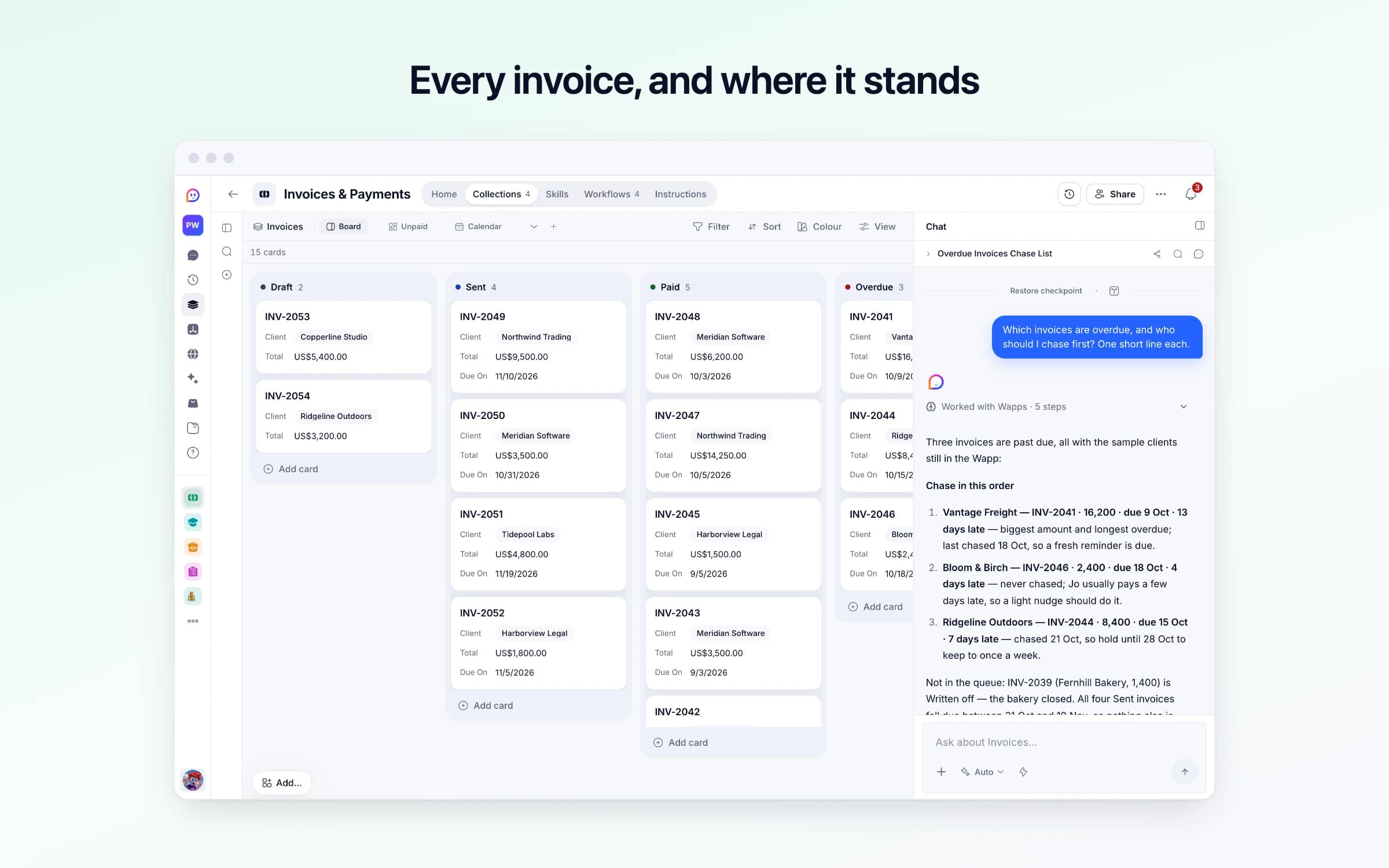
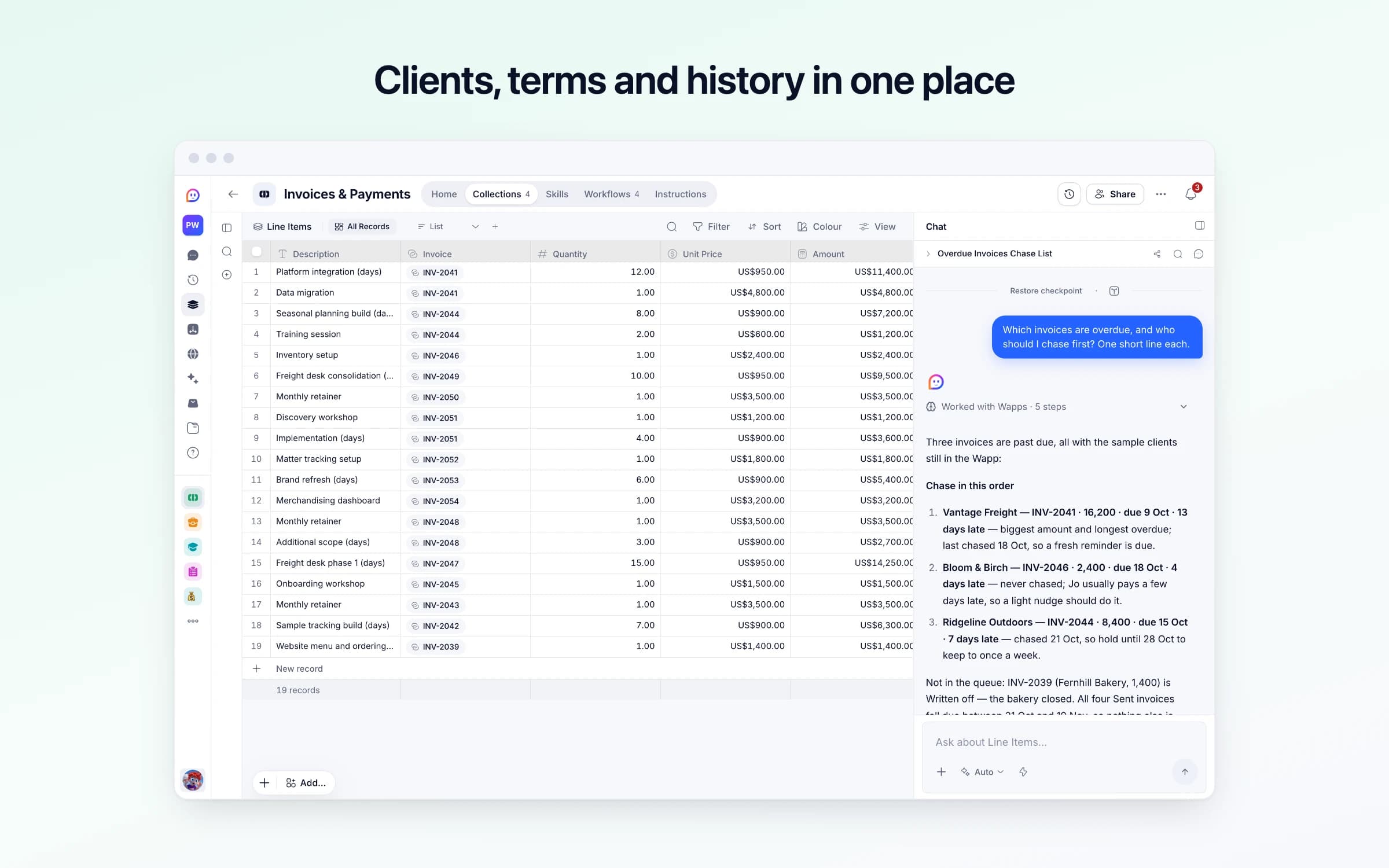
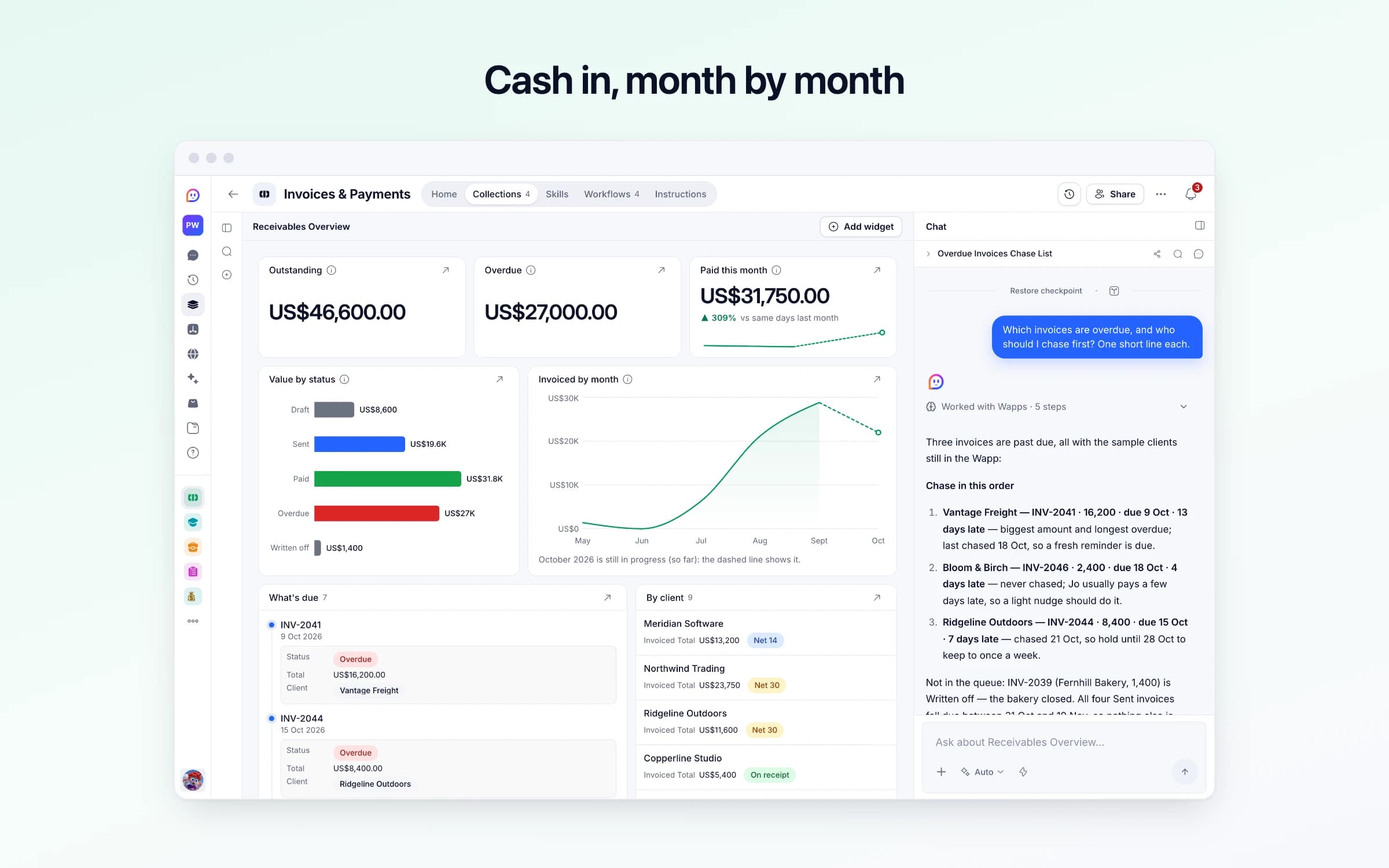
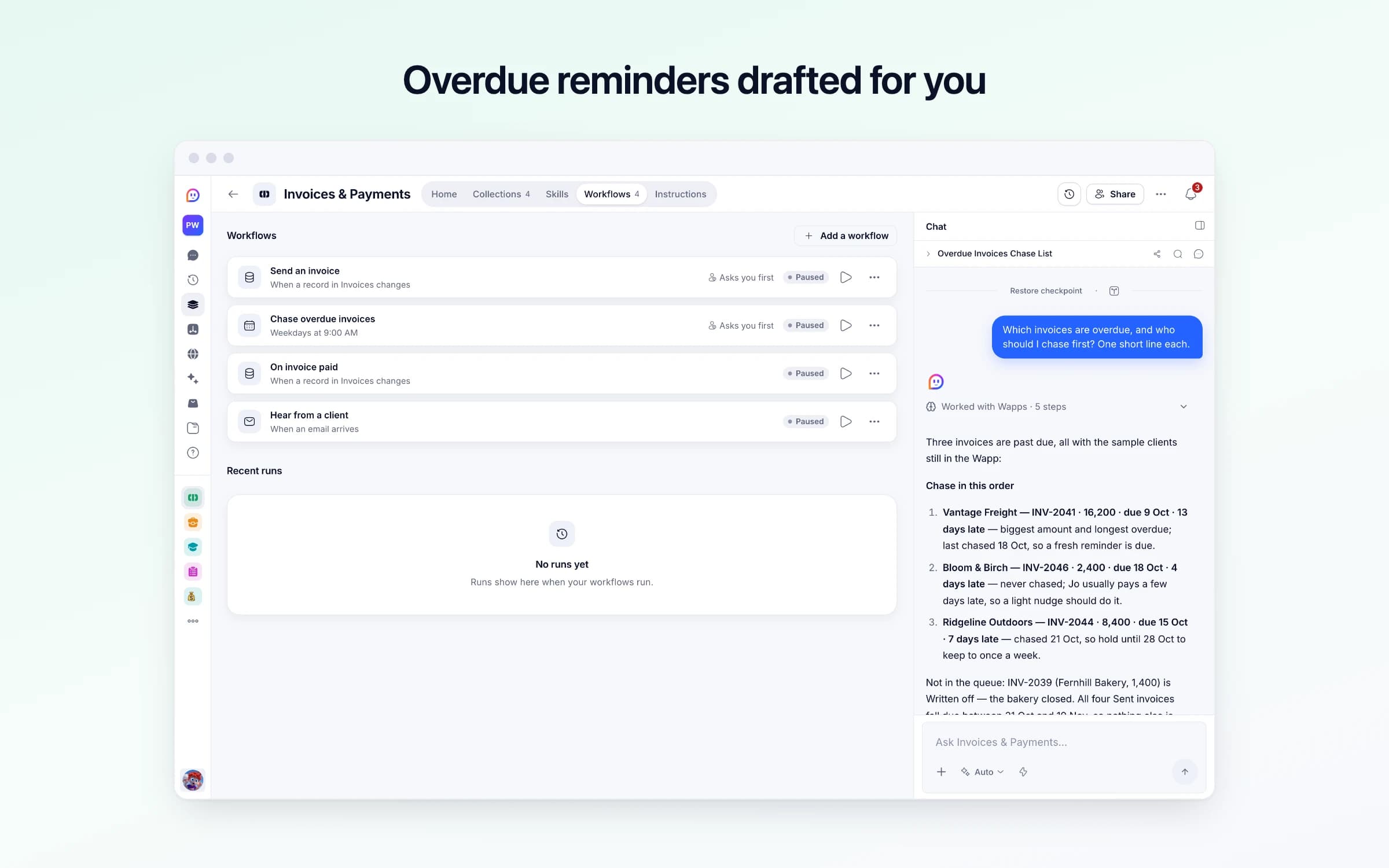
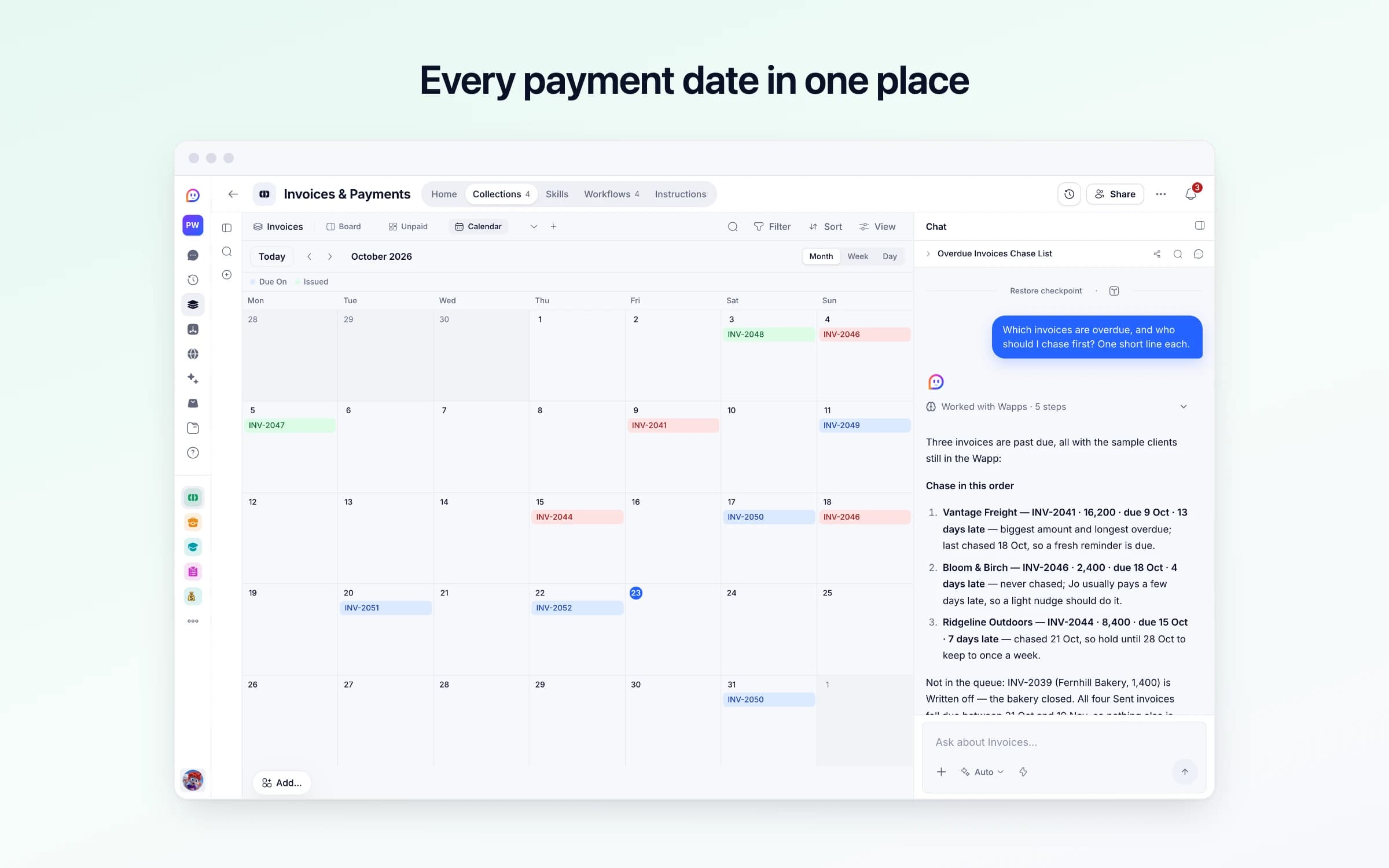
4 lists of records, 4 automations and 1 document. Every automation works from the records you keep here, so a change made once is the one they all see.
Every list as your copy starts it: its fields, and sample records you can clear in one go.
| Payment Terms Days | Send From |
|---|---|
14 | Your Cheqq address |
| Name | Billing Email | Terms | Billing Address | Notes |
|---|---|---|---|---|
Meridian Software | accounts@meridian.example | Net 14 | 18 Fenchurch Avenue London EC3M 5AG | Monthly retainer. Pays on time, every time. |
Northwind Trading | ap@northwind.example | Net 30 | 400 Harbour Road Seattle, WA 98104 | Empty |
Ridgeline Outdoors | finance@ridgeline.example | Net 30 | 77 Canyon Street Boulder, CO 80302 | Needs a PO number on every invoice or it bounces. Ask Dana in purchasing for one. |
Copperline Studio | theo@copperline.example | On receipt | Empty | Empty |
Bloom & Birch | jo@bloomandbirch.example | Net 14 | Empty | Jo pays by bank transfer. Usually a few days late, never more. |
Vantage Freight | accounts.payable@vantagefreight.example | Net 60 | 2 Dockside Way Rotterdam 3011 | Slow by policy, not by accident. Budget for it. |
| Number | Status | Client | Due On | Po Number |
|---|---|---|---|---|
INV-2041 | Overdue | Vantage Freight | 2 weeks ago | Empty |
INV-2044 | Overdue | Ridgeline Outdoors | 8 days ago | PO-88213 |
INV-2046 | Overdue | Bloom & Birch | 5 days ago | Empty |
INV-2049 | Sent | Northwind Trading | In 3 weeks | Empty |
INV-2050 | Sent | Meridian Software | In 8 days | Empty |
INV-2051 | Sent | Tidepool Labs | In 4 weeks | Empty |
| Description | Invoice | Quantity | Unit Price |
|---|---|---|---|
Platform integration (days) | INV-2041 | 12.00 | $950.00 |
Data migration | INV-2041 | 1.00 | $4,800.00 |
Seasonal planning build (days) | INV-2044 | 8.00 | $900.00 |
Training session | INV-2044 | 2.00 | $600.00 |
Inventory setup | INV-2046 | 1.00 | $2,400.00 |
Freight desk consolidation (days) | INV-2049 | 10.00 | $950.00 |
Every automation that starts by itself installs switched off. The ones marked Asks you first wait for your yes before anything goes out, until you let them run on their own.
Send an invoice
Asks you firstWhen you mark an invoice Sent, Cheqq fills in its issue and due dates from the client's terms and emails it to their billing address once you approve. Decline if you've sent it yourself.
Chase overdue invoices
Asks you firstEach weekday morning, marks late invoices Overdue and drafts a polite payment reminder to the client most overdue, which goes out once you approve it. A client hears from you at most once every 7 days. Costs nothing when nothing is late.
On invoice paid
Runs on its ownWhen you mark an invoice Paid, Cheqq notes today as the day the money arrived, unless you've set it.
Hear from a client
Runs on its ownWhen a client answers an invoice or a reminder, or writes to your invoices address, Cheqq tells you who it is and what they said. It never marks anything paid on its own.
How Invoices & Payments works
What's in it, what runs for you, what it never does, and your first week.
Invoices & Payments keeps track of the money your clients owe you: invoices built from what you did, sent to the right billing address, and polite reminders when one goes past its due date, sent only once you approve. It arrives with sample data so you can see it working. These steps make it yours.
Learn how it works
What's in it, what runs for you and when, and a routine for your first week.
Add your business details
Your name, address, tax number, currency, payment terms and how clients pay you. Invoices use exactly what you give here.
Add your clients
Who you bill, and the email their invoices go to. Bring a spreadsheet if you have one.
Create your first invoice
Tell Cheqq who it's for and what you did. It adds it up and emails it once you approve.
Turn it on
Switch on its automations. Nothing reaches a client until you approve it.
Tell Cheqq what you're billing and it builds the invoice from line items, with the due date set from the client's terms. Mark it Sent and it's emailed once you approve, and each weekday at 9 late ones move to Overdue, with a polite reminder waiting for your yes.
Invoices go out from a document template, numbered by hand, and the record of who has paid lives in the bank app and your head. Once a month you line up payments against invoice numbers in a spreadsheet to work out who's late.
The chase is what slips. Writing to a client about money is awkward, so it waits a week, then another, and a 30-day invoice becomes a 60-day one. Nobody can say at a glance what's outstanding, or which client always needs a second email.
You fill in your business details once: your name, address, tax number, terms and how clients pay you. Tell Cheqq what you're billing for, like eight days of work at 900 for Ridgeline Outdoors, and the invoice is built from line items, its total added up from them. Mark it Sent and its dates are set from the client's terms, and the email is written with your details, theirs, each line, the total and how to pay. It goes to their billing email once you approve it, and if something's missing, you're told what instead.
Each weekday at 9, every Sent invoice past its due date moves to Overdue, and a short, polite reminder is drafted to the client most overdue, naming each invoice, its amount and when it was due. It goes once you approve it, and a client hears from you at most once a week. When a client answers an invoice or a reminder, you're told who it is and what they said.
Mark an invoice Paid and the day the money arrived is noted, unless you've set it already. The Receivables Overview shows what's due next, the value sitting in each status and what you've invoiced each month, and every client keeps their terms, billing address and notes on how they pay.
Build from line items
Add what you are billing for and the total rolls up. Your business details go on every invoice, and the due date is set from the client's terms, rather than from you counting days.
Mark it Sent, approve the email
The invoice is emailed to the client's billing address once you say yes. Draft, sent, overdue and paid sit on one board, and marking one Paid notes the day the money arrived.
Late invoices get a reminder drafted
Each weekday at 9, anything past its due date moves to Overdue and a short, polite reminder is drafted, going out once you approve it. No client hears from you more than once a week.
The unpaid-invoices spreadsheet
Each invoice moves from Draft to Paid on one board, and the days overdue count themselves.
Invoicing apps like FreshBooks
If you need invoices built, emailed and the late ones chased, this does it without another subscription. It doesn't take payments.
Chasing from memory
A reminder is drafted for late invoices on weekday mornings, so the awkward email is already written and only needs your yes.
Once it's yours, describe a change the way you'd ask a colleague, and Cheqq makes it.
Yes, once you approve each one. Mark an invoice Sent and the email is written from your business details and the client's record, then waits for your yes before it goes to their billing email. It never writes to any other address.
It drafts the reminder and you approve it. Each weekday at 9, a short, polite reminder is drafted to the client most overdue, with no threats, fees or interest you haven't set. Nothing goes to a client without your yes, and nobody hears from you more than once a week.
Getting started on its Home walks you through it: read the guide, add your business details and your clients, create your first invoice and turn it on. Until your name, currency and payment details are in, no invoice goes out.
No. It doesn't connect to your bank or take payments, and it never marks an invoice Paid on its own. When the money arrives, mark the invoice Paid and today is noted as the paid date; change it if the money landed earlier.
Anyone who bills clients: freelancers, consultants and small firms. If you run a studio or agency, the Agency template keeps invoices alongside your leads, projects and hours, with a portal for each client.
Yes. Download invoices, clients or line items as CSV or JSON, filtered to the months they need.
1 of its 38 automation steps uses AI, and draws AI credits each time it runs: how many depends on the model you pick for the step. The other steps are fixed and draw none.
Every bill, receipt and renewal in one place, before it's due
Revenue in one place, and MRR explained every month
You get your own copy: your own records and automations. Change any part of it. Or we'll set it up with you.
Free to start · Invites go out in batches