Support Inbox
Every customer email triaged, answered and timed
Free to start · Invites go out in batches
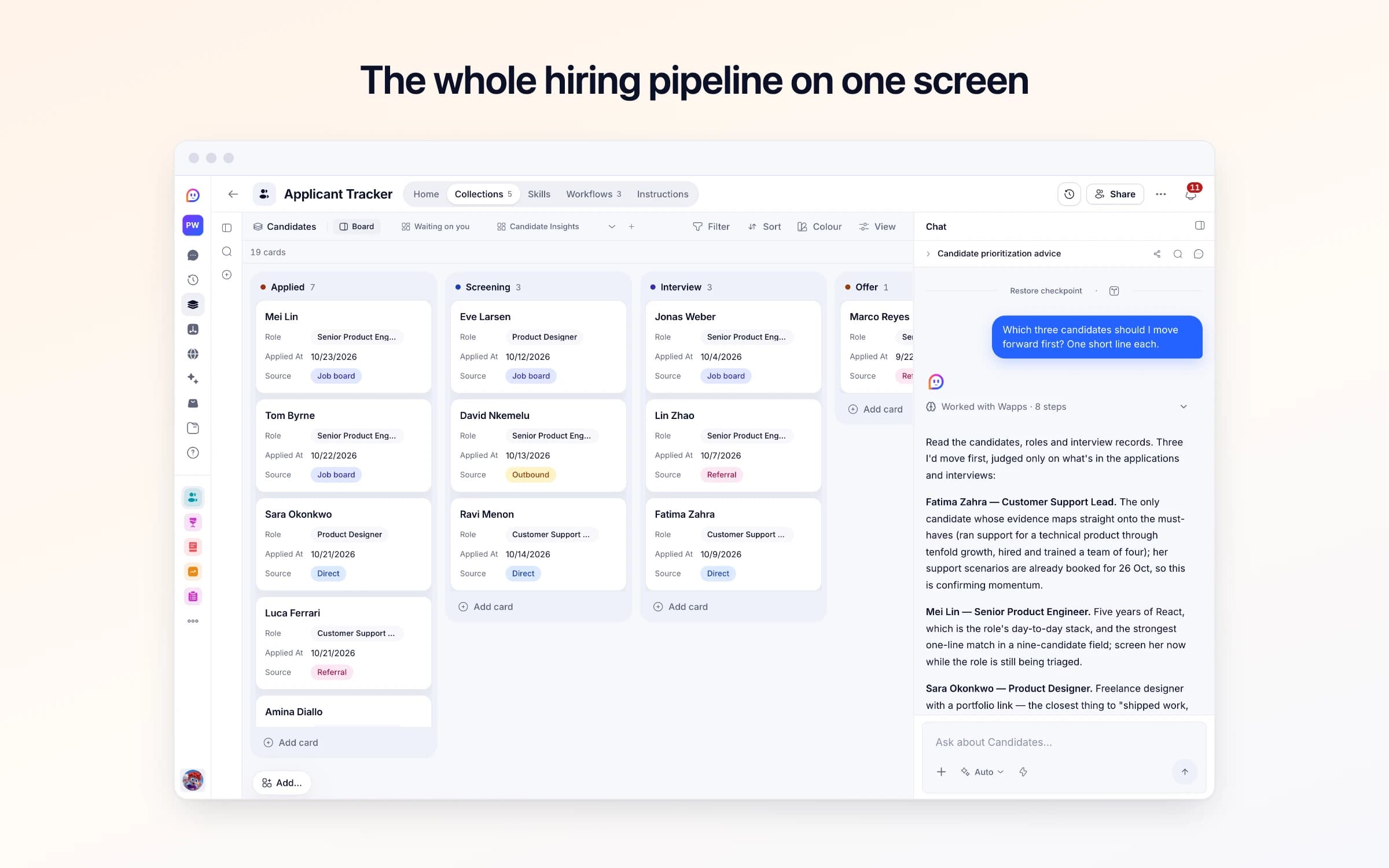
5 lists of records, 3 automations and 2 documents. Every automation works from the records you keep here, so a change made once is the one they all see.
Every list as your copy starts it: its fields, and sample records you can clear in one go.
| Title | Team | Status | Must Haves | Posting Url |
|---|---|---|---|---|
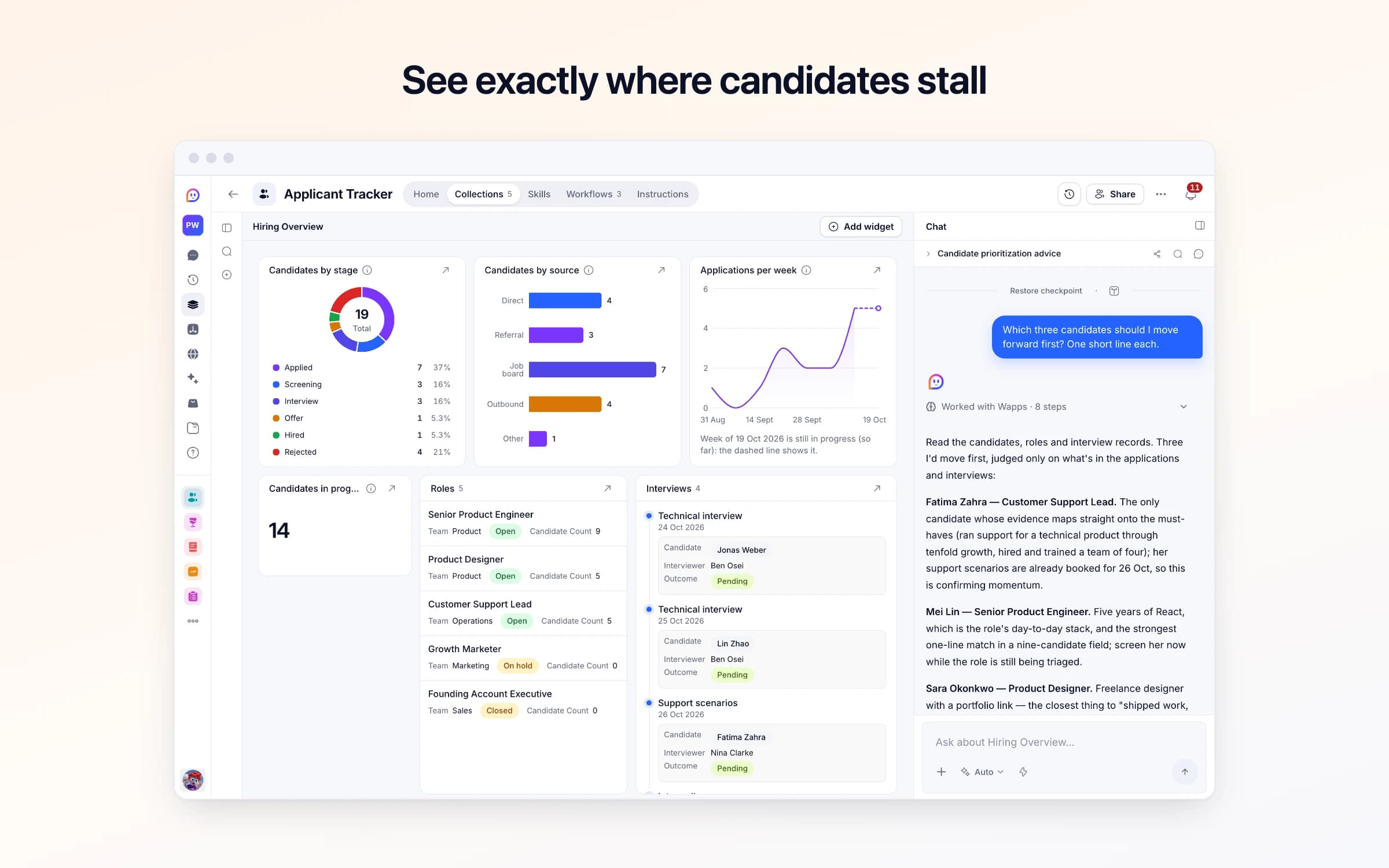
Senior Product Engineer | Product | Open | Builds features end to end and owns a part of the product. Writes clearly. TypeScript and React day to day. | https://jobs.example.com/senior-product-engineer |
Product Designer | Product | Open | Thinks in systems and can still sweat the details. A portfolio of shipped work, not concepts. | https://jobs.example.com/product-designer |
Customer Support Lead | Operations | Open | Has run support for a technical product and writes well under pressure. Our first support hire, so happy building it from scratch. | https://jobs.example.com/support-lead |
Growth Marketer | Marketing | On hold | Grows through writing and content. On hold until the new website is live. | Empty |
Founding Account Executive | Sales | Closed | Filled from inside the team in the spring. | Empty |
| Name | Stage | Role | Applied At | Source |
|---|---|---|---|---|
Marco Reyes | Offer | Senior Product Engineer | 4 weeks ago | Referral |
Aisha Bello | Hired | Product Designer | 7 weeks ago | Outbound |
Jonas Weber | Interview | Senior Product Engineer | 3 weeks ago | Job board |
Lin Zhao | Interview | Senior Product Engineer | 2 weeks ago | Referral |
Fatima Zahra | Interview | Customer Support Lead | 2 weeks ago | Direct |
Eve Larsen | Screening | Product Designer | 11 days ago | Job board |
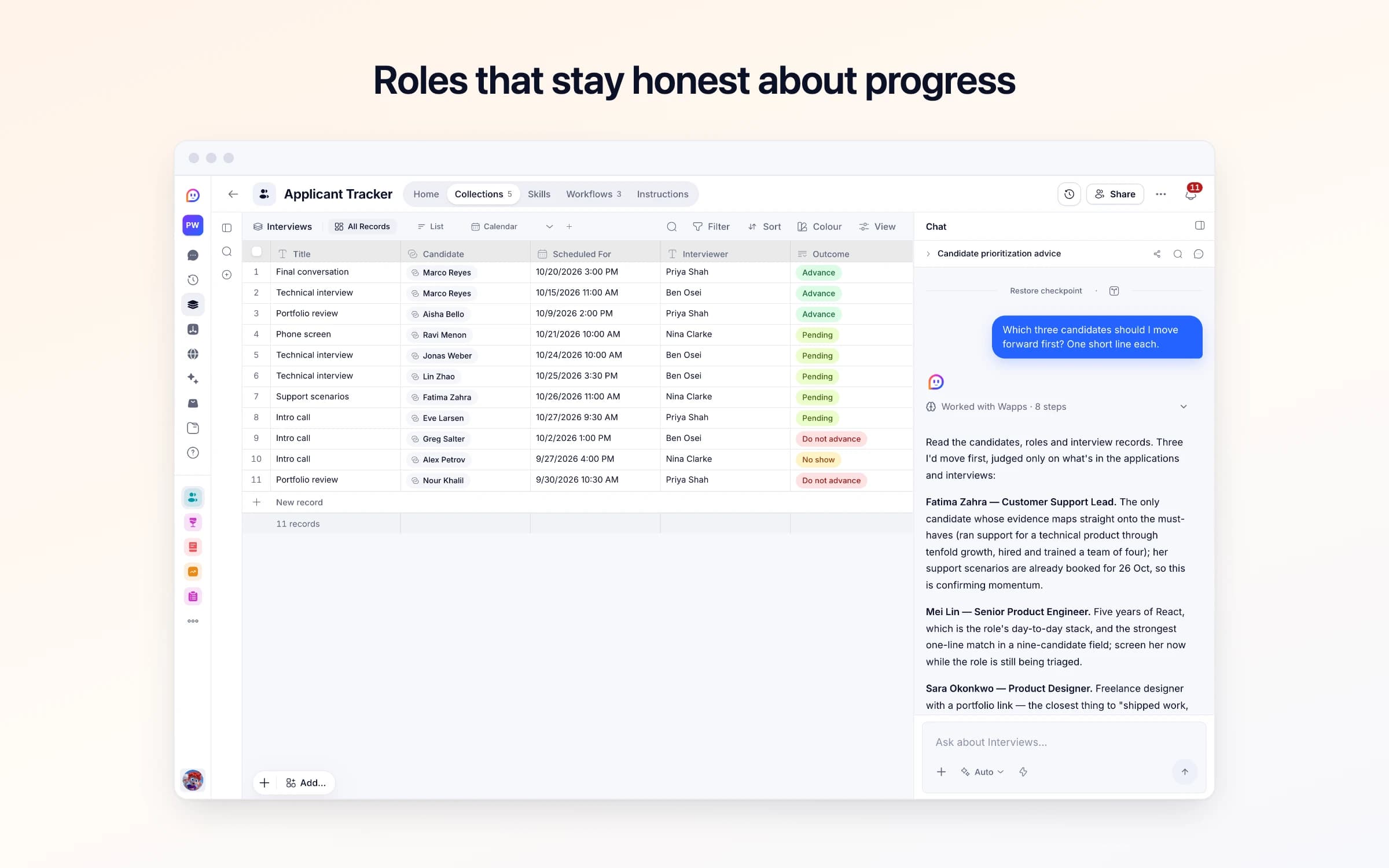
| Title | Candidate | Scheduled For | Interviewer | Outcome |
|---|---|---|---|---|
Final conversation | Marco Reyes | 3 days ago, 3:00 PM | Priya Shah | Advance |
Technical interview | Marco Reyes | 8 days ago, 11:00 AM | Ben Osei | Advance |
Portfolio review | Aisha Bello | 2 weeks ago, 2:00 PM | Priya Shah | Advance |
Phone screen | Ravi Menon | 2 days ago, 10:00 AM | Nina Clarke | Pending |
Technical interview | Jonas Weber | Tomorrow, 10:00 AM | Ben Osei | Pending |
Technical interview | Lin Zhao | In 2 days, 3:30 PM | Ben Osei | Pending |
| From | Subject | Reason | Snippet | Received At |
|---|---|---|---|---|
sales@recruitingtools.example | Cut your time-to-hire by 40% | A sales pitch, not an application | Hi, I noticed you're hiring for a Senior Product Engineer. Our platform... | Yesterday, 8:45 AM |
agency@talentpartners.example | Three engineers for your open role | A recruiter offering candidates, not someone applying | We have three engineers who would be a great fit. Our fee is 20%... | 3 days ago, 11:20 AM |
alerts@jobboard.example | Your job post has 12 new views | An automatic notice | Your post for Product Designer was seen 12 times this week... | 2 days ago, 7:00 AM |
| Careers Address | Check Replies |
|---|---|
Your Cheqq address | Yes |
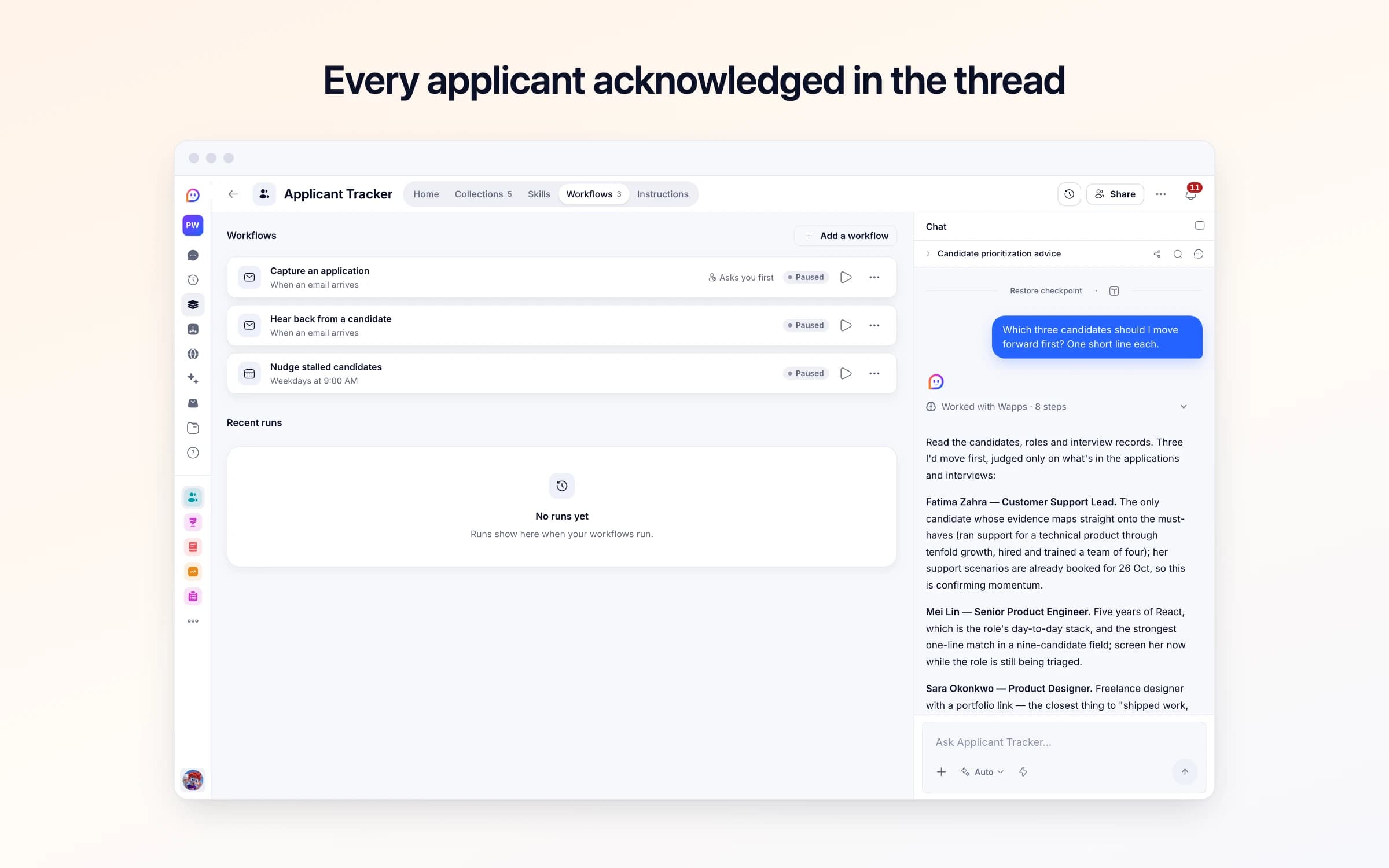
Every automation that starts by itself installs switched off. The ones marked Asks you first wait for your yes before anything goes out, until you let them run on their own.
Capture an application
Asks you firstApplications to your careers address land on the hiring board, matched to the role, with a reply drafted that goes once you approve it, unless you turned checking off.
Hear back from a candidate
Runs on its ownWhen an applicant answers a reply you sent, adds what they said to their record and tells you.
Nudge stalled candidates
Runs on its ownEach weekday morning, names the candidates who haven't moved in over 7 days and the interviews still owed feedback. A morning with nobody waiting sends nothing.
How Applicant Tracker works
What's in Applicant Tracker, what runs for you and when, what it never does, and your first week.
Fair hiring checklist
Before you post, screening, interviews, saying no, and keeping applicants' information.
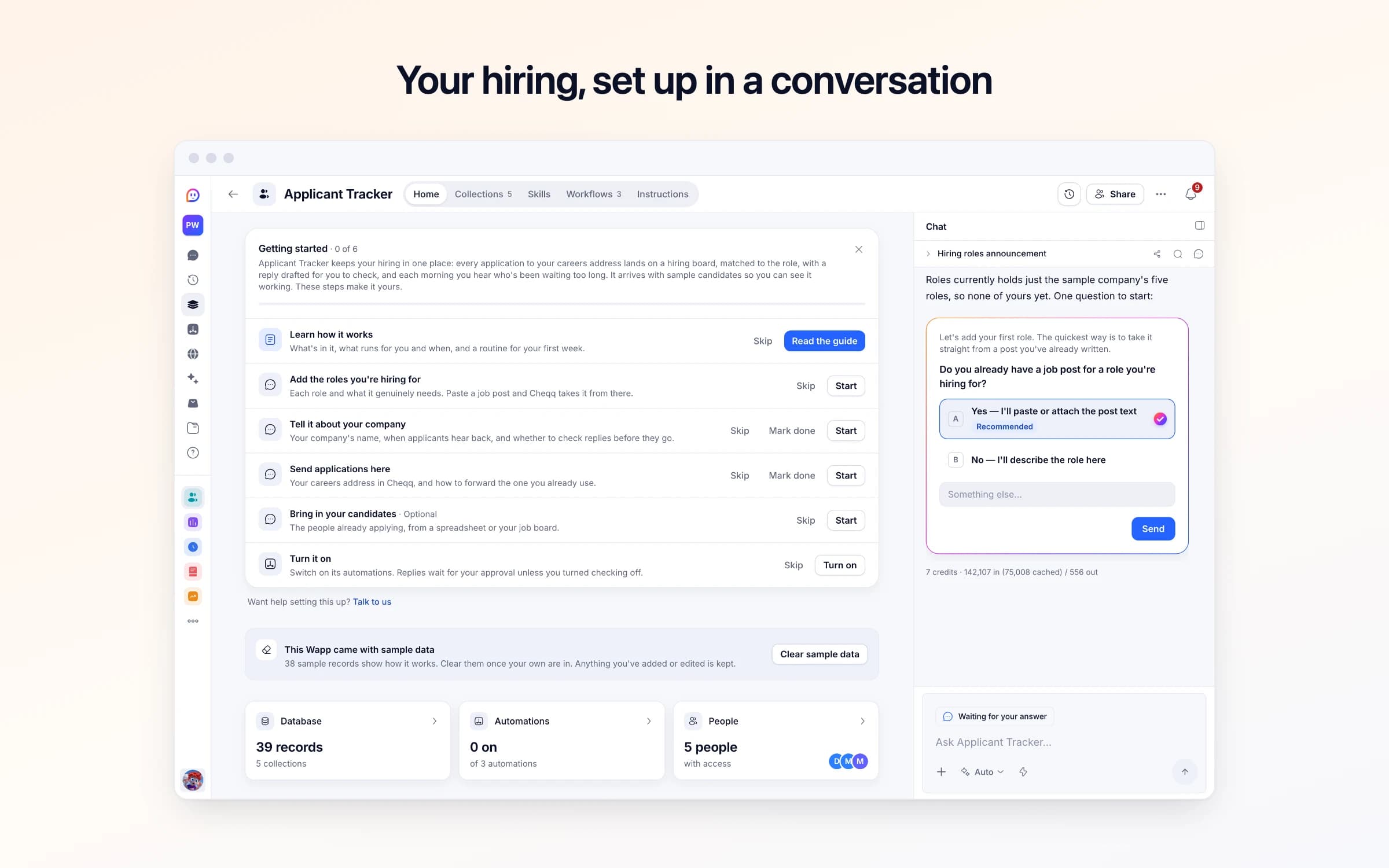
Applicant Tracker keeps your hiring in one place: every application to your careers address lands on a hiring board, matched to the role, with a reply drafted for you to check, and each morning you hear who's been waiting too long. It arrives with sample candidates so you can see it working. These steps make it yours.
Learn how it works
What's in it, what runs for you and when, and a routine for your first week.
Add the roles you're hiring for
Each role and what it genuinely needs. Paste a job post and Cheqq takes it from there.
Tell it about your company
Your company's name, when applicants hear back, and whether to check replies before they go.
Send applications here
Your careers address in Cheqq, and how to forward the one you already use.
Bring in your candidates
The people already applying, from a spreadsheet or your job board.
Turn it on
Switch on its automations. Replies wait for your approval unless you turned checking off.
Forward job applications to your Applicant Tracker address, and each becomes a candidate on the hiring board with the role, their links and a two-line summary filled in, with a short reply to the applicant ready for you to approve. Each weekday at 9, you hear who has sat in one stage for more than a week, and which interviews still need feedback.
Applications arrive in a shared jobs inbox, a founder's own email and a job board's messages. Someone copies the promising ones into a spreadsheet when there's a quiet hour, and the rest sit unread and unanswered.
Three weeks in, nobody is sure who replied to whom. A strong designer has heard nothing since she applied, an engineer you liked is waiting on a second interview nobody booked, and the spreadsheet still says Screening for people you turned down on a call.
Your jobs mailbox forwards a copy of each application to the Applicant Tracker address. Genuine applications become candidates at Applied, with their name, email, the role matched against your open roles, any CV or portfolio links, and a two-line summary of the experience they describe or their CV shows. The source is set too: Referral if someone introduced them, Job board if one is named, Direct otherwise.
A short reply is drafted in the same thread, thanking them, naming the role and saying when they'll hear about next steps, in the time you set. It goes once you approve it, from the template's address as your assistant, never as you. When an applicant writes back, it's added to their record and you're told; someone who applies again lands on the record they already have. Recruiters offering to fill your roles, vendor pitches and newsletters don't become candidates: they're set aside in Set-aside emails with the reason.
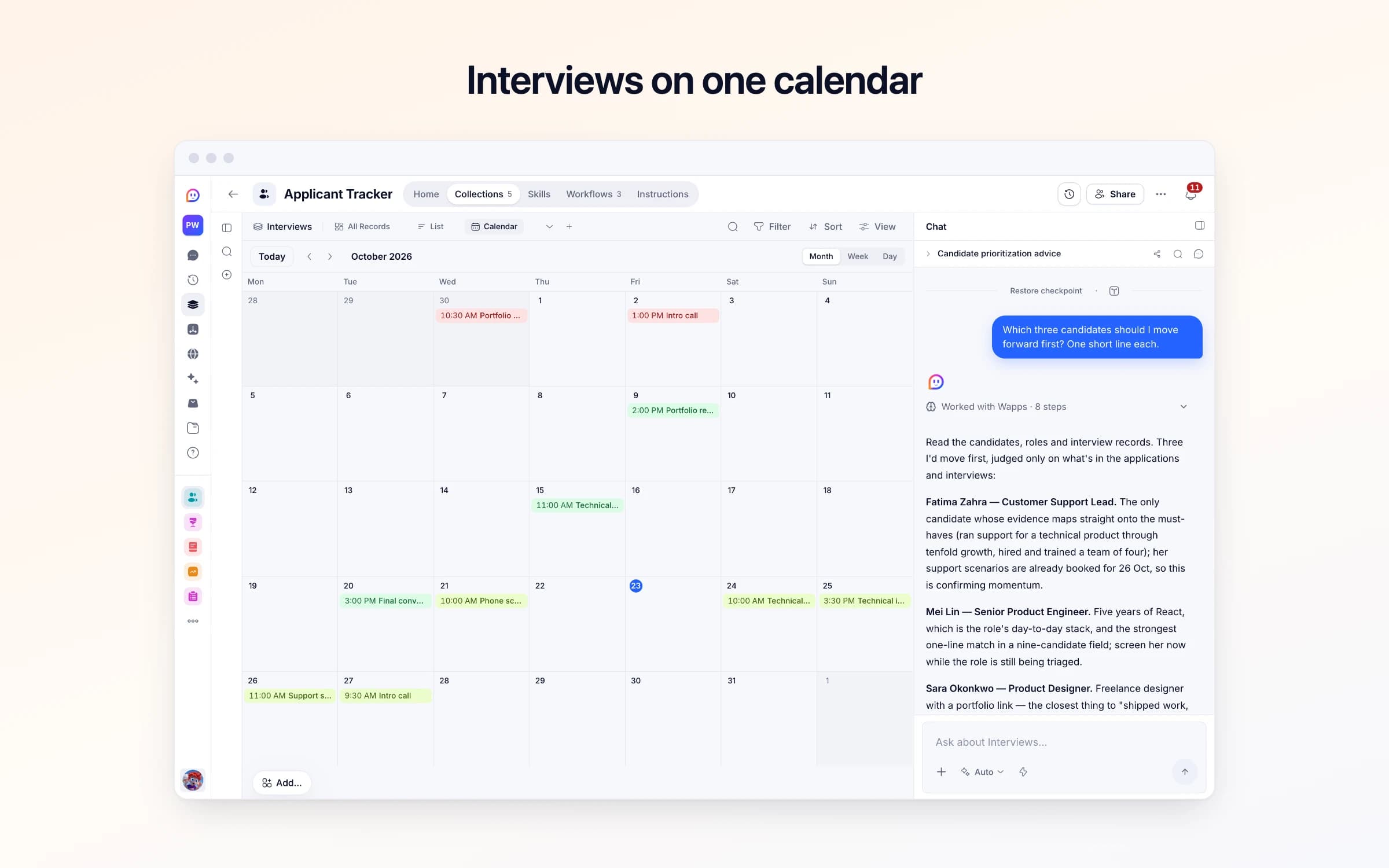
Interviews have their own list and a month calendar, with the interviewer, the outcome and written feedback. Each weekday at 9, you get the candidates who have sat in one stage for more than a week and the interviews still owed feedback; a morning with nobody waiting sends nothing. The Hiring Overview dashboard shows candidates by stage and source, applications each week, your open roles and upcoming interviews.
Point your careers address here
Applications arrive by email and become candidates — name, role, CV and portfolio links, and a two-line summary of what they have actually done.
They hear back in the same thread
A short reply is drafted naming them and the role and saying when they'll hear next. It's written as your assistant, never as you, and goes once you approve it. If they write back, it's added to their record.
Nobody gets forgotten
Each weekday it names the candidates who have sat in the same stage for over a week, and the interviews still waiting for feedback.
The jobs inbox
Every application becomes a candidate on one board, instead of an email someone has to remember to answer.
The hiring spreadsheet
Candidates are added as they apply, with the role and summary filled in, instead of copied across in a quiet hour.
Hiring tools like Workable or Breezy HR
If you hire a few roles a year and need applications filed, acknowledged and moved through stages, not job-board posting or a careers site, this covers it without another subscription.
Once it's yours, describe a change the way you'd ask a colleague, and Cheqq makes it.
By email. The template comes with its own Cheqq address: set your jobs mailbox to forward each application to it automatically, and the original, CV and all, stays where it is. Getting started gives you the address and walks you through the forwarding, one step at a time. The reply goes to the applicant, whether the application arrived through a forwarding rule or you forwarded it by hand.
It thanks the applicant, names the role and says when they'll hear about next steps, using the time you set. It waits for your approval before it goes, unless you untick Check replies in Hiring settings. It's written as your assistant: it never speaks as you, signs your name, or invents a link, a date or a promise.
Yes. A CV attached as a PDF or Word file is read with the email, so the candidate's summary reflects it as well as what they wrote. The file is kept in your Cheqq files, under Mail; add it to the candidate's CV field if you want it on their card.
No. It files and summarises, and every hiring decision stays with you. It doesn't score applicants or record age, gender, nationality or anything like them, and it comes with a Fair hiring checklist for screening, interviews and saying no. Emails it decides aren't applications are kept in Set-aside emails with the reason, so you can check its calls.
From each candidate's stage date, which is set when the application arrives. Moving a card on the board doesn't change it, so update the date when someone moves on, or ask Cheqq to keep it current for you. Anyone whose stage date is more than a week old is named each weekday at 9, until they're Hired or Rejected, along with any interview still waiting for feedback.
Yes. Invite the people who hire with you and they work from the same roles, board and interviews. The weekday list comes to you, in Cheqq and by email unless you turn that off; ask Cheqq to send it to others as well.
Yes. Download them as CSV or JSON, filtered by role or stage, whenever you need a copy outside Cheqq.
3 of its 41 automation steps use AI, and draw AI credits each time they run: how many depends on the model you pick for the step. The other steps are fixed and draw none.
Every customer email triaged, answered and timed
Client work in one place, with the Friday update drafted
Stock added up from every movement, with reorders flagged
You get your own copy: your own records and automations. Change any part of it. Or we'll set it up with you.
Free to start · Invites go out in batches