Applicant Tracker
Every application filed, and every applicant answered
Free to start · Invites go out in batches
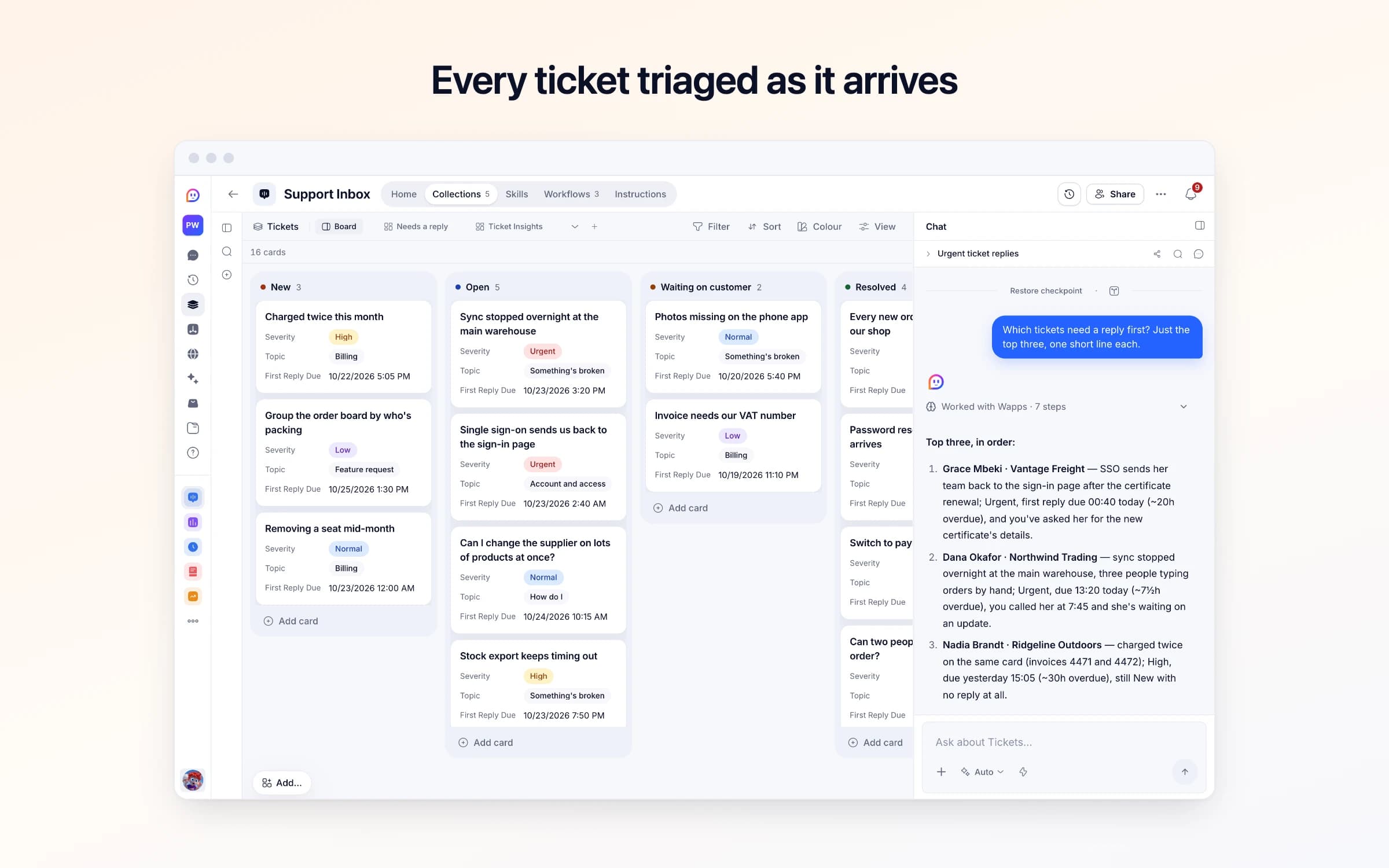
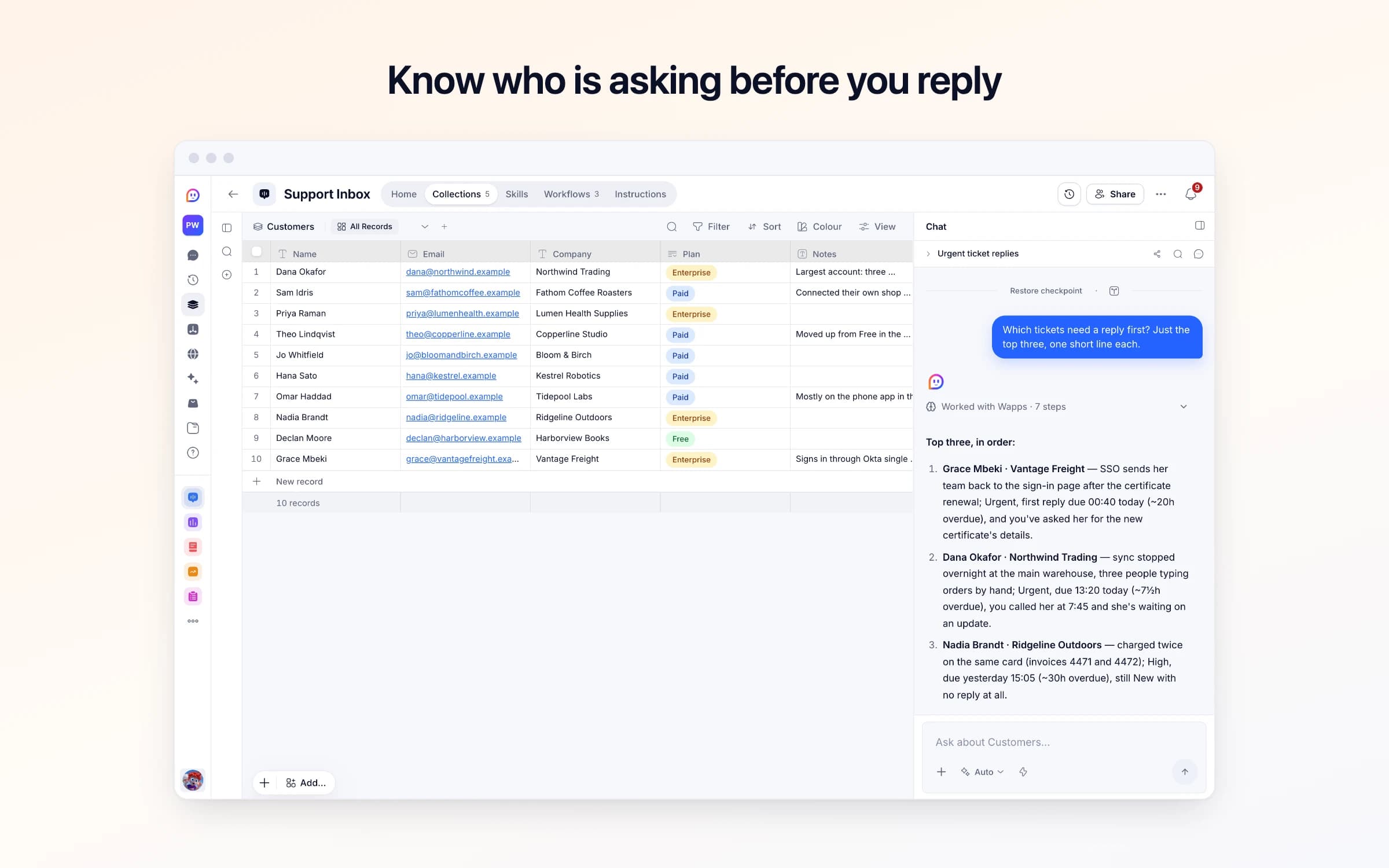
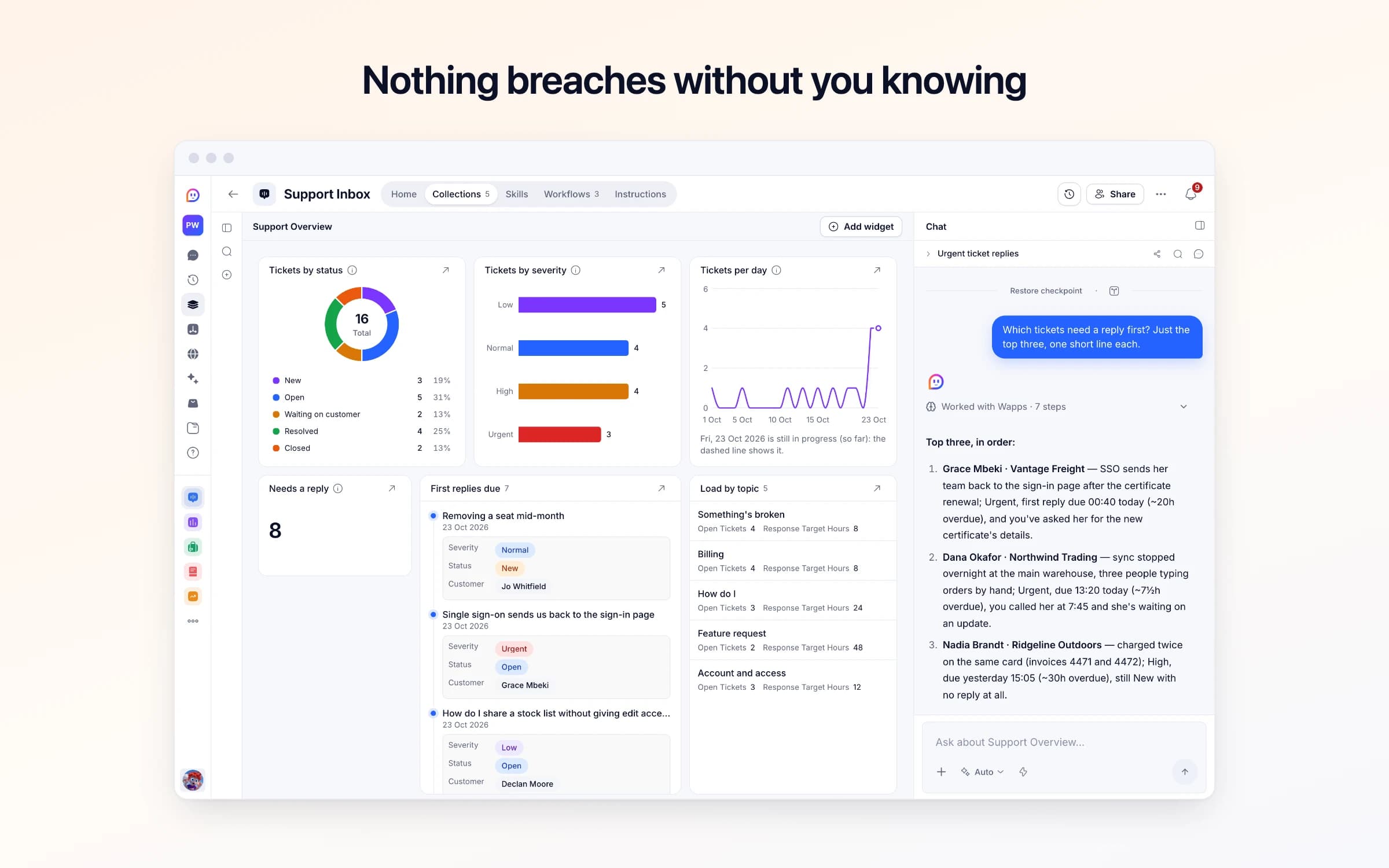
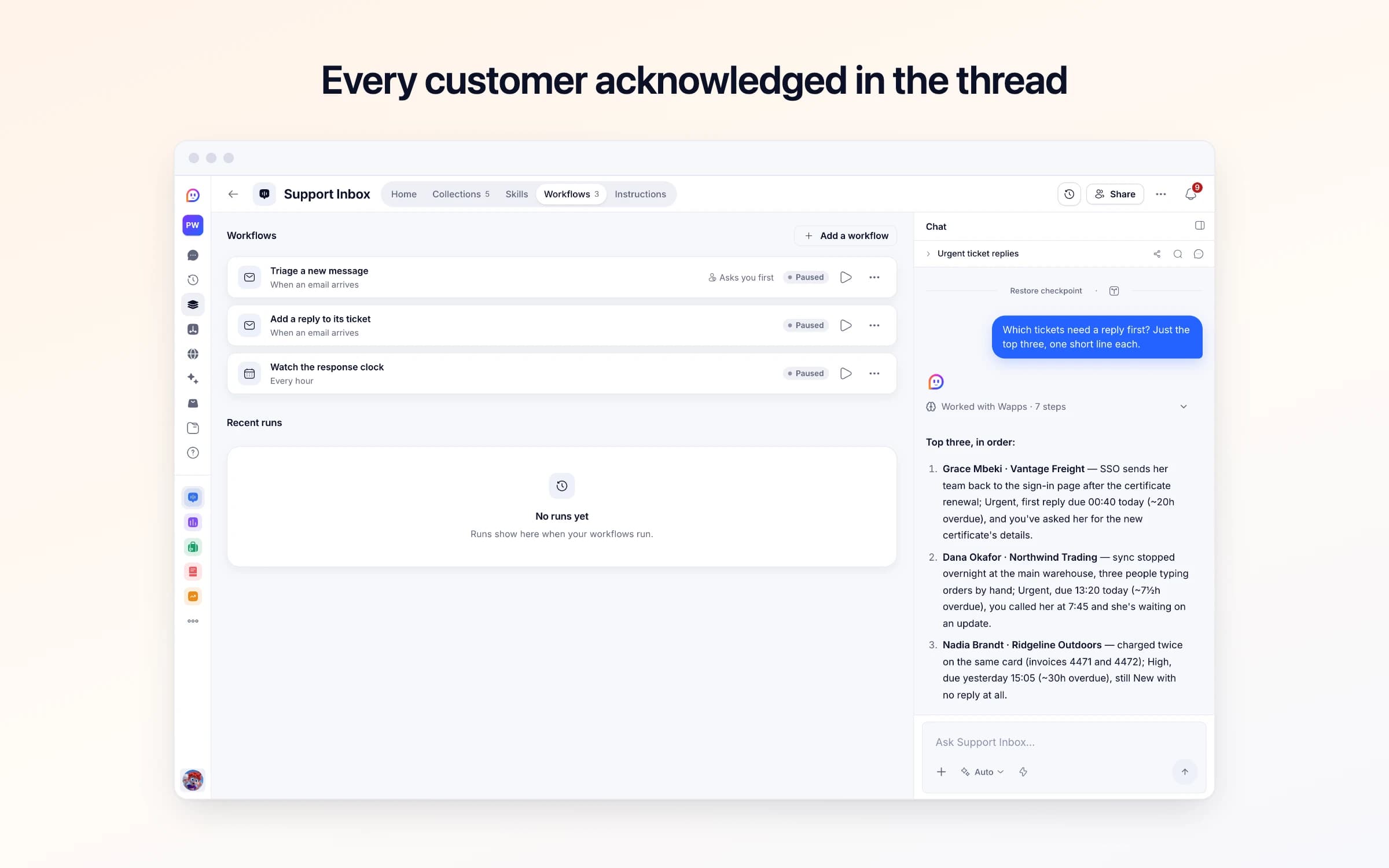
5 lists of records, 3 automations and 1 document. Every automation works from the records you keep here, so a change made once is the one they all see.
Every list as your copy starts it: its fields, and sample records you can clear in one go.
| Name | Description | Response Target Hours |
|---|---|---|
Something's broken | Something stopped working or behaves wrongly: sync, exports, errors. | 8 |
Billing | Invoices, charges, refunds, plan changes. | 8 |
How do I | Questions about something the product already does. | 24 |
Feature request | Something it doesn't do yet. | 48 |
Account and access | Signing in, seats, single sign-on, closing an account. | 12 |
| Name | Company | Plan | Notes | |
|---|---|---|---|---|
Dana Okafor | dana@northwind.example | Northwind Trading | Enterprise | Largest account: three warehouses on one workspace. Anything urgent, call her as well as replying. |
Sam Idris | sam@fathomcoffee.example | Fathom Coffee Roasters | Paid | Connected their own shop through webhooks. Technical, likes detail. |
Priya Raman | priya@lumenhealth.example | Lumen Health Supplies | Enterprise | Empty |
Theo Lindqvist | theo@copperline.example | Copperline Studio | Paid | Moved up from Free in the spring. Pays by invoice. |
Jo Whitfield | jo@bloomandbirch.example | Bloom & Birch | Paid | Empty |
Hana Sato | hana@kestrel.example | Kestrel Robotics | Paid | Empty |
| Subject | Status | Severity | Topic | First Reply Due |
|---|---|---|---|---|
Sync stopped overnight at the main warehouse | Open | Urgent | Something's broken | Today, 3:20 PM |
Charged twice this month | New | High | Billing | Yesterday, 5:05 PM |
Single sign-on sends us back to the sign-in page | Open | Urgent | Account and access | Today, 2:40 AM |
Can I change the supplier on lots of products at once? | Open | Normal | How do I | Tomorrow, 10:15 AM |
Stock export keeps timing out | Open | High | Something's broken | Today, 7:50 PM |
Group the order board by who's packing | New | Low | Feature request | In 2 days, 1:30 PM |
| From | Subject | Reason | Snippet | Received At |
|---|---|---|---|---|
no-reply@statuspage.example | Scheduled maintenance completed | An automatic notice, not a person asking for help | All systems are operational. No action is required. | Yesterday, 4:00 AM |
partnerships@growthagency.example | Quick question about a collaboration | A sales pitch, not a customer | I came across your product and think there's a great fit with our audience of... | 2 days ago, 10:30 AM |
digest@retailnews.example | This week in independent retail | A newsletter | Five stories worth your attention this week... | 4 days ago, 7:15 AM |
| Support Address | Check Replies |
|---|---|
Your Cheqq address | Yes |
Every automation that starts by itself installs switched off. The ones marked Asks you first wait for your yes before anything goes out, until you let them run on their own.
Triage a new message
Asks you firstMail to your support address becomes a ticket with a topic, a severity and a reply-by time, and a first reply is drafted. It goes once you approve it, unless you turned checking off.
Add a reply to its ticket
Runs on its ownWhen a customer answers in a ticket's email conversation, adds what they said to that ticket and reopens it. If the ticket had no customer yet, it gets one once they write from their own address. No second ticket, no second reply.
Watch the response clock
Runs on its ownEvery hour, tells you about tickets that just went past their reply-by time, or are due a reply within two hours. A quiet hour sends nothing.
How Support Inbox works
What's in Support Inbox, what runs for you and when, what it never does, and your first week.
Support Inbox turns your support email into one queue: each message becomes a ticket with a topic, a severity and a time to reply by, a first reply is drafted for you to check, and you hear about anything about to run late. It arrives with sample tickets so you can see it working. These steps make it yours.
Learn how it works
What's in it, what runs for you and when, and a routine for your first week.
Tell it about your business
Your business's name, how soon you reply, and whether to check replies before they go.
Send your support mail here
Your support address in Cheqq, and how to forward the address customers already use.
Sort tickets your way
The kinds of request you get, and how fast each one needs a first reply.
Bring in your customers
Import your customer list, so tickets land on the right customer with their plan.
Turn it on
Switch on its automations. First replies wait for your approval unless you turned checking off.
Forward your support email to the Support Inbox address, and each message becomes a ticket with a one-line summary, a topic, a severity and a first-reply deadline, with a first reply to the customer drafted for you to approve. A ticket close to its deadline is flagged to you two hours before, and once more if it goes overdue.
Support mail lands in one shared inbox that three people half-watch. Whoever opens a message first decides how urgent it is, usually by how angry it sounds, so a blocked customer's calm email sits under a loud one about a typo.
Nobody tracks when a reply is due. A billing question from your biggest account goes a day and a half without an answer because everyone assumed someone else had it, and the first sign is a second email asking whether anyone is there.
Your support mailbox forwards a copy of each message to the Support Inbox address. Real requests become tickets at New: the ask restated in one line, the closest topic, and a severity from the impact described. Urgent means blocked or losing money, High a broken core workflow, Normal a question or small defect, Low a nice-to-have. The sender is matched to a customer by email, or added as a new one.
Each ticket's first-reply deadline comes from its topic's response target, and a reply is drafted in the same thread confirming the message arrived, restating the problem and saying a person will follow up. It goes once you approve it. When the customer answers, what they said is added to their ticket, which comes back to your team; only mail from the customer's own address is added. Newsletters, status notices and sales pitches go to Set-aside emails with the reason instead.
Every hour it looks for New or Open tickets coming due. Each late ticket is named twice at most: two hours before its deadline, then once if it goes overdue, and a quiet hour sends nothing. Move a ticket to Waiting on customer or Resolved and it drops off. The Support Overview dashboard shows tickets by status and severity, volume per day, first replies coming due and the load on each topic.
A customer writes in
The message becomes a ticket with the request restated in one line, a topic, and a severity set from the impact they describe — not from how loudly they describe it.
A first reply waits for your yes
A reply is drafted that confirms you have it and repeats the problem back so they know they were understood. It promises nothing you have not verified, and goes once you approve it.
The clock is watched
Each topic carries a response target. A ticket is named two hours before its deadline, and once more if it goes overdue.
The shared support inbox
Every message becomes a ticket with a severity and a reply deadline, instead of a thread three people half-watch.
Help desks like Zendesk or Help Scout
If you need tickets triaged, acknowledged and timed, and you answer from your own email, this covers it without another subscription. There's no help centre or live chat.
“Did anyone reply to this?”
Tickets are named before their deadline and again if they pass it, instead of someone asking in the team chat.
Once it's yours, describe a change the way you'd ask a colleague, and Cheqq makes it.
By email. The template comes with its own Cheqq address: set your support mailbox to forward a copy of each message to it automatically, and keep answering from that mailbox. Getting started gives you the address and walks you through the forwarding. The first reply goes to the customer, whether the message reached the address through a forwarding rule or you forwarded it by hand. When the customer replies, what they said is added to their ticket rather than opening a new one.
It confirms the message arrived, restates the problem in one line and says a person will follow up. It never promises a fix, a date, a refund or a workaround, and it's written as your assistant, never as you. It waits for your approval before it goes, unless you untick Check replies in Support settings.
No. It acknowledges and keeps time, and the answer comes from you, from your own email. Once you've replied, move the ticket to Waiting on customer or Resolved so it stops showing up as overdue.
Severity comes from the impact the customer describes, not their tone, and you can change it whenever you know better. Each topic carries a response target: Something's broken and Billing 8 hours, Account and access 12, How do I 24, Feature request 48. Change any of them, or add topics of your own.
They're set aside in Set-aside emails with the sender, the subject, the reason and the opening lines, so a newsletter never becomes a ticket and a real request that was misjudged is easy to spot.
Yes. Invite your team and everyone sees the same tickets and customers. The deadline alerts come to you, in Cheqq and by email unless you turn that off; ask Cheqq to send it to others as well.
Yes. Download them as CSV or JSON, filtered by topic, status or date.
4 of its 66 automation steps use AI, and draw AI credits each time they run: how many depends on the model you pick for the step. The other steps are fixed and draw none.
Every application filed, and every applicant answered
Client work in one place, with the Friday update drafted
Stock added up from every movement, with reorders flagged
You get your own copy: your own records and automations. Change any part of it. Or we'll set it up with you.
Free to start · Invites go out in batches