Project Manager
Action items pulled out of threads and onto one board
Free to start · Invites go out in batches
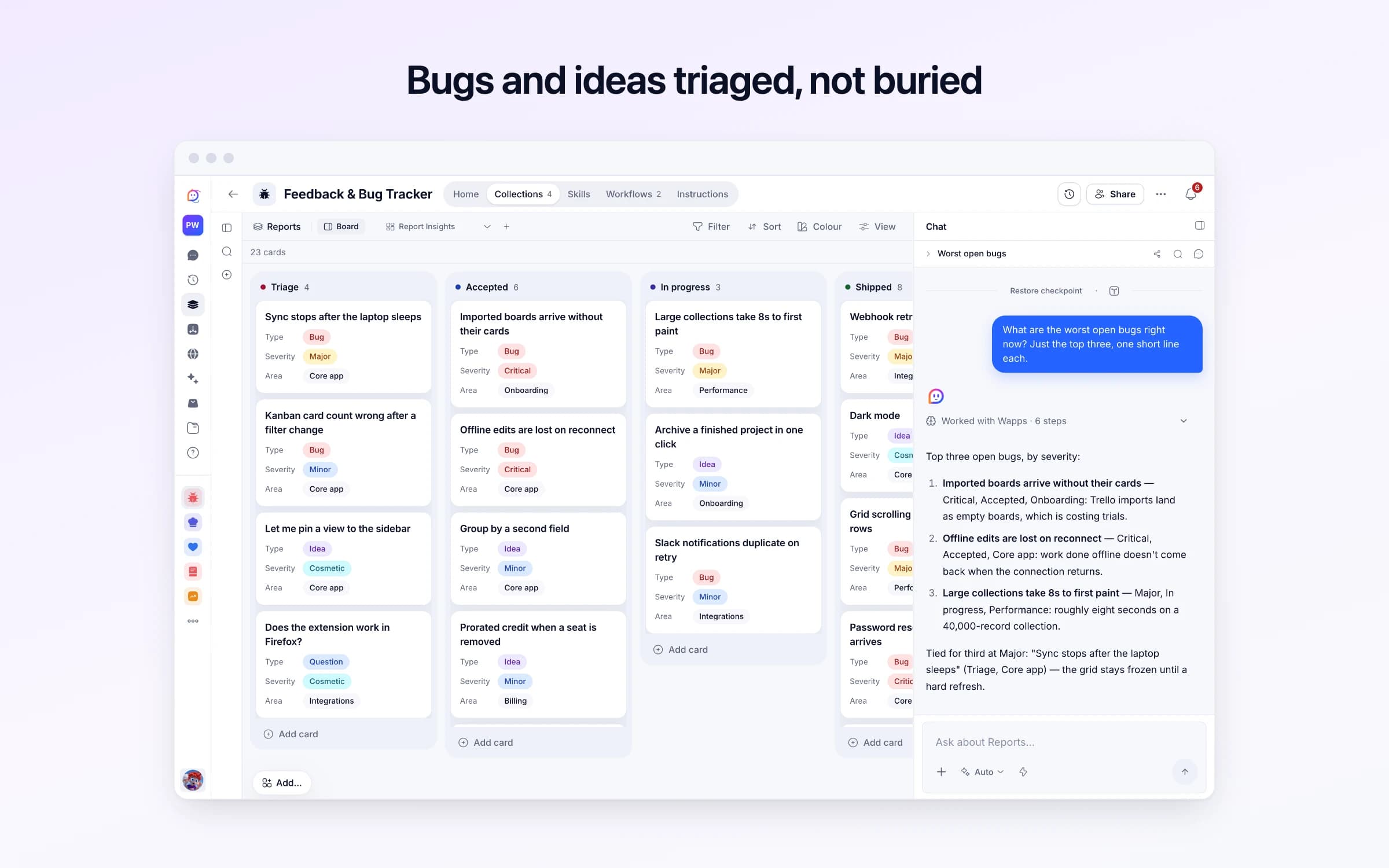
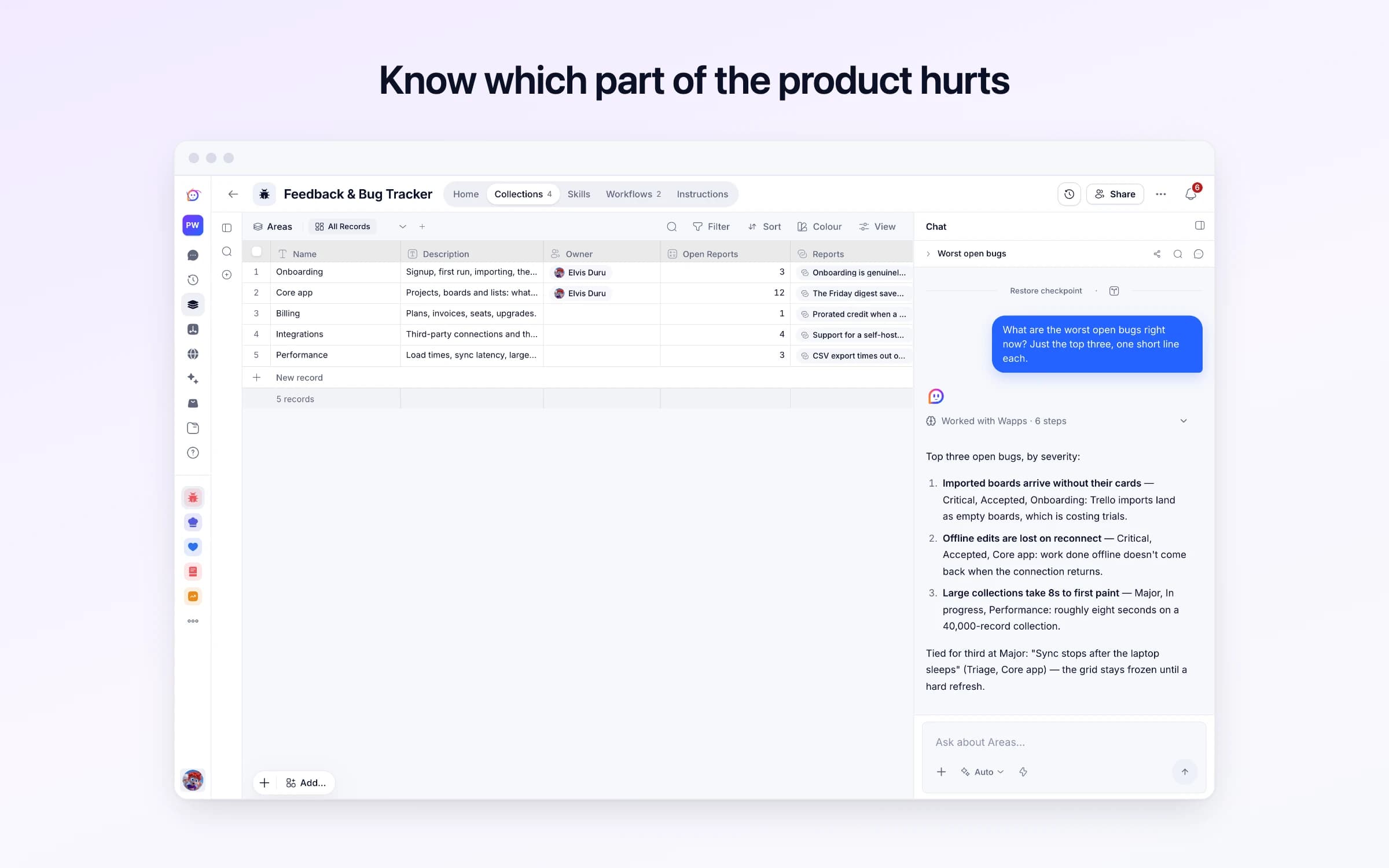
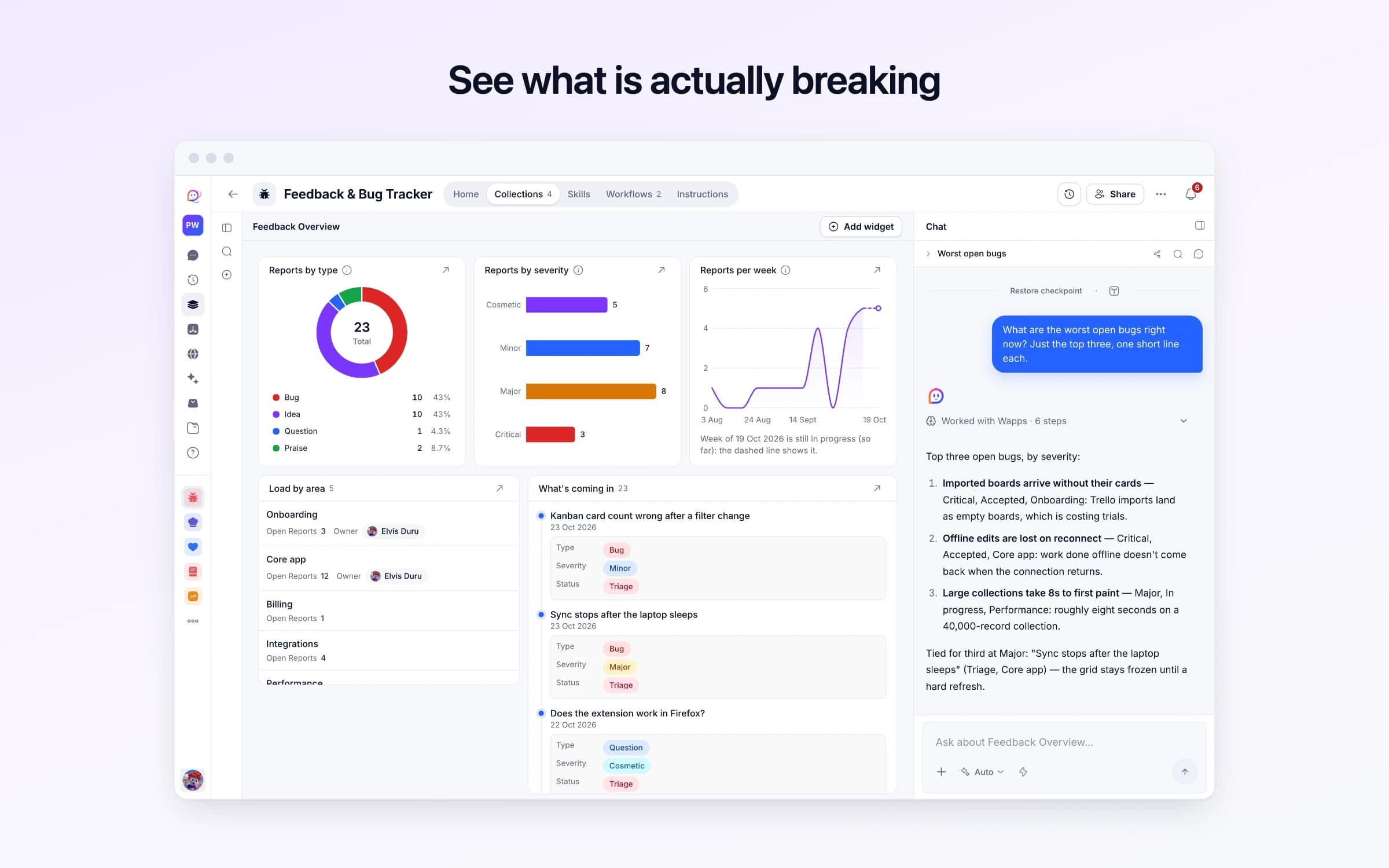
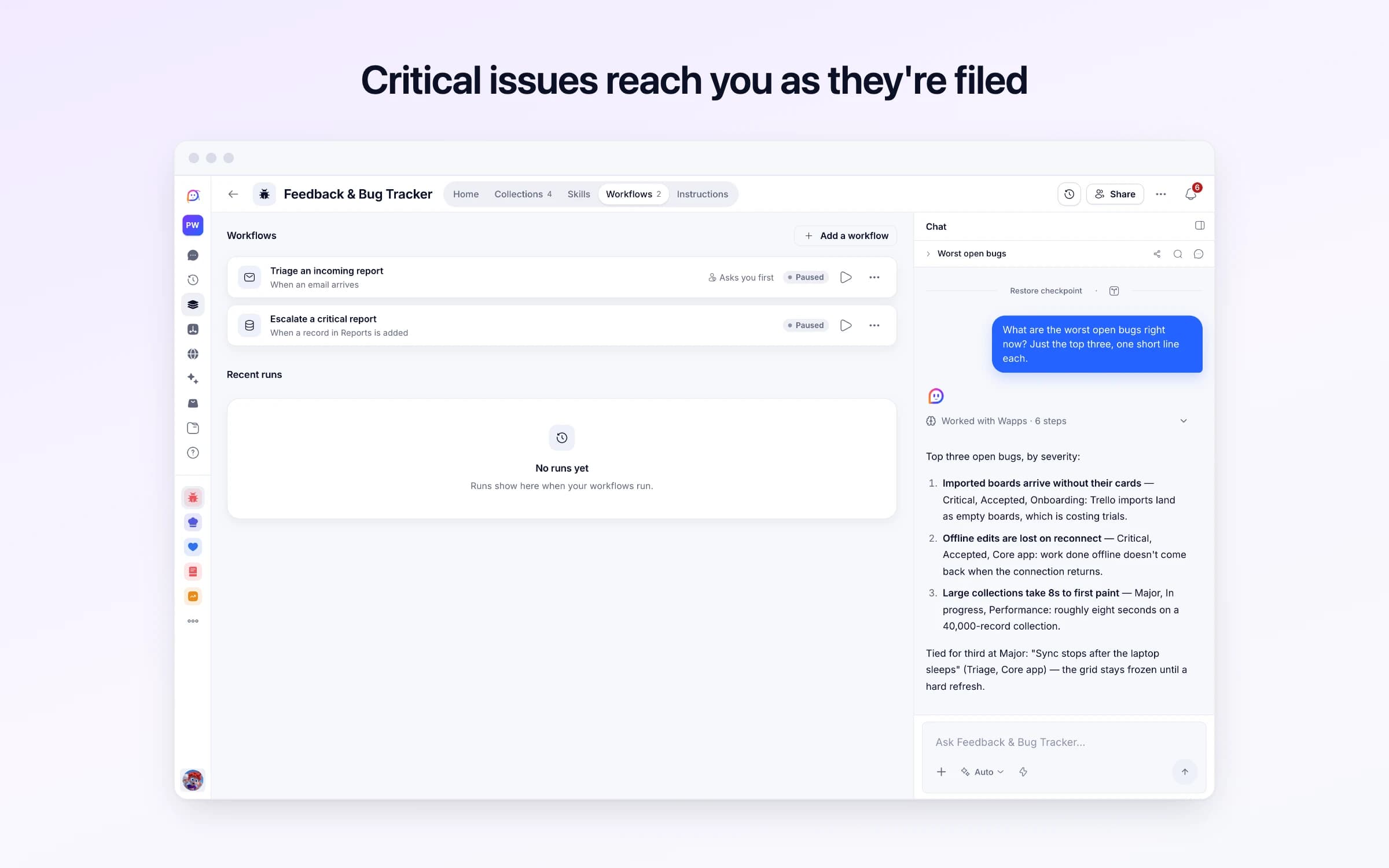
4 lists of records, 2 automations and 1 document. Every automation works from the records you keep here, so a change made once is the one they all see.
Every list as your copy starts it: its fields, and sample records you can clear in one go.
| Name | Description | Owner |
|---|---|---|
Onboarding | Signup, first run, importing, the setup checklist. | You |
Core app | Projects, boards and lists: what people use every day. | You |
Billing | Plans, invoices, seats, upgrades. | Empty |
Integrations | Third-party connections and the browser extension. | Empty |
Performance | Load times, sync latency, large-collection behaviour. | Empty |
| Version | Shipped On | Summary |
|---|---|---|
2.5.0 | Empty | In progress: offline sync and the rebuilt importer. |
2.4.0 | 9 days ago | Dark mode, faster grid scrolling, webhook retry fix. |
2.3.2 | 3 weeks ago | Patch — password reset delivery and CSV export timeouts. |
2.3.0 | 6 weeks ago | Kanban swimlanes, bulk edit, audit logging. |
2.2.0 | 2 months ago | SSO, seat management, the first pass at dashboards. |
| Title | Status | Type | Severity | Area |
|---|---|---|---|---|
Sync stops after the laptop sleeps | Triage | Bug | Major | Core app |
Kanban card count wrong after a filter change | Triage | Bug | Minor | Core app |
Let me pin a view to the sidebar | Triage | Idea | Cosmetic | Core app |
Does the extension work in Firefox? | Triage | Question | Cosmetic | Integrations |
Imported boards arrive without their cards | Accepted | Bug | Critical | Onboarding |
Offline edits are lost on reconnect | Accepted | Bug | Critical | Core app |
| Check Replies |
|---|
Yes |
Every automation that starts by itself installs switched off. The ones marked Asks you first wait for your yes before anything goes out, until you let them run on their own.
Triage an incoming report
Asks you firstWhen feedback arrives at this automation's address, files it as a bug, idea, question or praise, rates how bad it is, adds it to a report already open when it's the same problem, and drafts a thank-you, which goes once you approve it unless you turned checking off. Auto-replies and spam are left alone.
Escalate a critical report
Runs on its ownThe moment a report is filed as Critical, tells you, rather than waiting for the next review.
How Feedback Tracker works
What's in it, what runs for you, how severity works, and a routine for your first week.
Feedback Tracker gives your product one address for bugs, ideas and questions. Each report is sorted, rated, filed and acknowledged, and you hear at once when something critical lands. It arrives with sample data so you can see it working. These steps make it yours.
Learn how it works
What's in it, what runs for you, how severity works, and your first week.
Name the parts of your product
The areas reports are filed against, named the way your team talks about them.
Bring in the feedback you have
Paste it or upload a spreadsheet, so what people already told you is in one place.
Share your feedback address
Copy the address the triage automation shows and put it on your site, in your app and in your emails. Send it a test.
Choose how thank-yous go
Whether you check each thank-you before it goes. Checking is on to start.
Turn it on
Every report filed, a thank-you for you to approve unless you turned checking off, and an alert the moment something critical lands.
Customers email bugs, ideas, questions and praise to one address, and each becomes a report with its type, severity and product area, with a short thank-you drafted for you to approve. Repeats are added to the report already filed, and anything critical raises an alert as soon as it's filed.
Feedback arrives everywhere: the support inbox, a founder's own email, a reply to an invoice. Someone copies the useful ones into a spreadsheet when there's time, and the bug three customers hit sits there as three rows with three different names.
Nobody can say which part of the product is taking the most hits, the person who reported it never hears back, and the report that meant someone lost data gets read on Friday with everything else.
Customers write to the tracker's own Cheqq address: put it on your help page or in your app. Each email is sorted first: a bug, an idea, a question, praise, or not feedback at all, so auto-replies, newsletters and spam are left out. The rest becomes a report with its type, a severity from Cosmetic to Critical, the area of the product it touches, and a title that names the problem instead of repeating the subject line.
For bugs, the steps to reproduce, what they expected and what actually happened are filled in from what the reporter wrote, and noted as missing when they didn't say, never guessed. A report that's clearly the same defect as one already filed is added to that report's notes with the new reporter, instead of becoming a second report.
Each reporter gets a short thank-you drafted in the same thread, confirming the report arrived and restating it in a line, with no promise of a fix or a date. It goes once you approve it, unless you untick Check replies in Feedback settings, and only to an address Cheqq can confirm the email came from; an email that only claims to come from someone is filed without a reply. A report filed as Critical sends you an alert as soon as it lands, with a link straight to it.
The board runs from Triage to Accepted, In progress, Shipped or Declined, and the Feedback Overview dashboard shows reports by type, severity and week, and how many each area is carrying. Getting started on its Home helps you name your product's areas, bring in the feedback you already have and share your address.
Feedback arrives
One address takes bugs, feature ideas, questions and praise. Each email is sorted first, so auto-replies and spam are left out, and the rest becomes a typed report filed against the part of the product it touches.
It gets triaged, not just filed
Steps to reproduce, expected and actual are captured from what was written. Duplicates are merged into the existing report rather than piling up.
Critical does not wait
Anything filed as critical raises an alert the moment it lands, instead of waiting for someone to read the board.
The feedback spreadsheet
Every report is filed as it arrives, by type, severity and area, with the reporter's address kept for when it ships.
Issue trackers like Jira, at the intake end
If the job is catching and sorting what customers report, this does it before anything reaches your sprint. It doesn't plan sprints or link to code.
“Thanks, we're looking into it” by hand
Each reporter's thank-you is drafted in the same thread for your yes, and nobody is promised a date you haven't set.
Once it's yours, describe a change the way you'd ask a colleague, and Cheqq makes it.
By email, to the tracker's own Cheqq address. Customers can write to it directly, and the thank-you drafted for them goes once you approve it. You can also forward feedback that reached you: the report records the person who wrote it, but Cheqq can't confirm a forwarded email came from them, so no thank-you goes and it's yours to send.
Files attached to the email are read along with it when the report is written up, but they aren't kept on the report. Each report has a screenshot field you can add one to by hand.
From the impact on the person who hit it: Critical when data was lost or the product is unusable, Major when a core task is broken, Minor when there's a workaround, and Cosmetic when it looks wrong but works. Change any report's severity yourself and the board and charts follow.
A report that's clearly the same defect as one already filed. It goes into the existing report's notes with the new reporter's address, so one report shows everyone affected. Anything less certain gets a report of its own.
You do, in Cheqq and by email unless you've turned email off. Ask Cheqq to send it to a teammate as well, or to raise Major reports too.
Yes. Invite your team and everyone works from the same board. Each product area can have an owner, so it's clear who looks after which reports.
Yes. It comes with Onboarding, Core app, Billing, Integrations and Performance. Rename them to match your product, add your own and give each an owner; new reports are sorted into whichever areas you have.
2 of its 22 automation steps use AI, and draw AI credits each time they run: how many depends on the model you pick for the step. The other steps are fixed and draw none.
Action items pulled out of threads and onto one board
Meeting notes turned into decisions and owned actions
Every event's days, tasks and vendors on one calendar
You get your own copy: your own records and automations. Change any part of it. Or we'll set it up with you.
Free to start · Invites go out in batches