Feedback & Bug Tracker
Every bug report and idea filed, sorted and thanked
Free to start · Invites go out in batches
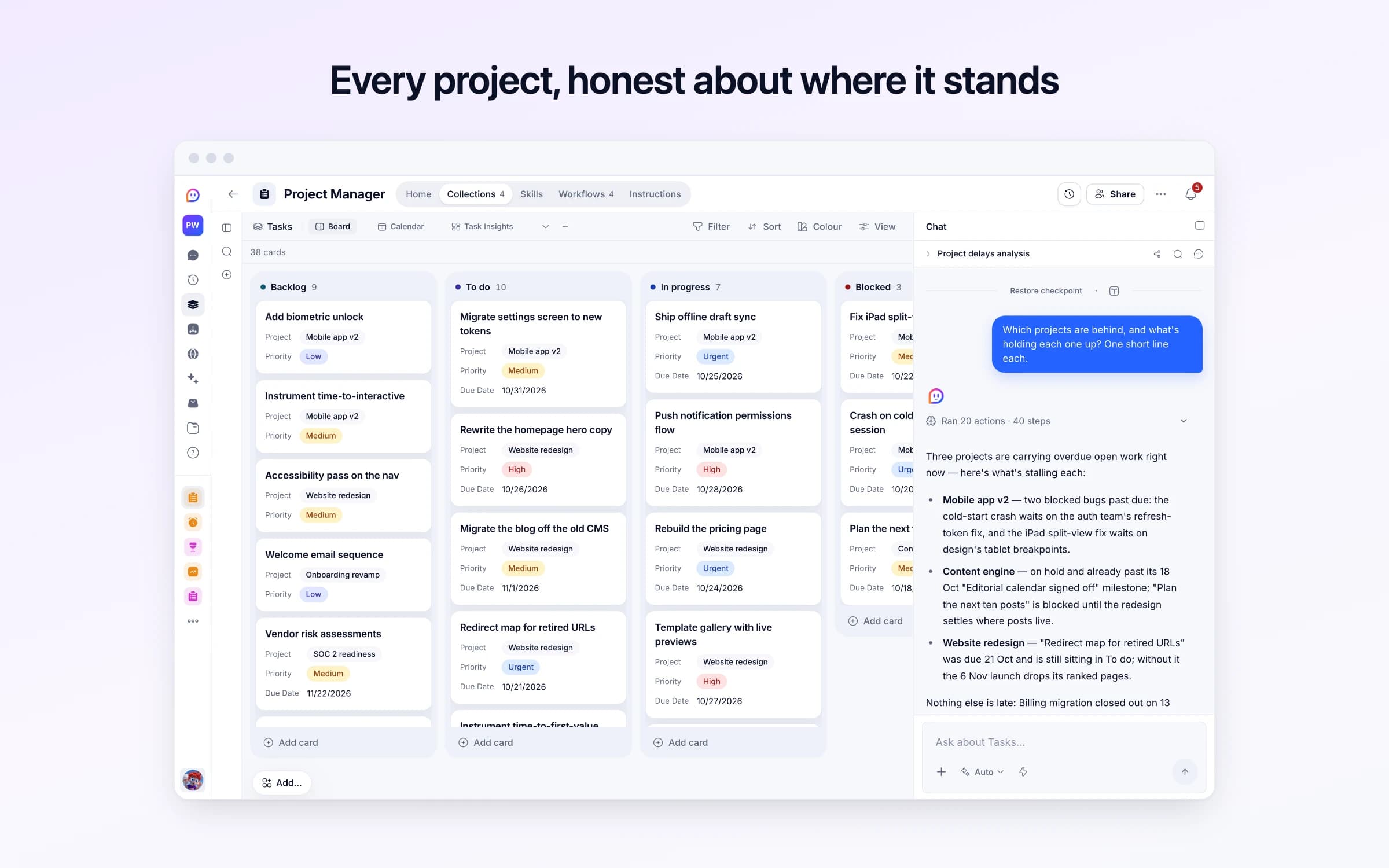
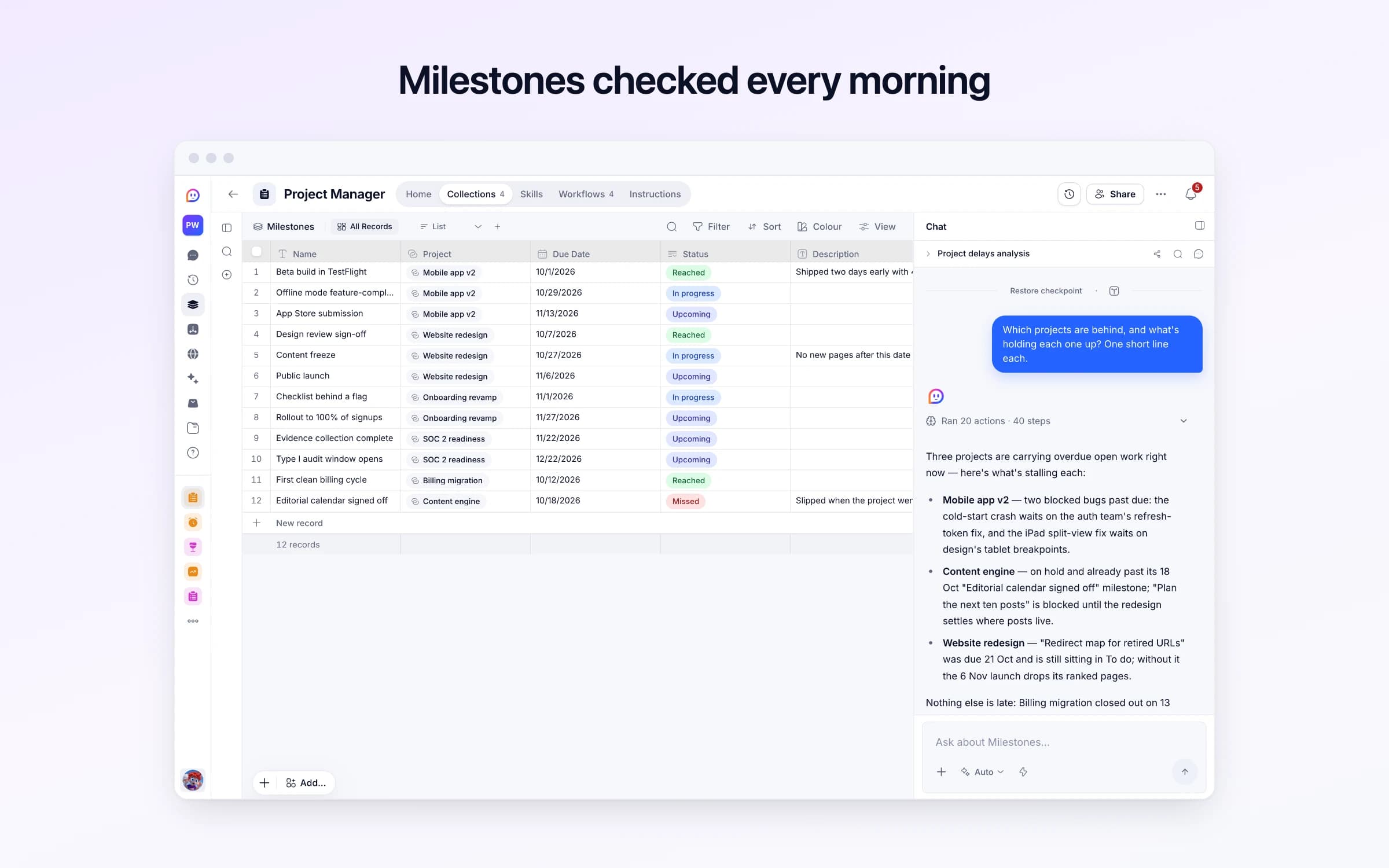
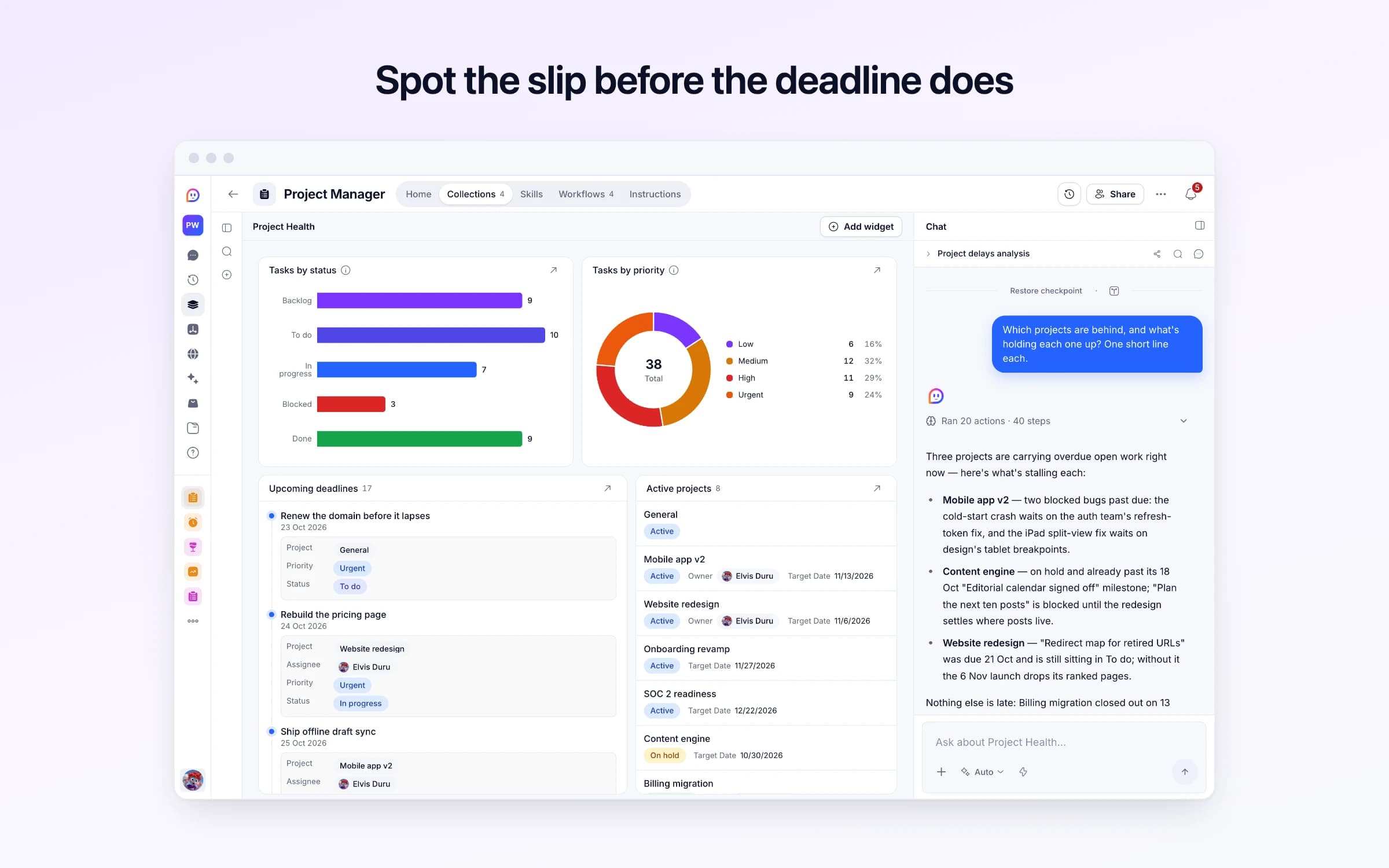
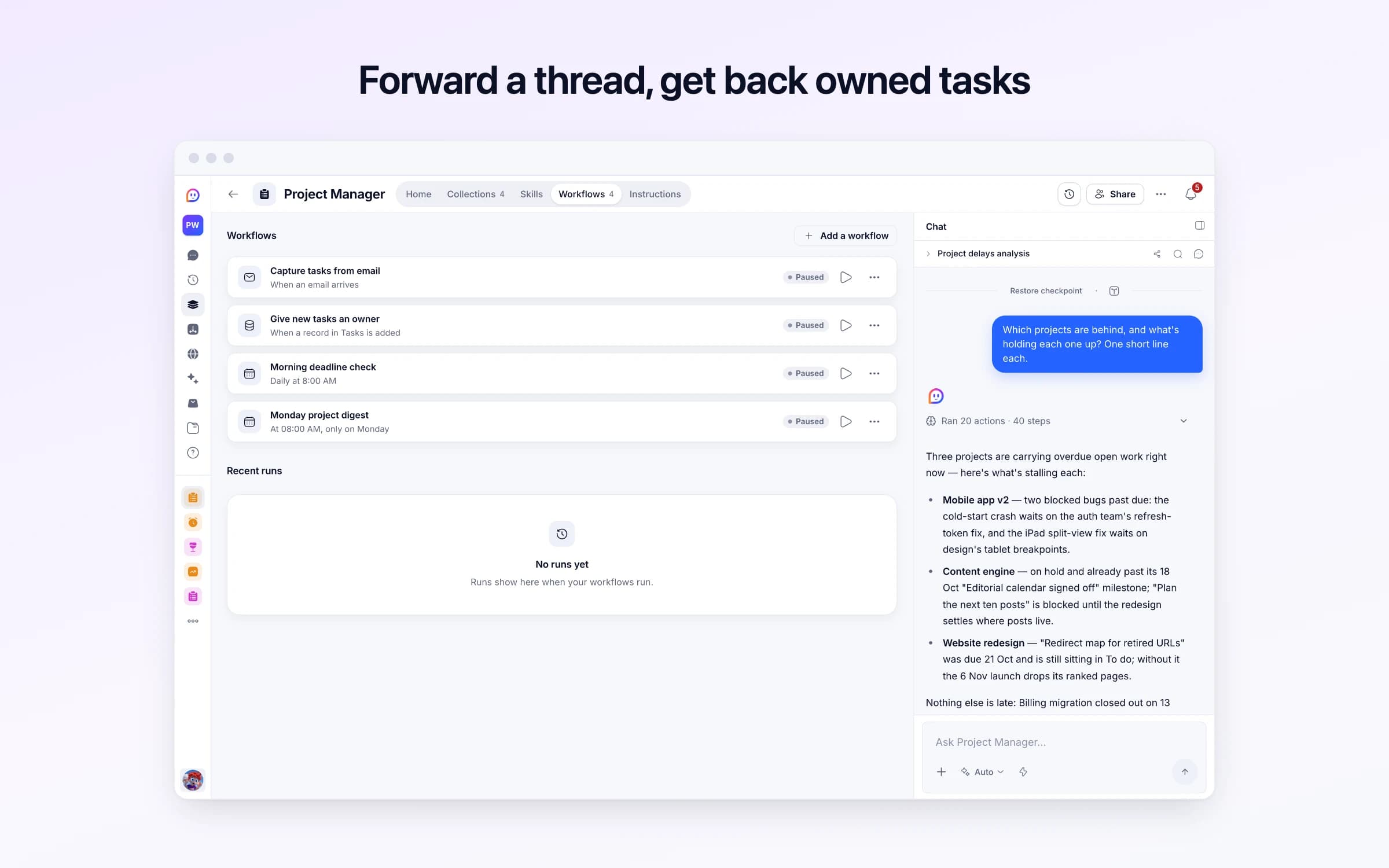
4 lists of records, 4 automations and 1 document. Every automation works from the records you keep here, so a change made once is the one they all see.
Every list as your copy starts it: its fields, and sample records you can clear in one go.
| Name | Description | Status | Owner | Start Date |
|---|---|---|---|---|
General | Work that doesn't belong to a named project yet. | Active | Empty | Empty |
Mobile app v2 | Rewrite of the mobile client on the new design system, with offline support and push notifications. | Active | You | 6 weeks ago |
Website redesign | New marketing site: positioning refresh, pricing page rebuild, and a template gallery that actually converts. | Active | You | 4 weeks ago |
Onboarding revamp | Cut time-to-first-value from eleven minutes to under three. Guided setup, sample data, and a checklist that survives a refresh. | Active | Empty | 12 days ago |
SOC 2 readiness | Evidence collection, access reviews and policy sign-off ahead of the Type I audit window. | Active | Empty | 3 weeks ago |
Content engine | Paused until the redesign ships — the new site changes where every post lands. | On hold | Empty | 2 months ago |
| Title | Status | Project | Priority | Due Date |
|---|---|---|---|---|
Ship offline draft sync | In progress | Mobile app v2 | Urgent | In 2 days |
Push notification permissions flow | In progress | Mobile app v2 | High | In 5 days |
Migrate settings screen to new tokens | To do | Mobile app v2 | Medium | In 8 days |
Fix iPad split-view layout | Blocked | Mobile app v2 | Medium | Yesterday |
Crash on cold start with expired session | Blocked | Mobile app v2 | Urgent | 3 days ago |
Add biometric unlock | Backlog | Mobile app v2 | Low | Empty |
| Name | Project | Due Date | Status | Description |
|---|---|---|---|---|
Beta build in TestFlight | Mobile app v2 | 3 weeks ago | Reached | Shipped two days early with 40 external testers. |
Offline mode feature-complete | Mobile app v2 | In 6 days | In progress | Empty |
App Store submission | Mobile app v2 | In 3 weeks | Upcoming | Empty |
Design review sign-off | Website redesign | 2 weeks ago | Reached | Empty |
Content freeze | Website redesign | In 4 days | In progress | No new pages after this date — copy edits only. |
Public launch | Website redesign | In 2 weeks | Upcoming | Empty |
| From | Subject | Reason | Snippet | Received At |
|---|---|---|---|---|
digest@productnews.example | Your Tuesday roundup: 8 launches to watch | A newsletter, nothing to do | This week in product: eight launches worth your attention, plus the week's funding news... | 2 days ago, 7:05 AM |
receipts@cloudhost.example | Invoice 4471 — payment received | A receipt, nothing to do | Thanks for your payment of $84.00. This invoice has been marked paid; no action is required. | 5 days ago, 3:40 AM |
no-reply@calendar.example | Accepted: Design review | A calendar reply, nothing to do | Priya Raman has accepted your invitation. | 6 days ago, 4:22 PM |
Every automation that starts by itself installs switched off.
Capture tasks from email
Runs on its ownForward a thread or meeting notes to this automation's address, and each action item in it becomes a new task on the right project, marked as from email. It never changes a task that's already there. Mail with nothing to do is logged in Discarded Emails instead.
Give new tasks an owner
Runs on its ownWhen a task is added with nobody on it, assigns it to its project's owner. Tasks that already have someone, or no project, are left alone.
Morning deadline check
Runs on its ownEach morning, lists the tasks due today or overdue, by project, and any milestone whose date has passed. Says nothing when nothing is due.
Monday project digest
Runs on its ownEvery Monday, a short digest for each active project: what was finished last week, what's in progress, what's blocked, and the next milestone. Says nothing when no project has news.
How Project Manager works
What's in it, what runs for you and when, and a routine for your first week.
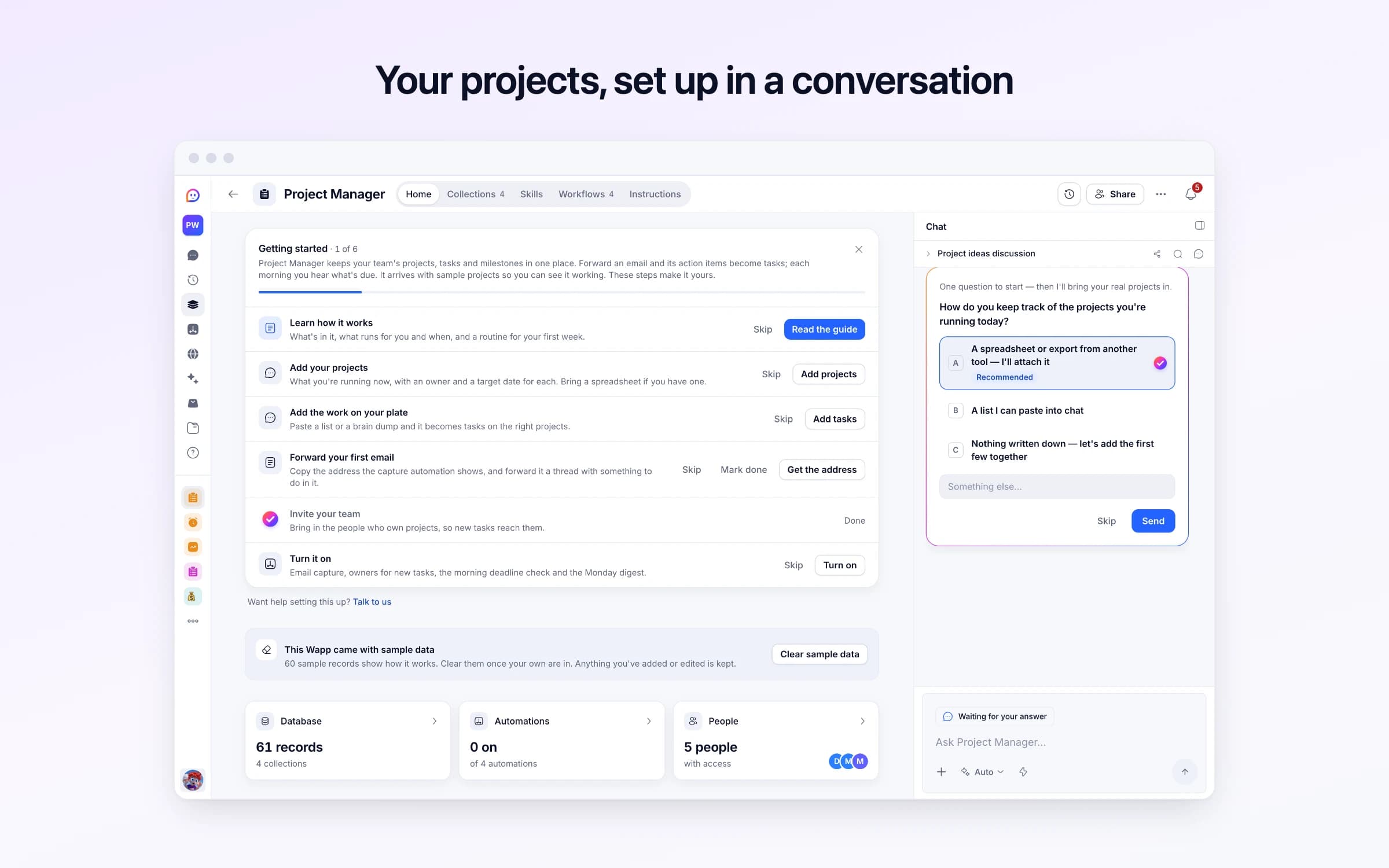
Project Manager keeps your team's projects, tasks and milestones in one place. Forward an email and its action items become tasks; each morning you hear what's due. It arrives with sample projects so you can see it working. These steps make it yours.
Learn how it works
What's in it, what runs for you and when, and a routine for your first week.
Add your projects
What you're running now, with an owner and a target date for each. Bring a spreadsheet if you have one.
Add the work on your plate
Paste a list or a brain dump and it becomes tasks on the right projects.
Forward your first email
Copy the address the capture automation shows, and forward it a thread with something to do in it.
Invite your team
Bring in the people who own projects, so new tasks reach them.
Turn it on
Email capture, owners for new tasks, the morning deadline check and the Monday digest.
Forward an email thread or meeting notes to your Project Manager address, and the action items become tasks on the board, with a priority, a due date wherever one was mentioned, and their project when it's clear. Every morning at 8 you get what's due and overdue, and every Monday a digest of each active project.
Work gets agreed in email threads and meetings, then lives with whoever remembers it. The project tool has the tasks someone found time to type in, which is never all of them, and rarely with the date that was actually promised.
On Monday someone asks what's blocked, and the answer takes an hour of scrolling. The deadline that slips is found on the day it was due, by the person who was waiting on it.
Forward the thread, or paste your meeting notes into an email, to your Project Manager address. Each action item becomes a task: a short title that starts with the action, the context it came with, a priority read from how urgent it sounded, a due date when one was mentioned, and the project it clearly belongs to, or General when none fits. You get a note saying how many were captured.
A new task without anyone on it goes to its project's owner, and whoever the thread named is kept in the task's description. Emails with nothing to do in them, like newsletters, receipts and calendar notices, are set aside in Discarded Emails with the reason, so you can check what was left out.
Every morning at 8, you get the tasks due today and the overdue ones, grouped by project with their owners, plus any milestone whose date has passed. On a morning with nothing due, there's no message. Every Monday at 8, a digest covers each active project: what was finished, what's in progress, what's blocked and the next milestone.
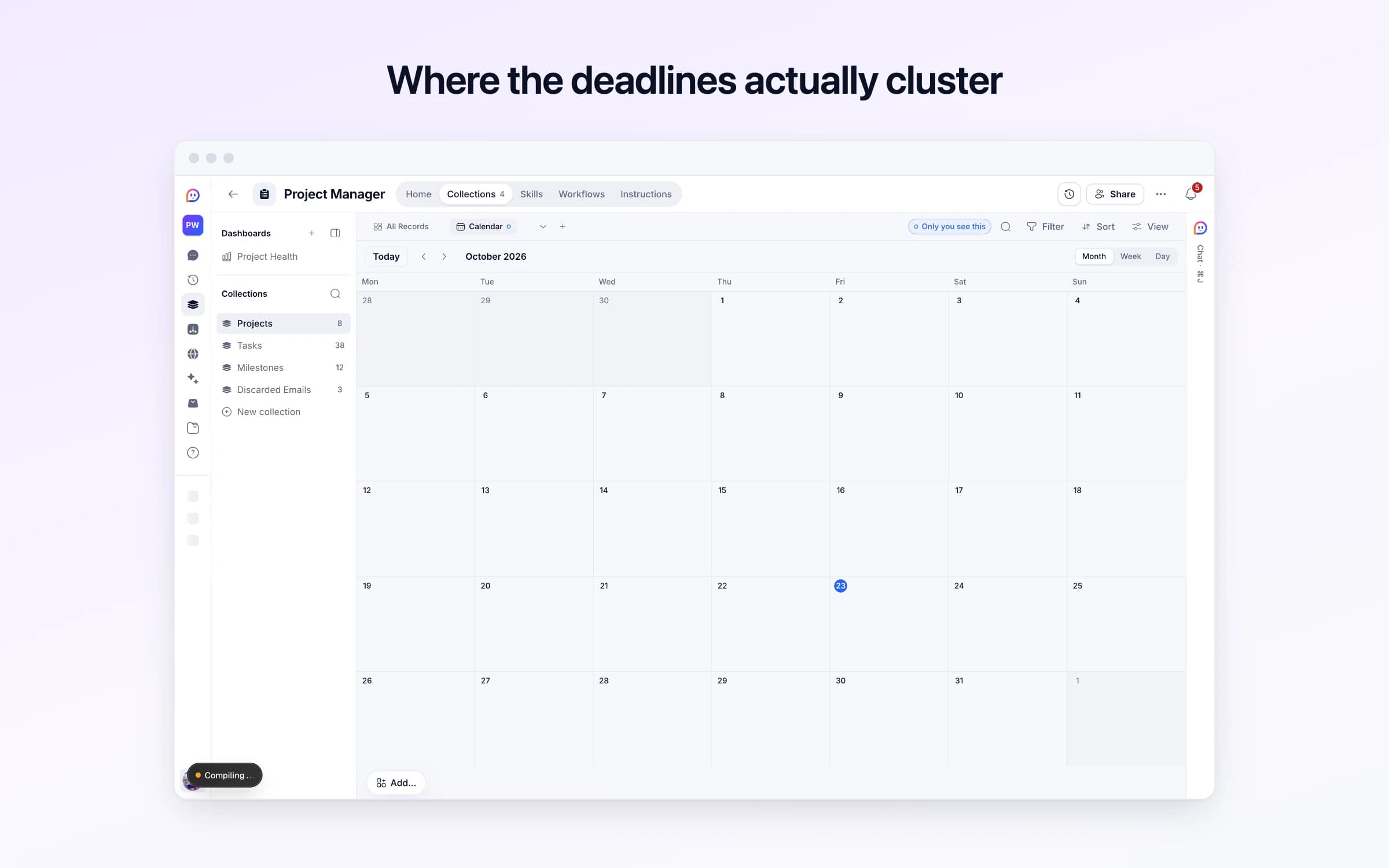
The board by status, a calendar of due dates and the Project Health dashboard all show the same tasks, so where things stand is one look away. Getting started on its Home walks you through adding your projects, forwarding a first email and inviting your team.
Talk through the work
Describe what needs doing, or forward the thread where it was decided. Prose is fine — you are not filling in a project tool.
It becomes a plan
Action items, owners, due dates and priorities are pulled out onto a board instead of staying buried in the conversation.
Deadlines are watched
Every morning at 8, what's due today and overdue comes to you by project and owner, and every Monday a digest of each active project.
Tasks buried in email threads
Forward the thread and its action items land on the board, with the context attached.
Project tools like Asana or Trello
If you need projects, a task board, owners, milestones and a morning deadline check, this covers it. It doesn't do task dependencies or time tracking.
The Monday status round-up
A digest for each active project arrives at 8 every Monday: done, in progress, blocked and the next milestone.
Once it's yours, describe a change the way you'd ask a colleague, and Cheqq makes it.
Three ways: forward an email thread or meeting notes to its Cheqq address, tell Cheqq in chat, or add them on the board yourself. Tasks captured from email are marked as coming from email, so you can tell them from the ones added by hand.
No. Tasks can only be assigned to people you've invited. A task captured from email goes to its project's owner, and whoever the thread named stays in the task's description, so you can hand it on.
On the day. The 8 o'clock check lists what's due today and what's overdue, and stays quiet when nothing is. The Monday digest names each project's next milestone. To hear sooner, ask Cheqq to add tasks due in the next three days to the morning check.
They're set aside in Discarded Emails with the sender, the subject, the opening lines and why nothing was captured. A newsletter never becomes work, and a real request that was missed is easy to spot and add.
Yes. Invite your team to the workspace and everyone works from the same board, with tasks assigned to them and each project given an owner. The morning check and the Monday digest come to you; ask Cheqq to send them to others as well.
Yes. Download any view as CSV or JSON with its filters applied, or ask Cheqq for a summary by project or by person.
Try Agency first. It adds enquiries, hours, invoices and a portal where each client follows their own projects. Project Manager suits a team running its own work.
2 of its 37 automation steps use AI, and draw AI credits each time they run: how many depends on the model you pick for the step. The other steps are fixed and draw none.
Every bug report and idea filed, sorted and thanked
Meeting notes turned into decisions and owned actions
Every event's days, tasks and vendors on one calendar
You get your own copy: your own records and automations. Change any part of it. Or we'll set it up with you.
Free to start · Invites go out in batches