Order Tracker
Everything you've ordered on one board, Ordered to Delivered
Free to start
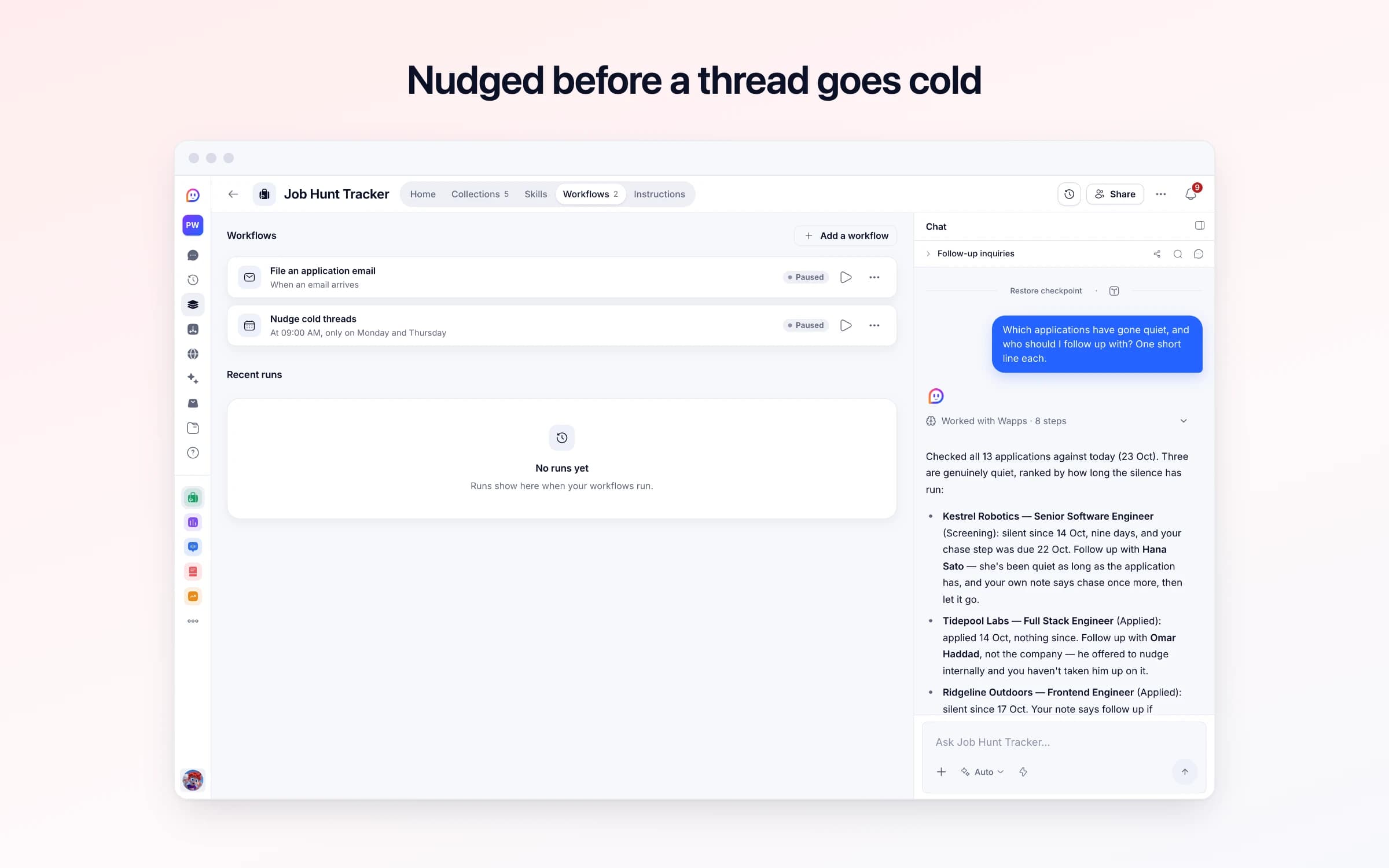
The routine part, done whether or not you're at your desk.
When an email arrives
File an application email
Runs on its ownForward confirmations, recruiter mail and interview invites: each one adds the application, or moves the one already on the board along. Updates you forward from an address in Your details, or that come verifiably from the company, change the application; anything else only tells you.
At 9:00 AM, only on Monday and Thursday
Nudge cold threads
Runs on its ownTwice a week, surface applications that have gone quiet and what's coming up. Quiet when there's nothing to chase.
Talk to it the way you'd ask a colleague. It answers from what it has on record, and makes a change when you ask for one.
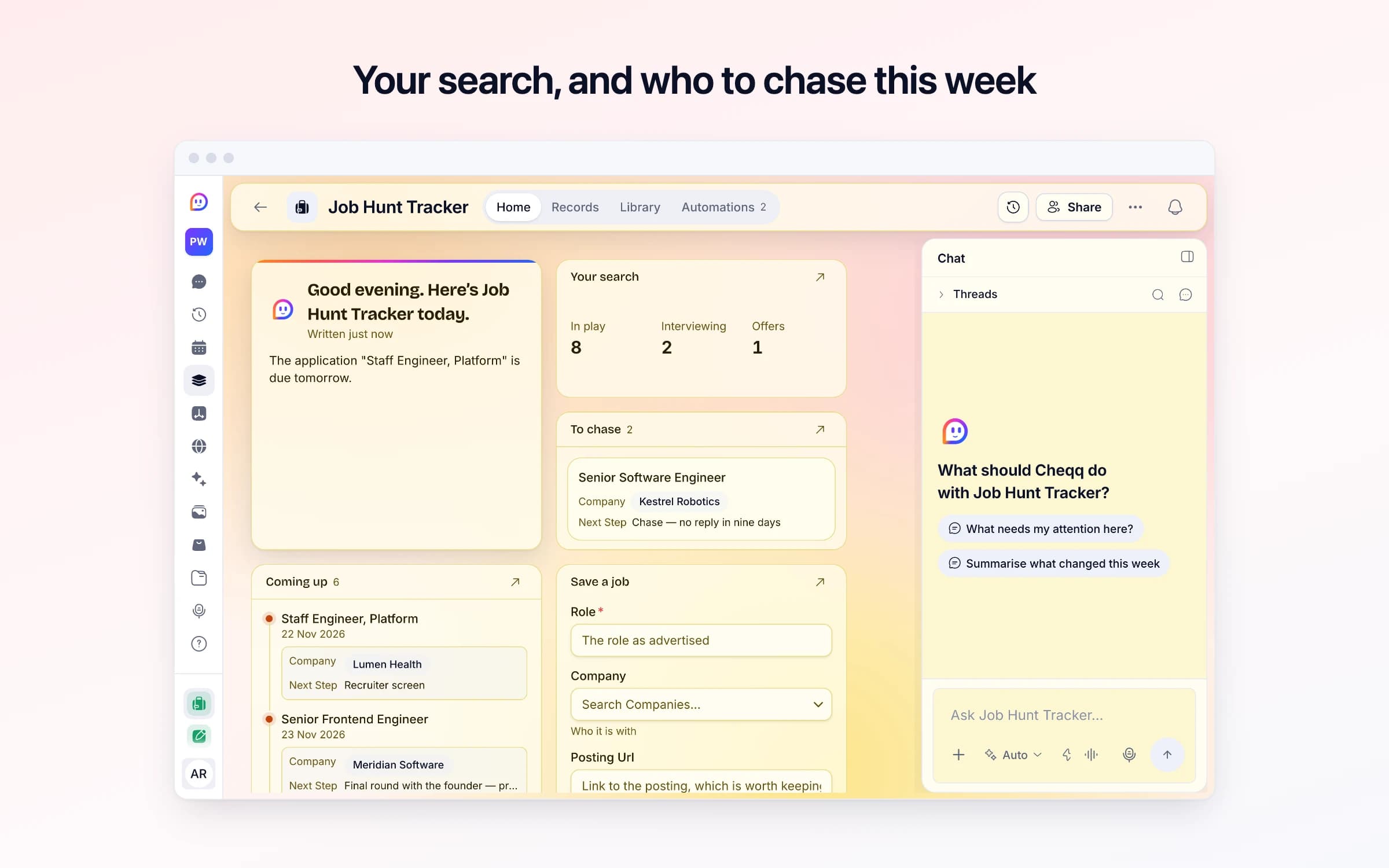
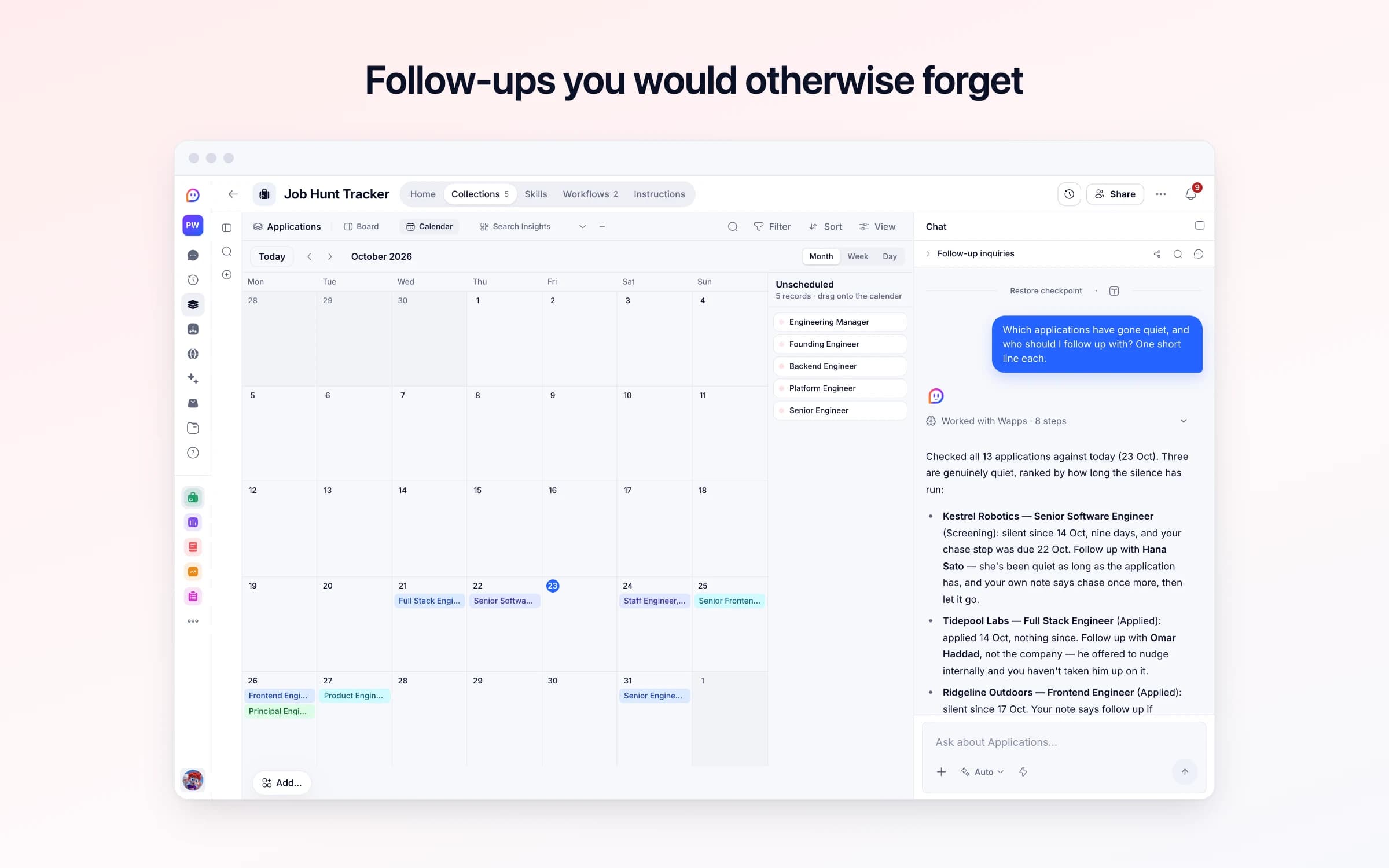
Forward confirmations, recruiter emails and interview invites to your Job Hunt Tracker address, and each one updates the right application on your board. Every Monday and Thursday at 9, you get what's coming up and which threads have gone quiet, with a suggested next message for each, and nothing when nothing needs you.
Applications go out through three job boards, a recruiter and a couple of referrals, and each leaves its own trail in the inbox: a confirmation, then maybe a screening call, then often nothing. A spreadsheet keeps up for the first fortnight, until updating it becomes one more thing to do.
By week six you can't say who you've heard back from. Thursday's interview time is buried in a thread, the referral you meant to chase has been quiet for twelve days, and the rejections sit unread, so the search looks healthier than it is.
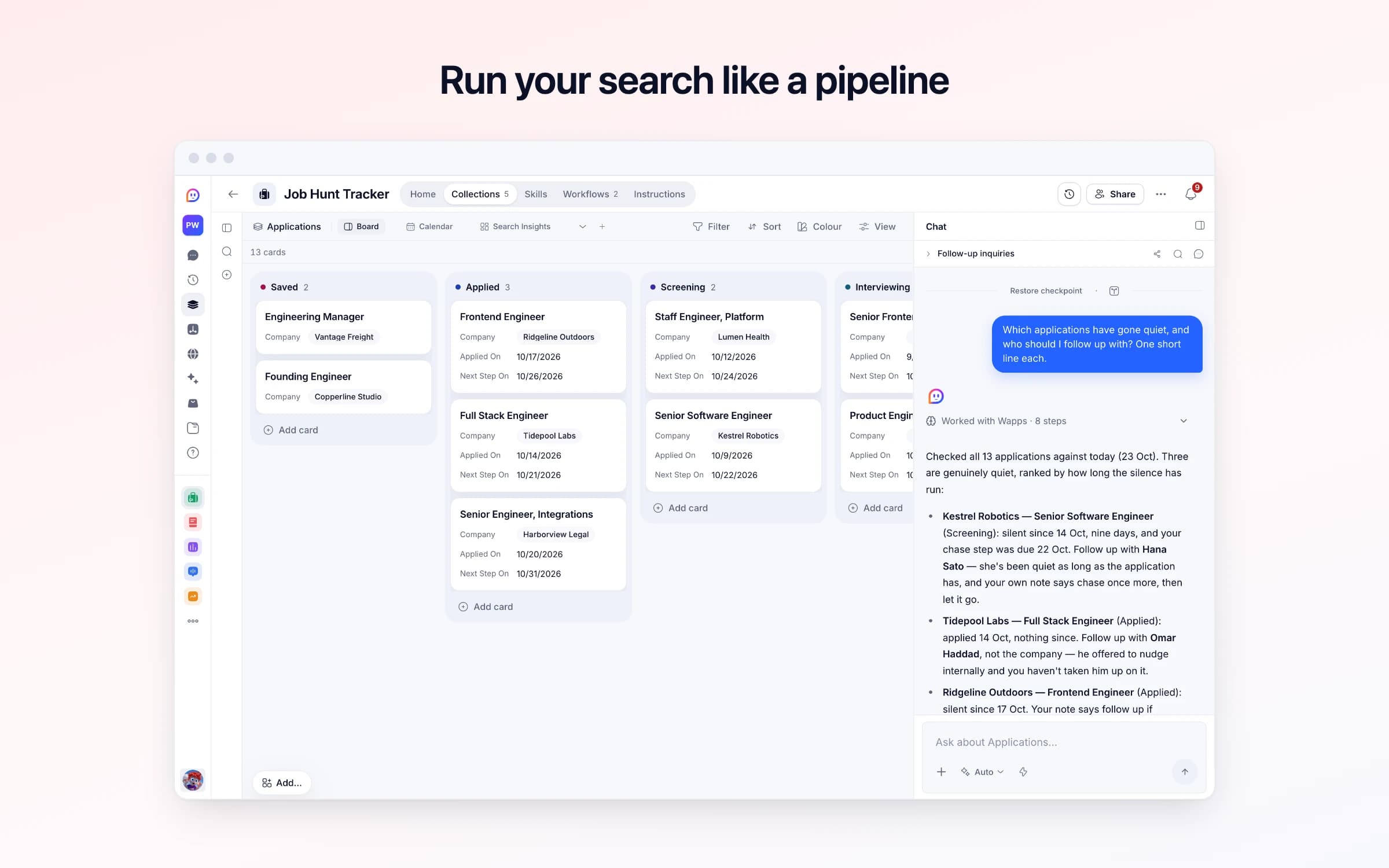
Every email about your search goes to your Job Hunt Tracker address, forwarded by hand or by a filter in your inbox. Each one updates the right application instead of adding another: a confirmation marks it Applied, an interview invite moves it to Interviewing and puts the date on the tracker's calendar, and a rejection is filed as Rejected, plainly. The company and the person who wrote are added if they're new, and you get a one-line note of what changed.
Every Monday and Thursday at 9, you get the interviews and deadlines in the next seven days, then every live application that's been quiet for more than ten days, oldest first. Each comes with a suggested next message that names who you spoke to and where things were left. When nothing is coming up or quiet, there's no message, and nothing is ever sent for you.
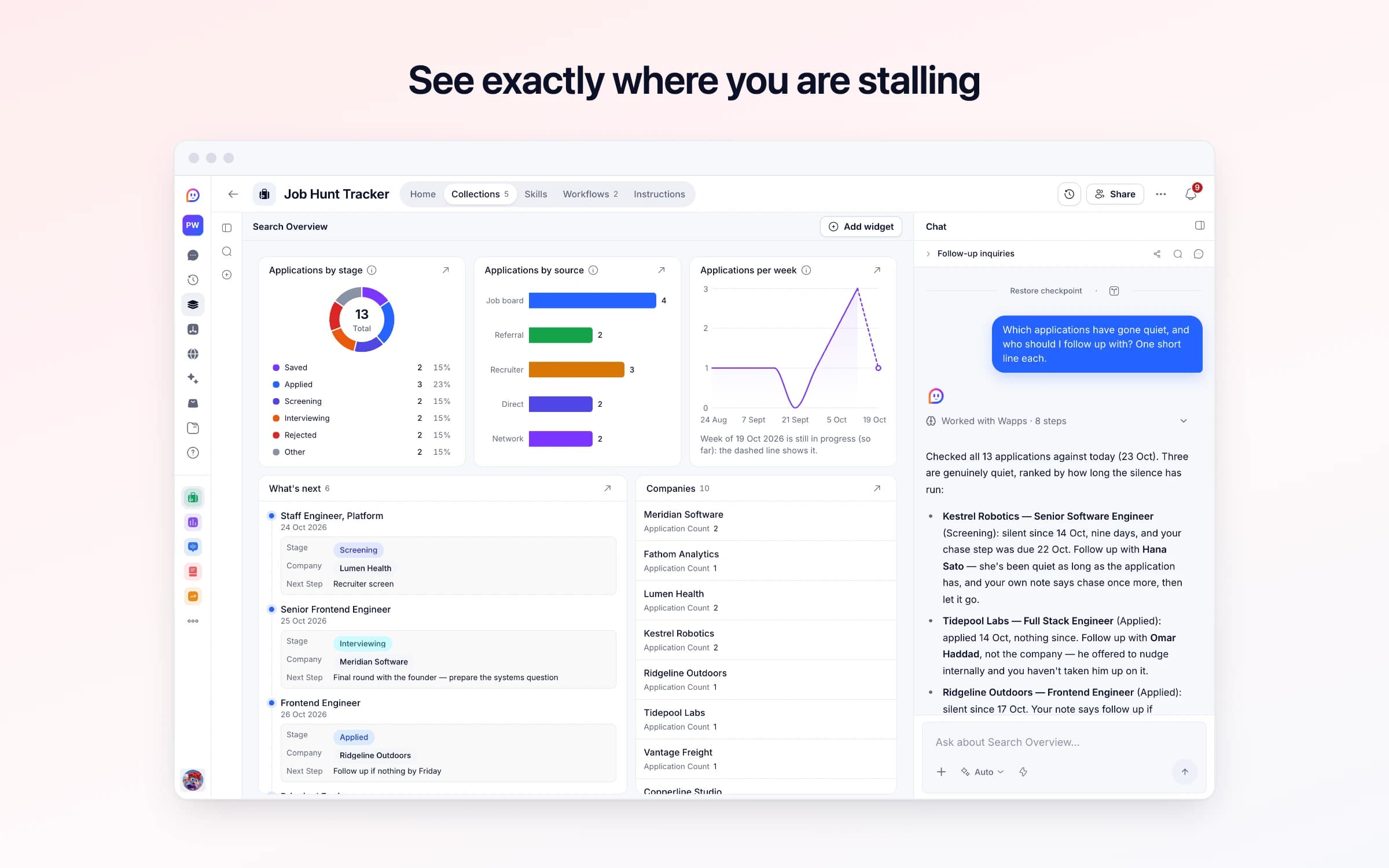
Job alerts, profile-view notices and course adverts are set aside with the reason. The board shows where every application stands, from Saved to Offer, and the charts show how many applications came from each source and how many you're sending each week.
Forward the mail
Confirmations, recruiter approaches, interview invites and rejections all land here and update the right application rather than adding a duplicate. List the addresses you forward from in Your details so your forwards can update it; Getting started on its Home walks you through it.
The board stays current
Stages move from what the email actually says, companies and contacts stay attached, and interview dates land on a timeline.
Quiet threads get flagged
Every Monday and Thursday at 9 it names what is coming up and what has gone quiet, with a suggested next message grounded in where things were left. Nothing needing you means no message.
The job-search spreadsheet
The board updates from the emails themselves, so it's still current in week eight.
Job trackers like Huntr or Teal
If what you need is applications filed from your email and a twice-weekly look at what's gone quiet, not a CV builder, this does it without another subscription.
Searching the inbox before every call
The company, your contacts there, the salary range and your notes are all on the application.
2 automations, 5 lists of records and 1 document. Every automation works from the records you keep here, so a change made once is the one they all see.
Everything it reads and writes is yours to open: each list as your copy starts it, with sample records you can clear in one go.
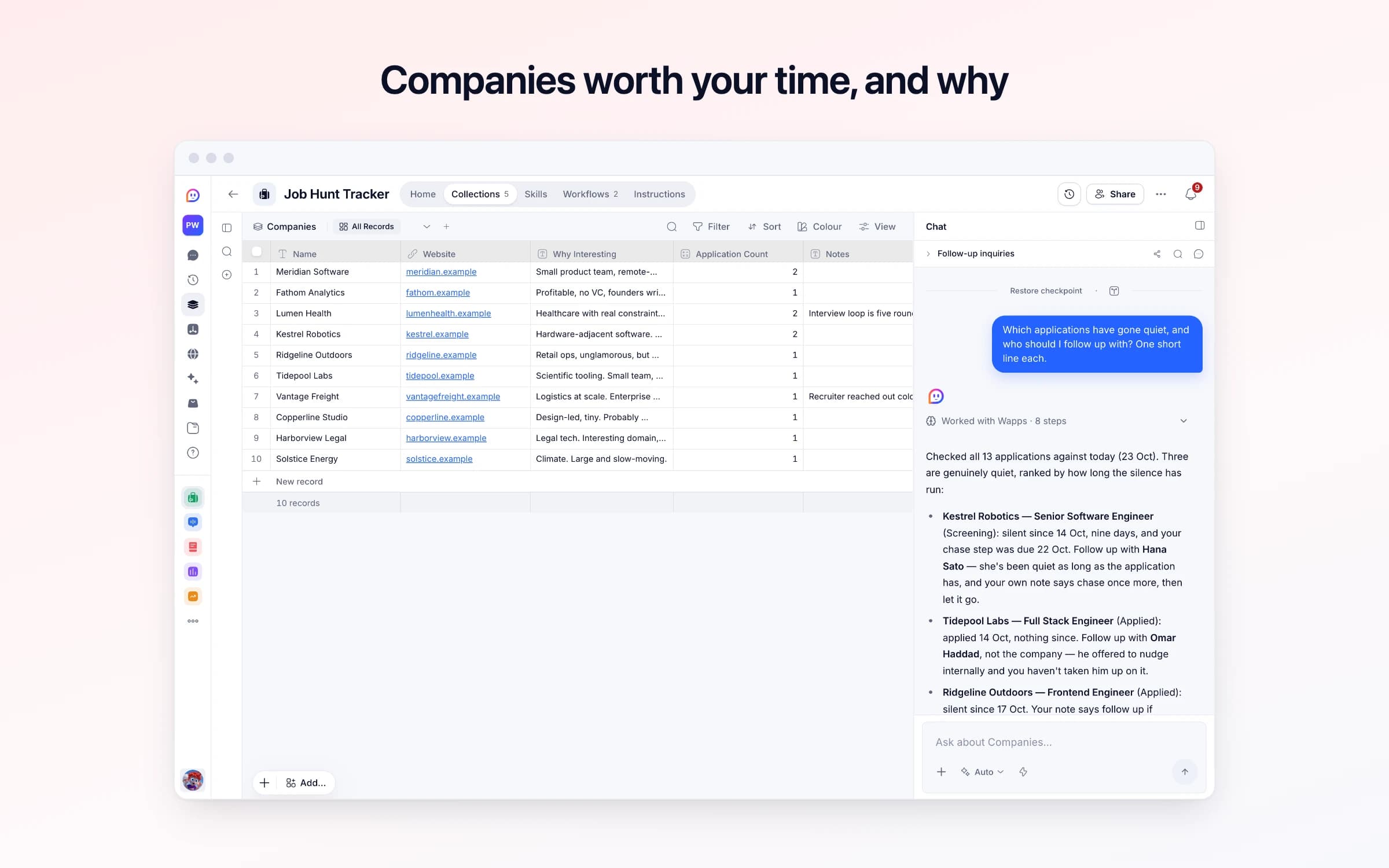
| Name | Website | Why Interesting | Notes |
|---|---|---|---|
Meridian Software | https://meridian.example | Small product team, remote-first, working on something I'd actually use. | Empty |
Fathom Analytics | https://fathom.example | Profitable, no VC, founders write publicly about how they work. | Empty |
Lumen Health | https://lumenhealth.example | Healthcare with real constraints. Bigger, slower, but the problem is worth it. | Interview loop is five rounds. Budget the time. |
Kestrel Robotics | https://kestrel.example | Hardware-adjacent software. Would learn a lot. | Empty |
Ridgeline Outdoors | https://ridgeline.example | Retail ops, unglamorous, but they ship. | Empty |
Tidepool Labs | https://tidepool.example | Scientific tooling. Small team, long horizon. | Empty |
| Role | Stage | Company | Applied On | Next Step On |
|---|---|---|---|---|
Senior Frontend Engineer | Interviewing | Meridian Software | 3 weeks ago | In 2 days |
Product Engineer | Interviewing | Fathom Analytics | 3 weeks ago | In 4 days |
Staff Engineer, Platform | Screening | Lumen Health | 11 days ago | Tomorrow |
Senior Software Engineer | Screening | Kestrel Robotics | 2 weeks ago | Yesterday |
Frontend Engineer | Applied | Ridgeline Outdoors | 6 days ago | In 3 days |
Full Stack Engineer | Applied | Tidepool Labs | 9 days ago | 2 days ago |
| Name | Role | Company | Last Spoke On | |
|---|---|---|---|---|
Renata Alves | renata@meridian.example | Recruiter | Meridian Software | 2 days ago |
Marco Reyes | marco@meridian.example | Hiring manager | Meridian Software | 8 days ago |
Sam Idris | sam@fathom.example | Hiring manager | Fathom Analytics | Yesterday |
Priya Raman | priya@lumenhealth.example | Recruiter | Lumen Health | 4 days ago |
Hana Sato | hana@kestrel.example | Hiring manager | Kestrel Robotics | 9 days ago |
Omar Haddad | omar@tidepool.example | Referrer | Tidepool Labs | 9 days ago |
| From | Subject | Reason | Snippet | Received At |
|---|---|---|---|---|
alerts@jobboard.example | 12 new Senior Engineer roles this week | Job alert digest — no specific application | Based on your saved search, here are this week's matches... | Yesterday, 6:00 AM |
no-reply@jobboard.example | Your profile was viewed 8 times | Platform notification | Recruiters are looking at your profile... | 4 days ago, 9:30 AM |
courses@interviewprep.example | Ace your next system design interview | Marketing — not from an employer | Our 6-week course has helped 4,000 engineers... | 6 days ago, 2:15 PM |
How Job Hunt Tracker works
What's in Job Hunt Tracker, what runs for you, what it never does, and your first week.
Job Hunt Tracker keeps every application, company and contact in one place, files the emails you forward, and nudges you before a thread goes cold. It arrives with sample applications so you can see it working. These steps make it yours.
Learn how it works
What's in Job Hunt Tracker, what runs for you, what it never does, and a routine for your first week.
Tell it your email addresses
The addresses you forward from. Only your forwards, or mail verifiably from the company, can update an application already on the board.
Get your forwarding address
Job Hunt Tracker has its own email address, shown on this automation. Forward job emails to it, or set a rule in your email app to do it for you.
Bring in your applications
The roles you've already applied for, from your own list or spreadsheet, or one by one.
Turn it on
Applications filed and moved along as you forward their emails, and a Monday and Thursday nudge about what needs chasing.
By forwarding. The template comes with its own Cheqq address: once it's switched on, forward confirmations, recruiter emails and interview invites to it, by hand or with a filter in your inbox. Each updates the matching application, or starts one if nothing matches, and roles you find yourself can be added by hand or by telling Cheqq. Only emails you forward from an address listed in Your details, or that come verifiably from the company, can change an application already on the board; anything else is added as new or shown to you. Getting started on its Home asks for your addresses and gives you the forwarding address.
No. It only sees what you forward: the sender, the subject and the body. Attachments such as a job description PDF aren't read, only their names.
No. It never applies, replies or negotiates for you. It keeps the board current, suggests what to write when a thread goes quiet, and drafts a note if you ask; you decide what to send.
A live application with no activity for more than ten days. Each email you forward about it resets the clock, and the Monday and Thursday update lists quiet ones oldest first, with who you last spoke to.
Yes. Saved, Applied, Screening, Interviewing, Offer, Rejected and Withdrawn come preset. Ask Cheqq to add one, such as Take-home for assessments, and to file those emails there.
Yes. It sits in your own Cheqq account, and nobody sees it unless you invite them. Download applications, companies or contacts as CSV or JSON whenever you like.
3 of its 32 automation steps use AI, and draw AI credits each time they run: how many depends on the model you pick for the step. The other steps are fixed and draw none.
Everything you've ordered on one board, Ordered to Delivered
Every to-do in one list, with a morning note of what's due
Habits that move real goals, reviewed every Sunday
You get your own copy: your own records and automations. Change any part of it. Or we'll set it up with you.
Free to start