Newsletter Digest
Every newsletter's key points on one list
Free to start · Invites go out in batches
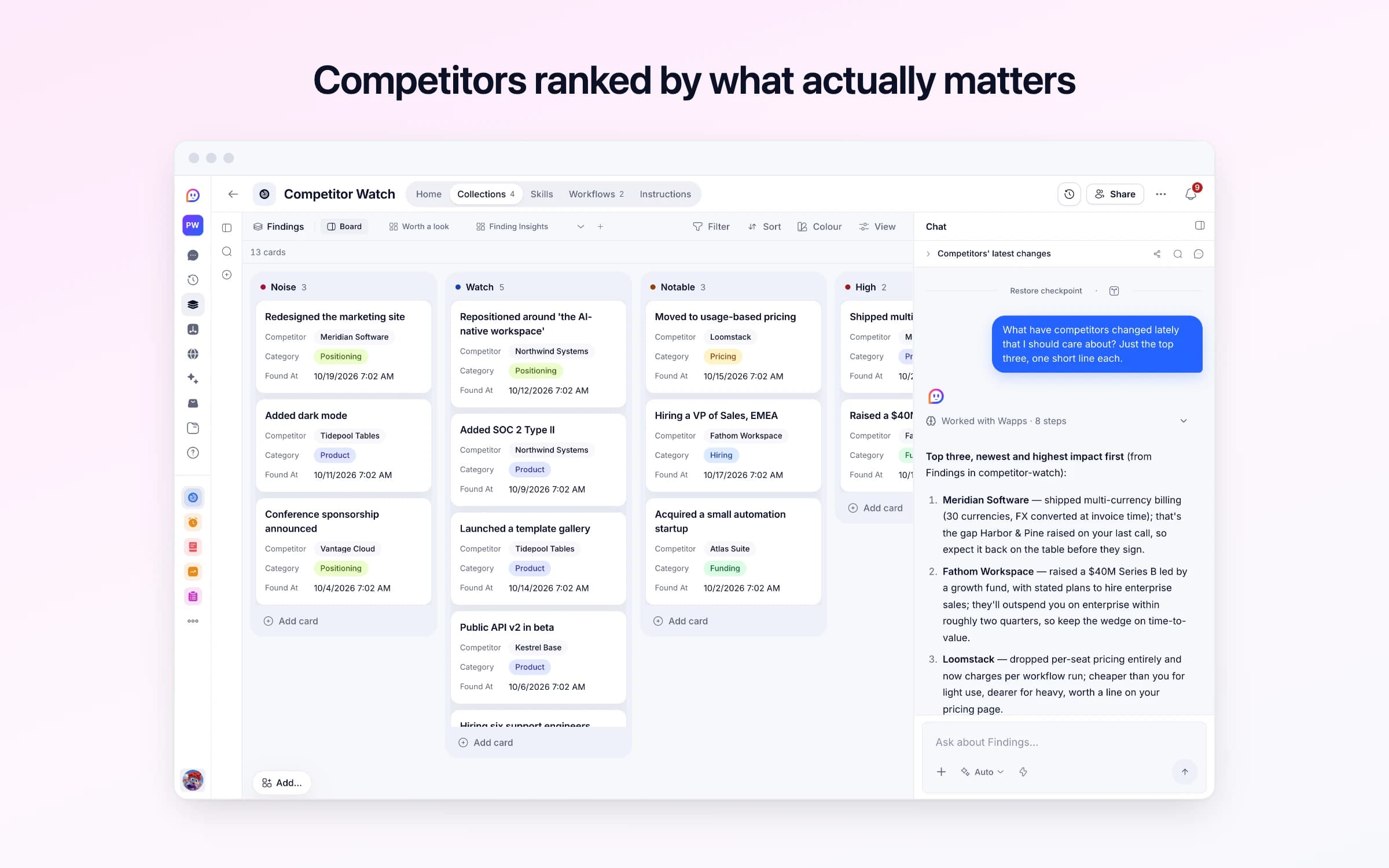
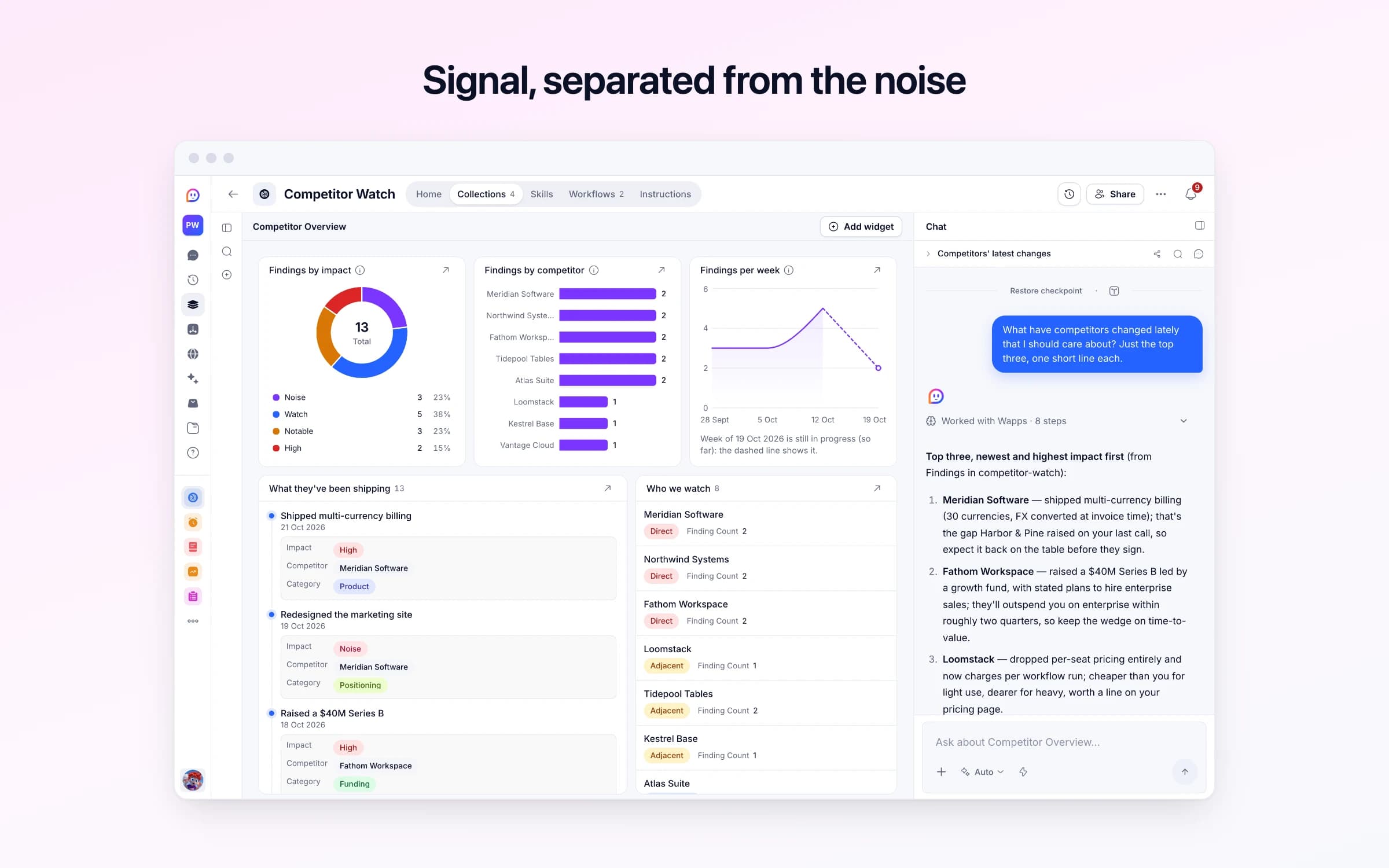
4 lists of records, 2 automations and 1 document. Every automation works from the records you keep here, so a change made once is the one they all see.
Every list as your copy starts it: its fields, and sample records you can clear in one go.
| Name | Tier | Website | Feed Problem | Feed Url |
|---|---|---|---|---|
Meridian Software | Direct | https://meridian.example | Empty | https://meridian.example/changelog.xml |
Northwind Systems | Direct | https://northwindsystems.example | Empty | https://northwindsystems.example/blog/feed.xml |
Fathom Workspace | Direct | https://fathomworkspace.example | Empty | https://fathomworkspace.example/changelog.xml |
Loomstack | Adjacent | https://loomstack.example | Empty | https://loomstack.example/feed.xml |
Tidepool Tables | Adjacent | https://tidepooltables.example | Empty | https://tidepooltables.example/changelog.xml |
Kestrel Base | Adjacent | https://kestrelbase.example | Couldn't read this feed. Check the address still works. | https://kestrelbase.example/blog/rss |
| Title | Impact | Competitor | Category | Found At |
|---|---|---|---|---|
Shipped multi-currency billing | High | Meridian Software | Product | 2 days ago, 7:02 AM |
Raised a $40M Series B | High | Fathom Workspace | Funding | 5 days ago, 7:02 AM |
Moved to usage-based pricing | Notable | Loomstack | Pricing | 8 days ago, 7:02 AM |
Hiring a VP of Sales, EMEA | Notable | Fathom Workspace | Hiring | 6 days ago, 7:02 AM |
Repositioned around 'the AI-native workspace' | Watch | Northwind Systems | Positioning | 11 days ago, 7:02 AM |
Added SOC 2 Type II | Watch | Northwind Systems | Product | 2 weeks ago, 7:02 AM |
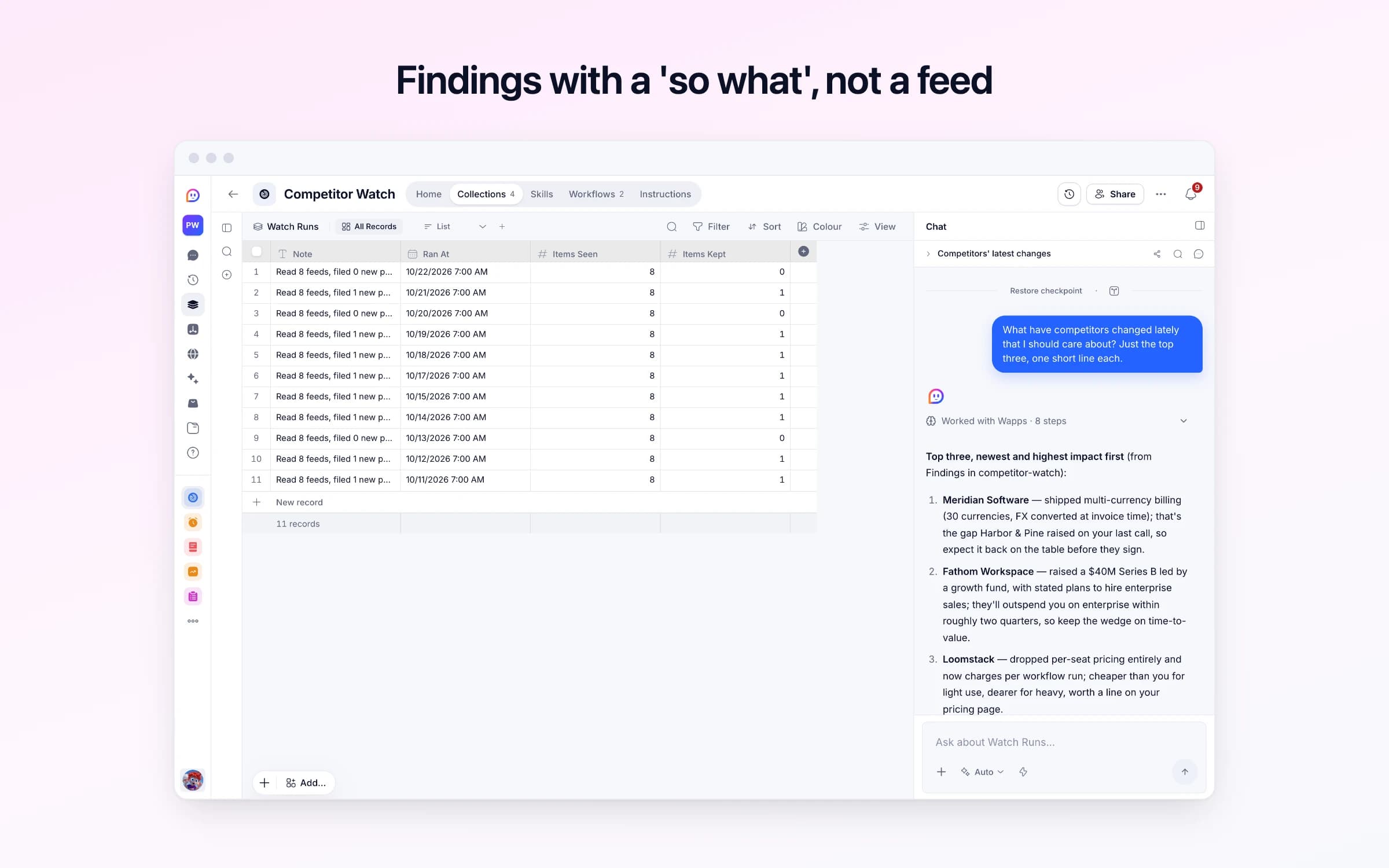
| Note | Ran At | Items Seen | Items Kept |
|---|---|---|---|
Read 8 feeds, filed 0 new posts. Couldn't read: Kestrel Base. | Yesterday, 7:00 AM | 8 | 0 |
Read 8 feeds, filed 1 new post. | 2 days ago, 7:00 AM | 8 | 1 |
Read 8 feeds, filed 0 new posts. | 3 days ago, 7:00 AM | 8 | 0 |
Read 8 feeds, filed 1 new post. | 4 days ago, 7:00 AM | 8 | 1 |
Read 8 feeds, filed 1 new post. | 5 days ago, 7:00 AM | 8 | 1 |
Read 8 feeds, filed 1 new post. | 6 days ago, 7:00 AM | 8 | 1 |
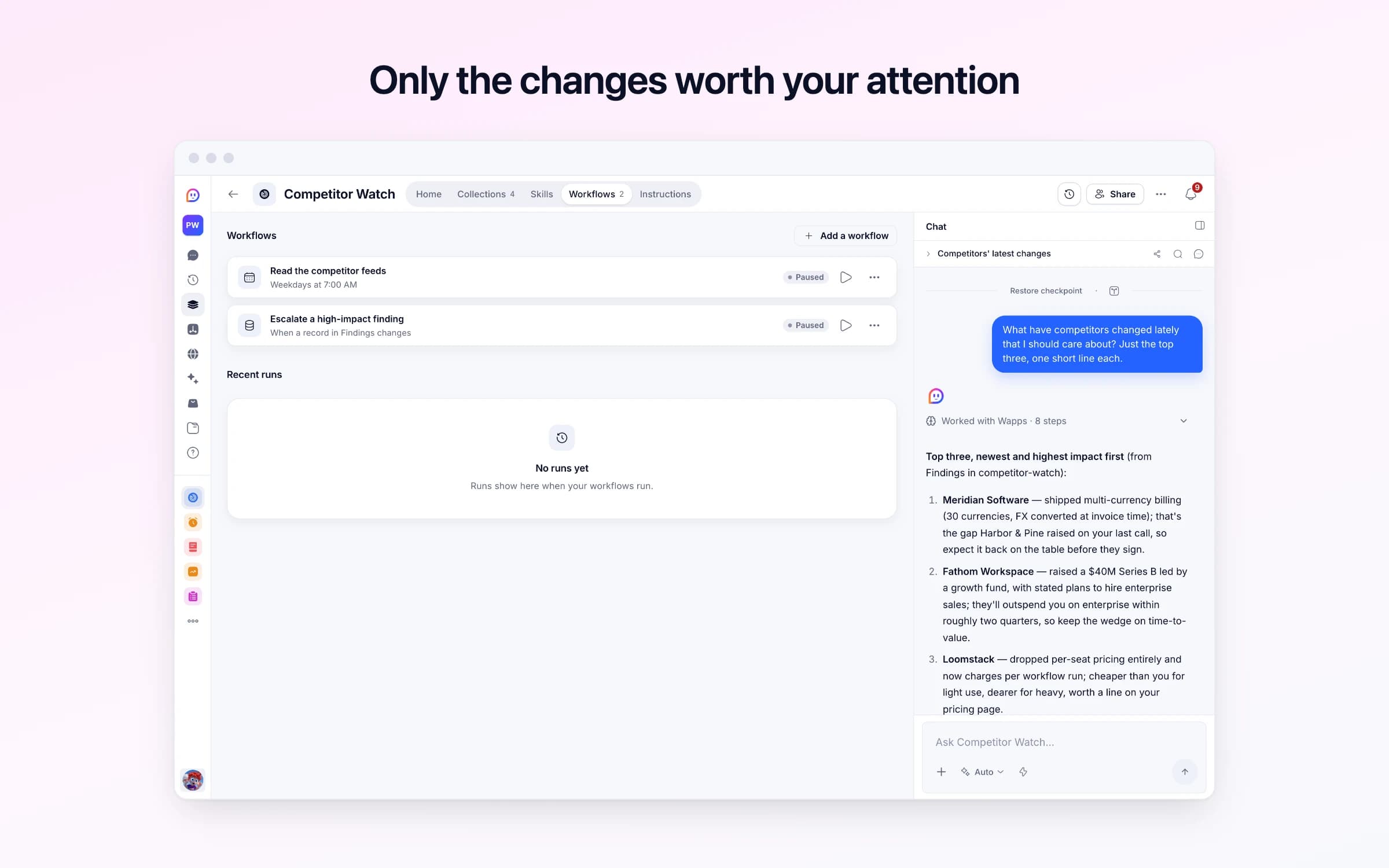
Every automation that starts by itself installs switched off.
Read the competitor feeds
Runs on its ownEach weekday morning, reads your competitors' blog and changelog feeds, files what's new with a note on what it means for you, and sends a short briefing when there's something to read.
Escalate a high-impact finding
Runs on its ownWhen you rate a finding High yourself, tells you straight away rather than waiting for tomorrow's briefing. Posts the morning read rates High reach you as it files them.
How Competitor Watch works
What it reads, how it rates what it finds, what it never does, and your first week.
Competitor Watch reads your competitors' blogs and changelogs every weekday morning, files what's new with a note on what it means for you, and tells you about the posts that matter. It arrives with sample data so you can see it working. These steps make it yours.
Learn how it works
What it reads, how it rates what it finds, what it never does, and a routine for your first week.
Tell it about your company
What you sell, who to and where you win, so every note says what a post means for you.
Add your competitors
Who you lose deals to. It finds each one's blog or changelog feed for you.
See what's worth a look
The posts rated Notable or High, newest first. Open this each morning.
Start the morning read
Open Read the competitor feeds and switch it on once your own competitors are in. It reads their feeds at 7am each weekday and only messages you when something new came in.
Turn on alerts
Switch on the alert that tells you straight away when you rate a finding High yourself.
Tell it what you sell and add each competitor's blog or changelog feed, then turn on the morning read. Every weekday their new posts are filed and rated Noise, Watch, Notable or High against your company, and a move on pricing or positioning gets a note on what it means for you. A short briefing comes only when something new came in, and anything rated High sends an alert of its own.
Once a month, someone opens five competitors' blogs in five tabs, skims what's new and pastes a few links into a channel nobody rereads. The pricing change one of them made in week two is noticed in week six, when a prospect brings it up on a call.
Nothing is kept. Six months on, nobody can say when a rival started calling itself an AI company or how often it ships, because the only record is a vague impression and a few bookmarked posts.
You start by telling it about your own company: what you sell, who to, where you win and the deals you're protecting. Your competitors sit on a board by tier: direct, adjacent or aspirational, each with its website, its feed and how it describes itself. Once you turn on the morning read, every weekday at 7 each feed is read for posts from the last week, up to five per competitor. Anything already filed is skipped, and each new post becomes a finding: a one-line title, what they shipped or claimed, a category from product, pricing, positioning, funding and hiring, and the link.
Every post is rated Noise, Watch, Notable or High for your business, against what you told it about your company, and most are Noise, which is the honest answer. A Noise or Watch post is filed as it is; a Notable or High one gets a separate note on what it means for you, and a High one reaches you straight away. Change a finding to High yourself and you're told at once too.
The morning briefing names the findings that matter, and on a morning with nothing new there's no briefing at all. The Competitor Overview dashboard shows findings by impact, by competitor and per week, and each morning's read is logged with how many posts were read and how many were kept, so you can see which feeds earn their place.
Name who you watch
Tell it what you sell and where you win, then add each competitor with their blog or changelog feed, and whether they are direct, adjacent, or aspirational.
The feeds get read for you
Once you turn it on, every weekday it reads what's new, skips anything already filed, and records what they actually shipped. A move on pricing or positioning gets a note on what it means for you.
Impact is rated, not assumed
Each new post is rated Noise, Watch, Notable or High against your company. The High ones send an alert of their own, and the morning briefing comes only when something new came in.
The monthly tab-opening session
Feeds are read every weekday, and what's new is filed with a link back to the post.
An RSS reader
A reader shows you every post. Here each one is filed, categorised and rated, and only the ones that matter are named.
Competitive intelligence tools like Crayon or Klue
If what you need is what competitors publish, read and rated, not battlecards, win-loss interviews or tracking changes to their web pages, this does it without another subscription.
Once it's yours, describe a change the way you'd ask a colleague, and Cheqq makes it.
Each competitor's blog or changelog feed: the RSS or Atom address most blogs and changelogs publish. It doesn't watch pages without a feed, social accounts or review sites. For what people say about a competitor on Reddit, X or LinkedIn, Mention Watch is the sibling template.
Every weekday at 7 in the morning, once you've turned it on, for posts from the last week it hasn't filed yet. Ask Cheqq to change the time or add weekends, and the note arrives when you want it.
Yes. Add a post you heard about with a title and a summary. Findings you add by hand aren't rated for you, so give it the impact you judge; set it to High and you're alerted straight away.
Not until you turn it on. The sample competitors' feeds aren't real, so the morning read and the High alert arrive switched off. Getting started on its Home walks you through telling it about your company, adding your competitors (it can find a feed from their website), starting the morning read and turning on alerts, and it runs from the next weekday morning.
Yes. Invite your team and everyone reads the same board and dashboard. The morning note and the High alerts come to you, and you can ask for them to go to others as well.
Yes. Download them as CSV or JSON, filtered to a competitor or a quarter, or ask Cheqq how one competitor's positioning has moved over the year.
3 of its 29 automation steps use AI, and draw AI credits each time they run: how many depends on the model you pick for the step. The other steps are fixed and draw none.
Every newsletter's key points on one list
Ideas drafted for each channel and scheduled
From brief to published post, on one board
You get your own copy: your own records and automations. Change any part of it. Or we'll set it up with you.
Free to start · Invites go out in batches