Lead Inbox
Every enquiry on one board, with a reply ready as it arrives
Free to start · Invites go out in batches
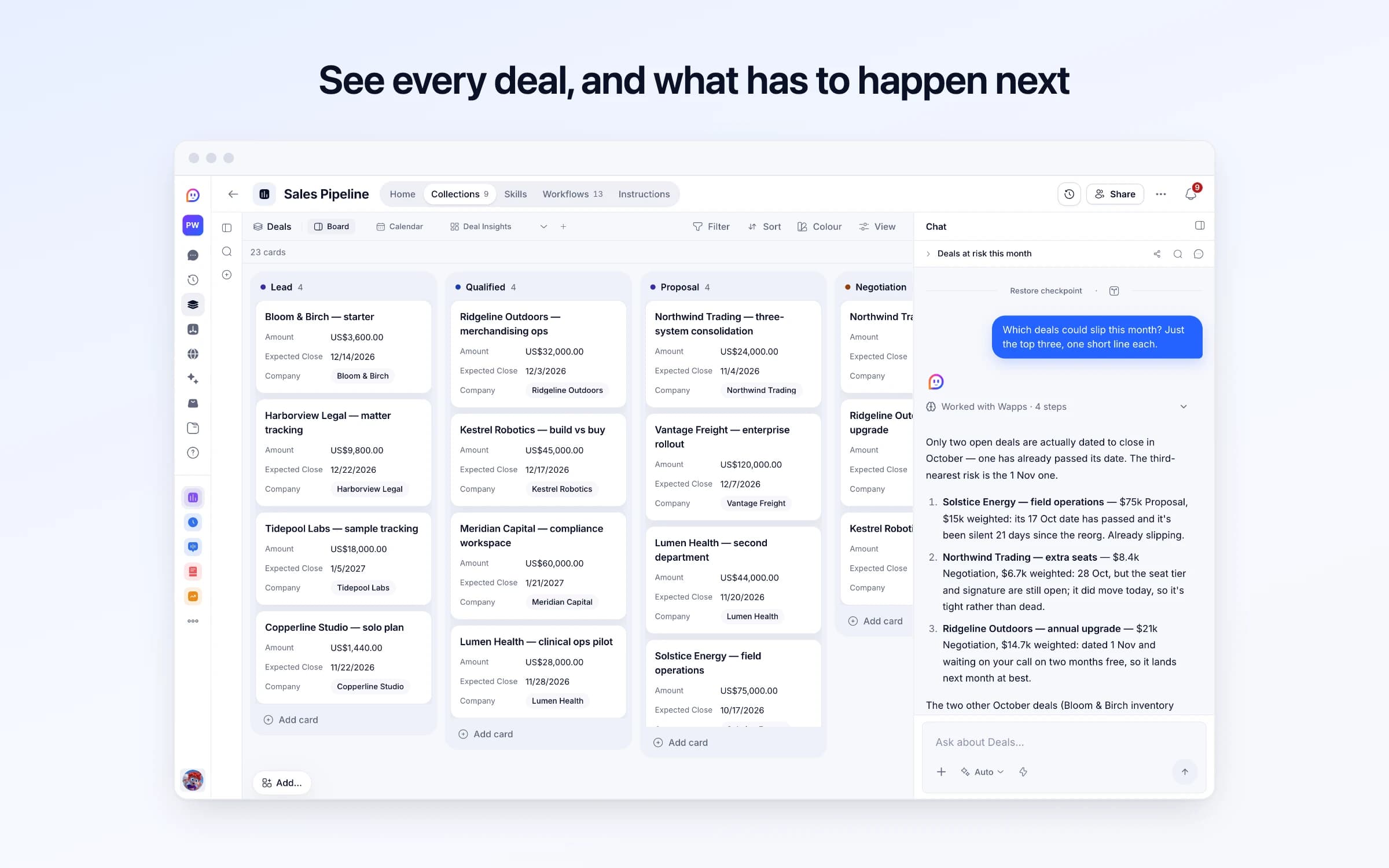
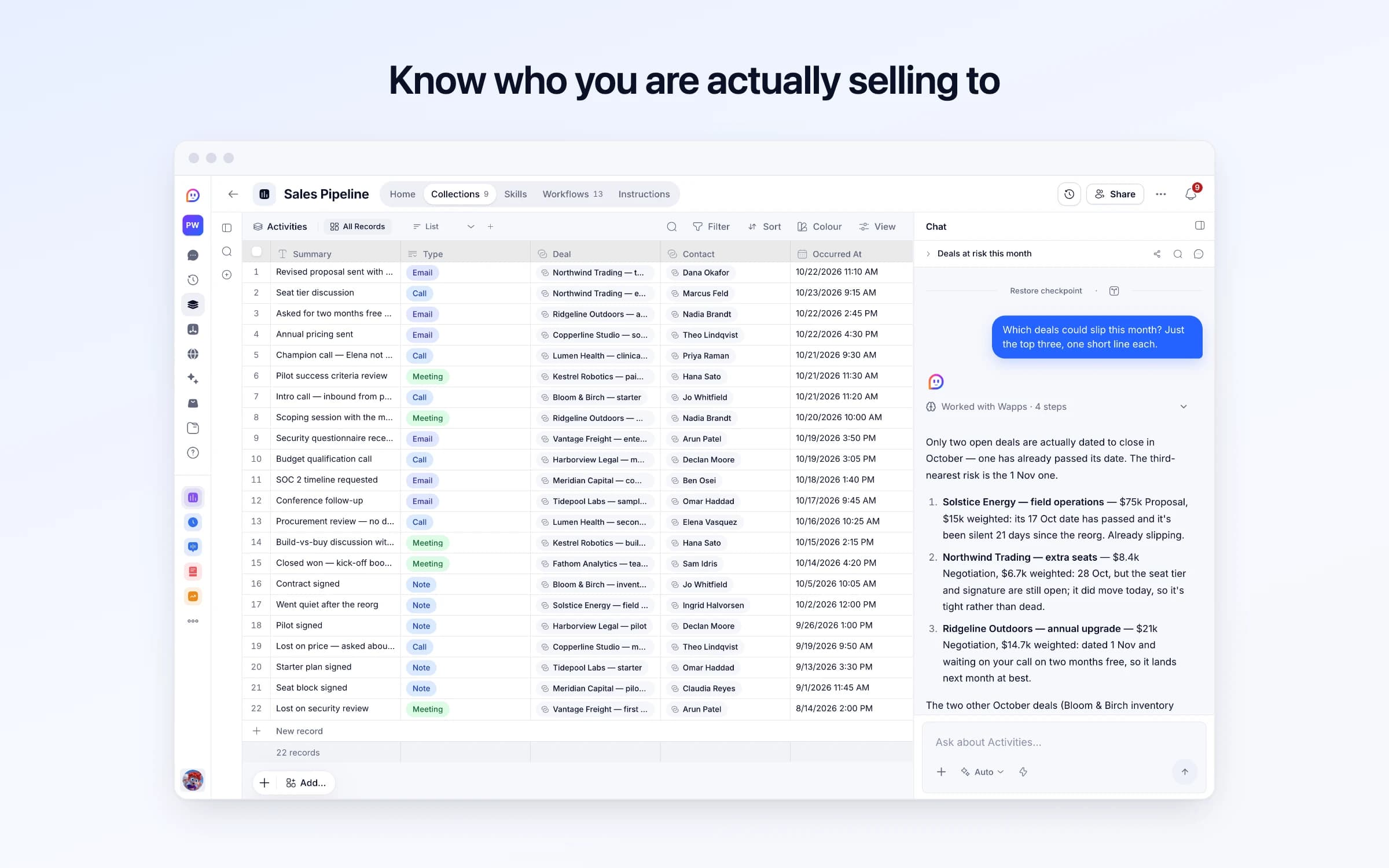
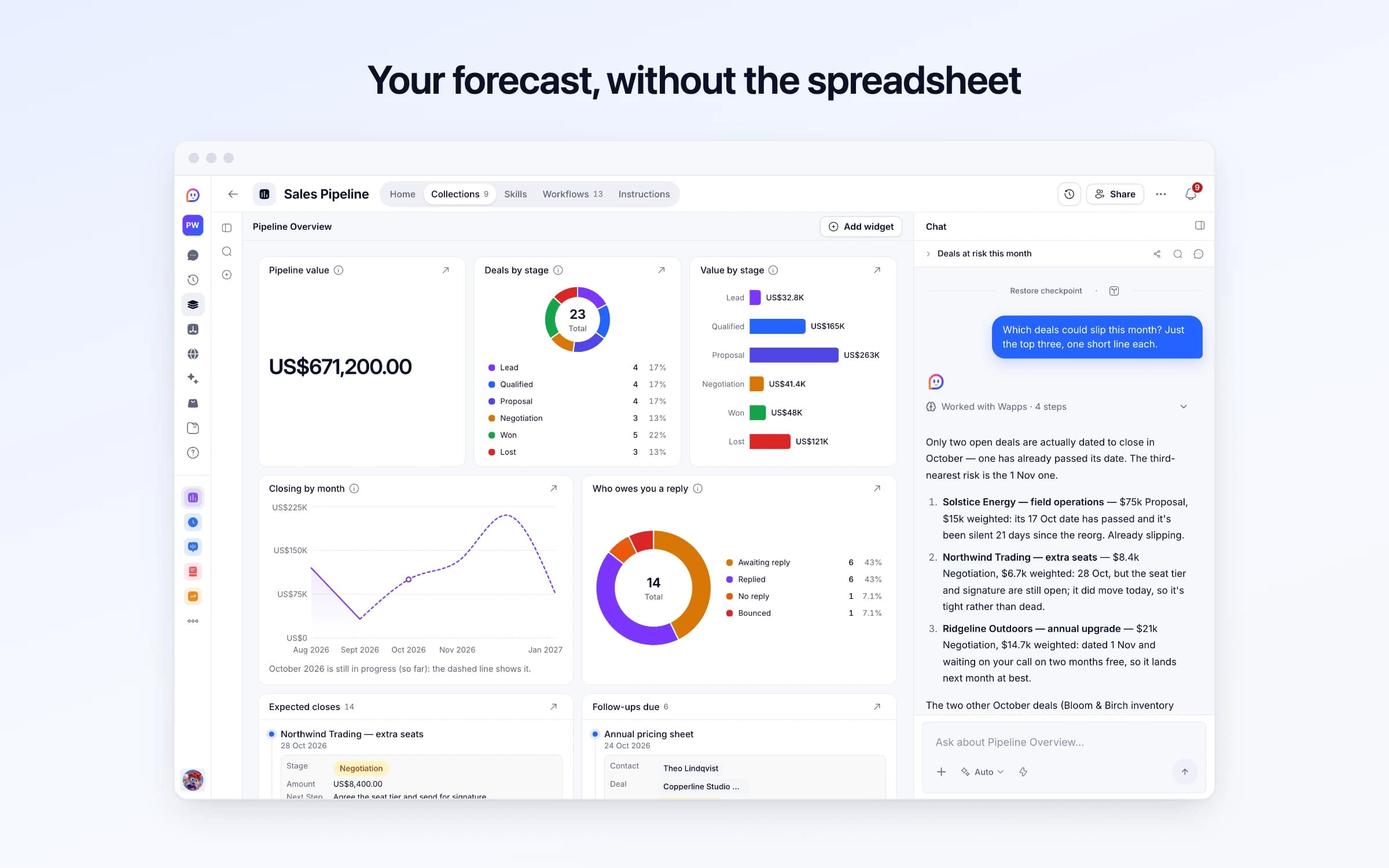
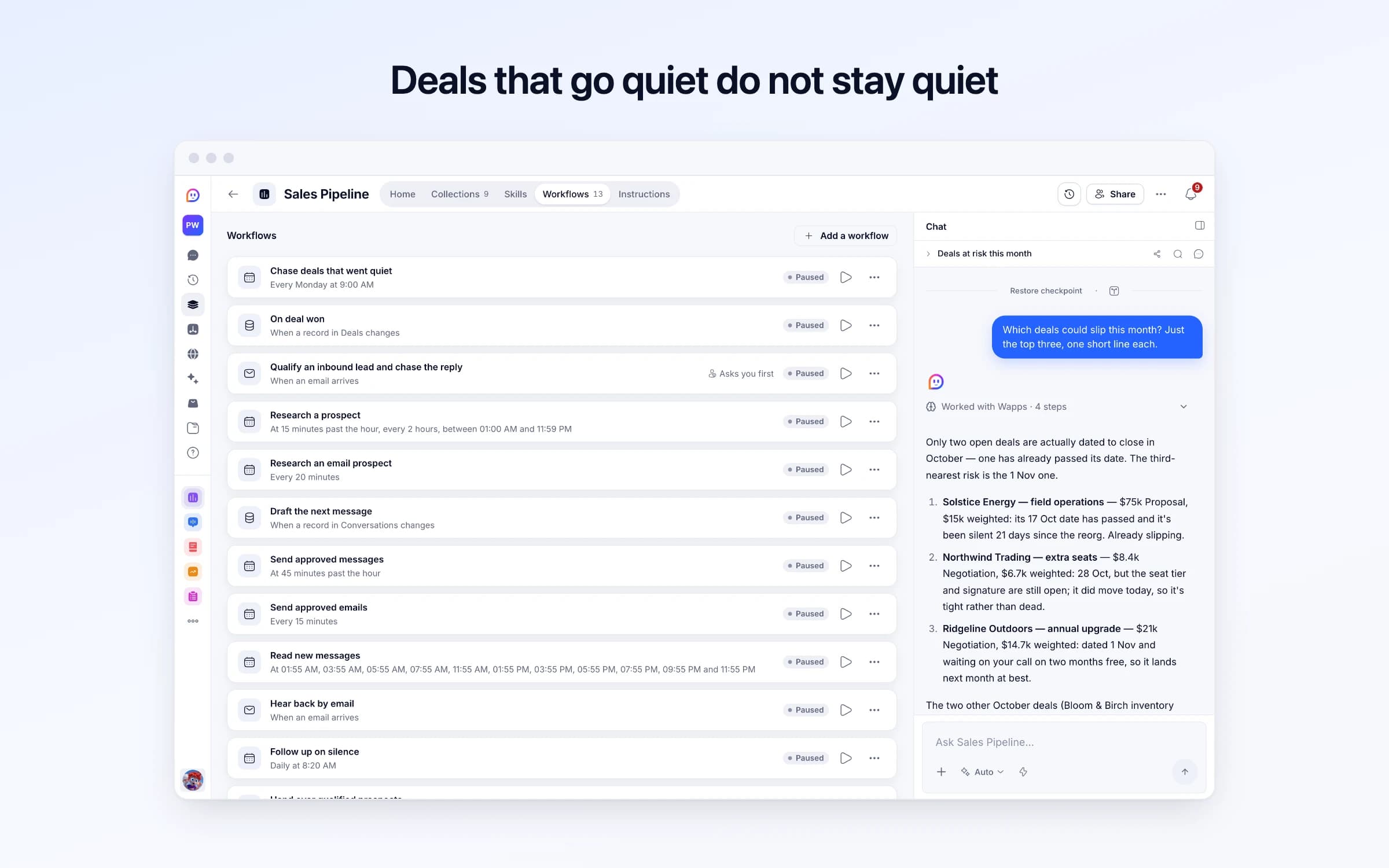
10 lists of records, 16 automations and 3 documents. Every automation works from the records you keep here, so a change made once is the one they all see.
Every list as your copy starts it: its fields, and sample records you can clear in one go.
| Reply Inbox | Opt Out Line | New Per Day | Send From Hour | Send Until Hour |
|---|---|---|---|---|
Your Cheqq address | If this isn't for you, just say so and I won't write again. | 20 | 9 | 18 |
| Name | Source | Platforms | Phrases | Signal |
|---|---|---|---|---|
Sample: Founders asking about onboarding emails | People asking | XLinkedIn | anyone recommend onboarding emails who writes your onboarding emails trial users not activating | Empty |
Sample: SaaS teams worried about trial churn | People asking | LinkedIn | our free trial conversion is terrible how do you get trial users to come back | Empty |
Sample: SaaS companies hiring in growth | Company signals | Empty | Empty | Hiring for |
| Person | Stage | Channel | Warmth | Next Action At |
|---|---|---|---|---|
Sample: Maya Chen | Talking | LinkedIn | Mutual connection | Tomorrow |
Sample: Tom Okafor | Researched | X | Engaged with your posts | Empty |
Sample: Ines Duarte | Researched | Email | Hasn't heard of you | Empty |
Sample: Dev Raman | Opened | X | Hasn't heard of you | Tomorrow |
Sample: Priya Natarajan | Suggested | X | Hasn't heard of you | Empty |
Sample: Jonas Feld | Suggested | LinkedIn | Hasn't heard of you | Empty |
| Text | Person | Direction | Channel | Status |
|---|---|---|---|---|
saw your post on the 9% open rate. is that the welcome email or the whole sequence? | Sample: Maya Chen | From you | LinkedIn | Sent |
the whole sequence honestly. welcome is fine, days 2-5 just die | Sample: Maya Chen | From them | LinkedIn | Received |
days 2-5 is where most die, people stop reading once they don't need anything yet. do those emails ask them to do one thing, or catch them up on features? | Sample: Maya Chen | From you | LinkedIn | To review |
4% usually means the emails explain the product instead of getting people to one first win. are yours sent on a timer, or when someone does (or doesn't do) something? | Sample: Dev Raman | From you | X | Sent |
| Name | Domain | Industry | Size | Notes |
|---|---|---|---|---|
Northwind Trading | https://northwind.example | Logistics | 51-500 | Regional freight broker. Consolidating three legacy systems this year — budget already approved. |
Lumen Health | https://lumenhealth.example | Healthcare | 500+ | Procurement is slow and security review is mandatory. Champion is strong but does not own budget. |
Fathom Analytics | https://fathom.example | Software | 2-50 | Fast movers. Signed inside three weeks of first call. |
Ridgeline Outdoors | https://ridgeline.example | Retail | 51-500 | Empty |
Copperline Studio | https://copperline.example | Design | Solo | Referred by Fathom. Price-sensitive, wants annual billing. |
Vantage Freight | https://vantagefreight.example | Logistics | 500+ | Enterprise motion — legal, security and a procurement portal. Long cycle, large contract. |
| Name | Phone | Role | Company | |
|---|---|---|---|---|
Dana Okafor | dana@northwind.example | +1 415 555 0142 | Head of Operations — signs off | Northwind Trading |
Marcus Feld | marcus@northwind.example | Empty | Ops Manager — daily user | Northwind Trading |
Priya Raman | priya@lumenhealth.example | +1 617 555 0119 | Director of Clinical Ops — champion | Lumen Health |
Elena Vasquez | elena@lumenhealth.example | Empty | Procurement — owns the contract | Lumen Health |
Sam Idris | sam@fathom.example | Empty | Founder | Fathom Analytics |
Nadia Brandt | nadia@ridgeline.example | +1 503 555 0177 | VP Merchandising | Ridgeline Outdoors |
| Name | Stage | Amount | Expected Close | Company |
|---|---|---|---|---|
Bloom & Birch — starter | Lead | $3,600.00 | In 7 weeks | Bloom & Birch |
Harborview Legal — matter tracking | Lead | $9,800.00 | In 2 months | Harborview Legal |
Tidepool Labs — sample tracking | Lead | $18,000.00 | In 2 months | Tidepool Labs |
Copperline Studio — solo plan | Lead | $1,440.00 | In 4 weeks | Copperline Studio |
Ridgeline Outdoors — merchandising ops | Qualified | $32,000.00 | In 6 weeks | Ridgeline Outdoors |
Kestrel Robotics — build vs buy | Qualified | $45,000.00 | In 8 weeks | Kestrel Robotics |
| Summary | Type | Deal | Contact | Occurred At |
|---|---|---|---|---|
Revised proposal sent with phased timeline | Email | Northwind Trading — three-system consolidation | Dana Okafor | Yesterday, 11:10 AM |
Seat tier discussion | Call | Northwind Trading — extra seats | Marcus Feld | Today, 9:15 AM |
Asked for two months free on annual | Email | Ridgeline Outdoors — annual upgrade | Nadia Brandt | Yesterday, 2:45 PM |
Annual pricing sent | Email | Copperline Studio — solo plan | Theo Lindqvist | Yesterday, 4:30 PM |
Champion call — Elena not yet involved | Call | Lumen Health — clinical ops pilot | Priya Raman | 2 days ago, 9:30 AM |
Pilot success criteria review | Meeting | Kestrel Robotics — paid pilot | Hana Sato | 2 days ago, 11:30 AM |
| Subject | Reply Status | Contact | Deal | Outreach Date |
|---|---|---|---|---|
Revised proposal — phased timeline | Replied | Dana Okafor | Northwind Trading — three-system consolidation | 4 days ago, 9:20 AM |
Seat tier pricing for the expansion | Awaiting reply | Marcus Feld | Northwind Trading — extra seats | 3 days ago, 3:00 PM |
Two months free on annual — where we landed | Replied | Nadia Brandt | Ridgeline Outdoors — annual upgrade | 5 days ago, 10:30 AM |
Annual pricing sheet | Awaiting reply | Theo Lindqvist | Copperline Studio — solo plan | 6 days ago, 4:30 PM |
Getting Elena into the next call | Replied | Priya Raman | Lumen Health — clinical ops pilot | 7 days ago, 9:30 AM |
Pilot success criteria — draft for review | Awaiting reply | Hana Sato | Kestrel Robotics — paid pilot | 2 days ago, 11:30 AM |
| Check Replies |
|---|
Yes |
Every automation that starts by itself installs switched off. The ones marked Asks you first wait for your yes before anything goes out, until you let them run on their own.
Chase deals that went quiet
Runs on its ownEvery Monday, lists the open deals with nothing logged for two weeks, worth most first, with each one's next step. Says nothing when none have gone quiet.
On deal won
Runs on its ownWhen a deal moves to Won, logs the win as an activity, sets its probability to 100 and says so.
Qualify an inbound lead and chase the reply
Asks you firstScores an inbound enquiry, opens a deal for the good ones and drafts a reply, which goes once you approve it unless you turned checking off, then drafts one chase for anything still quiet two days later. A reply to one of those threads marks it replied.
Research a prospect
Runs on its ownThrough the day, takes the next person you've added on X or LinkedIn, reads their profile and recent posts in your browser, finds what to open on, and judges the fit. Good fits get a first message drafted.
Research an email prospect
Runs on its ownTakes the next person you've added to email, reads about them and their company on the web, finds what to open on, and judges the fit.
Draft the next message
Runs on its ownWhen a conversation needs a message (a new prospect, their reply, a follow-up) drafts one in your voice for you to approve. If they ask not to be contacted, it marks them and never writes again.
Send approved messages
Runs on its ownSends the X and LinkedIn messages and public replies you've approved from your logged-in browser, exactly as written: one an hour, in the other person's working hours, and no more new people a day than your Offer allows.
Send approved emails
Runs on its ownSends the emails you've approved from your own mail server, in the other person's working hours, with replies coming back here. First emails end with your opt-out line.
Read new messages
Runs on its ownWhile people owe you a reply on X or LinkedIn, reads your messages in your browser for theirs, every two hours at first and less often while it's quiet. A reply gets the next message drafted.
Hear back by email
Runs on its ownWhen someone answers one of your outreach emails, keeps their reply in the conversation and gets your next message drafted.
Follow up on silence
Runs on its ownEach morning, asks for one short follow-up where someone hasn't replied in 2 days, and quietly lets a conversation go after the follow-up gets no answer either. Costs nothing on a quiet day.
Hand over qualified prospects
Runs on its ownWhen a conversation reaches Qualified, adds them to Contacts, opens a deal in your pipeline, and tells you.
Start a conversation
Runs on its ownFrom the Cheqq Companion on someone's post or profile on X or LinkedIn: adds them to Conversations with their post as the reason to write. Research and a first draft follow.
Find people for your plays
Runs on its ownEach morning, runs your plays exactly as you confirmed them: People asking finds posts on X and LinkedIn asking for what you sell; Company signals finds companies hiring, launching, raising or rebranding, and the person to reach there. Up to 10 a play a day land in Suggested for you, each with why now and how to reach them. Nobody hears from you until you approve them. Free on a morning no play is due.
Set skipped suggestions aside
Runs on its ownWhen you pick a skip reason for someone suggested, moves them to Skipped, out of your list. They're never suggested again.
Tune your plays
Runs on its ownEach Monday morning, for a play you skipped 10 or more people from since it was last tuned, suggests one change, like a phrase to add or a narrower location, with why. The suggestion waits on the play; nothing changes until you ask the assistant to apply it. Free on a week no play is due.
How Sales Pipeline works
Your pipeline, the people it finds and your conversations, what runs for you, what never happens, and your first week.
Conversation playbook
The moves every message is drafted from, with examples.
Outreach rules
What outreach always does, and never does.
Sales Pipeline runs your deals, and the conversations that start them on X, LinkedIn and email. Each morning it finds people asking for what you sell, and companies that just hired, launched or raised; the ones you approve are researched, written to in your voice one message at a time, and sent only once you approve. It arrives with sample data so you can see it working. These steps make it yours.
Learn how it works
How a conversation moves, what runs for you, what never happens, and a routine for your first week.
Describe your offer and your voice
What you sell, who it's for, the facts a message may use, and a few messages you've sent yourself.
Connect your browser
Install the Cheqq Companion, approve browser access, and log in to X and LinkedIn there. It searches, and sends, from your own account.
Find people to reach
People who already know you first, then two or three plays that find, every morning, people asking for what you sell or companies that just hired, launched or raised.
Approve your first suggestions
Set Stage to Found for the people worth writing to, or pick a skip reason. Approved people are researched and get a first message drafted.
Approve your first messages
Edit if you like, then set each to Approved. They go out in the other person's working hours.
Set your pace, and add email
How many new people a day, when messages go out, and your own mail server if you want to email too.
Turn it on
Switch on its automations. Nothing is sent until you approve it.
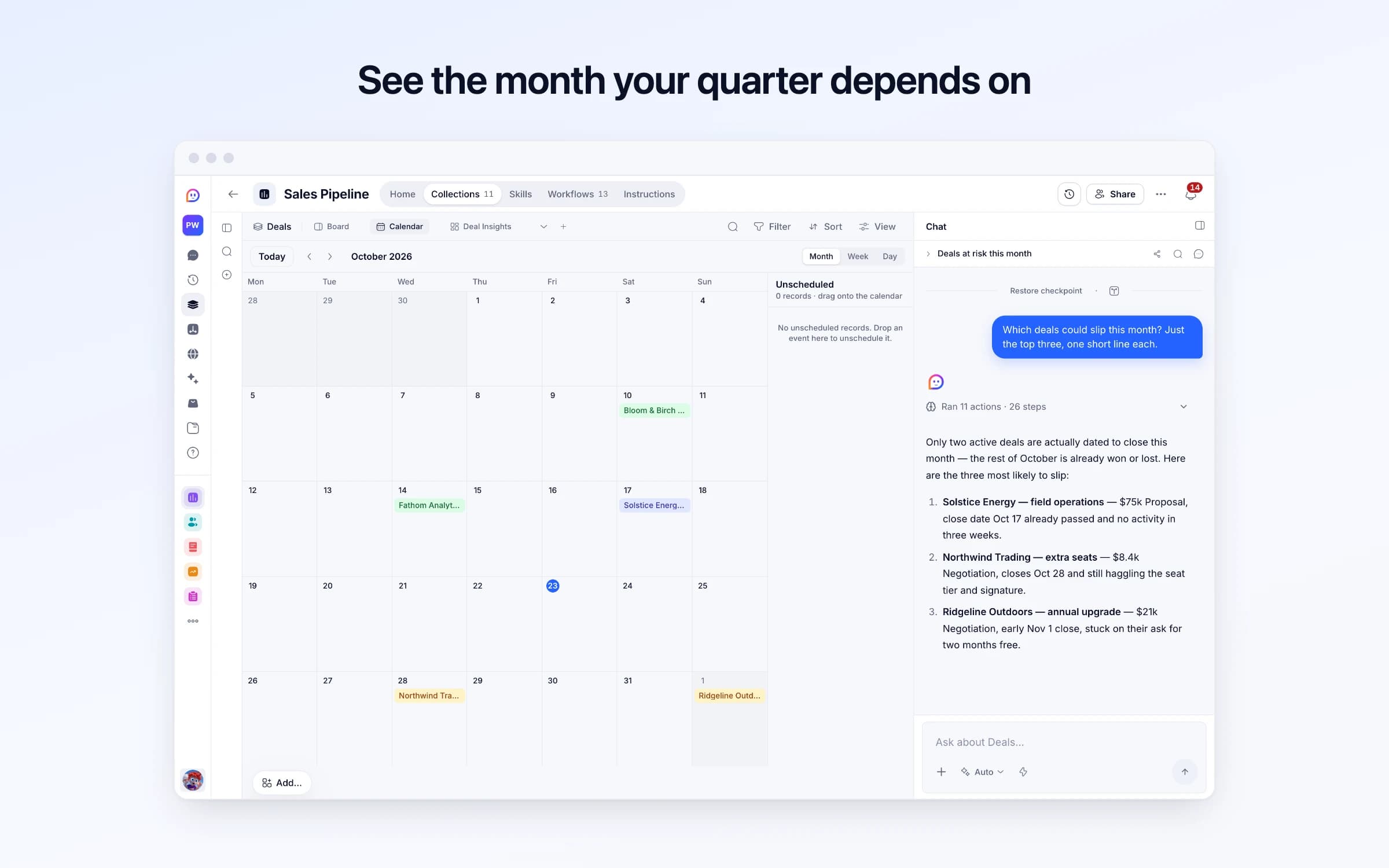
Each morning Cheqq searches X and LinkedIn for people who asked in public for what you sell, and the web for companies that just hired, launched or raised, with the person in the role you want to reach there. It suggests them to you, and you add the people you already know. You approve each one, and nothing is sent until you do. Approve someone and Cheqq reads their profile and recent posts, drafts a first message about them in your voice, often a reply under their own post, and once you approve it, sends it from your own account. Their replies get the next message drafted, anyone interested becomes a deal on a weighted board, and every Monday the deals gone quiet come back to you.
Finding people to sell to means scrolling X and LinkedIn hoping to spot someone who needs you, and the ones who asked last Tuesday are long answered by the time you do. The company that just hired the exact role you help gets found a month later, if at all. Outreach is a list of names in a spreadsheet and an afternoon you keep postponing. When it happens it's the same template pasted thirty times, and people can tell: a message that opens on your product, to someone who's never heard of you, gets ignored.
The few who reply are scattered across LinkedIn, X and your inbox. A promising answer waits three days because you missed it, a follow-up never goes out, and the pipeline is a column of stages with a total at the bottom that counts every deal as won.
You describe who you want to reach and the words they'd use asking for it, and confirm each phrase once. Every morning Cheqq searches X and LinkedIn from your own browser for people who asked in the last two days, and lists them in Suggested for you with their post and why they're there, a list short enough to read over coffee. Another play watches for companies hiring for a role you help with, launching, raising or rebranding in the last month, and finds the person in the role you named there, with why now and a link to where it says so. You approve each one, and nothing is sent until you do; skip the rest and they never come back, and every Monday a play you keep skipping from suggests one change for you to accept or drop. You also add the people you already know, with how well you know each other and why you're writing, and they come first. Through the day Cheqq reads each person's profile and recent posts, or their company's website for email, and judges whether they fit what you sell. From any post you're reading, the Cheqq Companion adds its author in one click.
For each good fit it drafts a first message about them, in the way you write, with one easy question and no pitch. Someone who asked in public gets it as a reply under their post; on LinkedIn, someone you aren't connected with waits until you connect yourself. Every draft waits in To review, with a note if it pitches too early, sounds too familiar for a stranger, or repeats another opener. Approve it and it goes from your own LinkedIn or X account, or your own mail server, in their working hours, one an hour, and no more new people a day than you set.
When they reply, the next message is drafted: an answer in their own words, and once they're interested, one specific next step with your booking link. Anyone who asks you to stop is never written to again, and anything waiting to go to them is dropped. Interested people become a contact and a deal on the board, where every deal carries a weighted value, and every Monday the deals untouched for two weeks come back ranked by what they're worth.
Wake up to people asking
Tell it who you want to reach and the words they'd use, or the kind of company news that means now is a good time. Each morning it finds the people who asked in public, and the right person at companies hiring, launching or raising, ready for you to approve or skip.
Approve each message
You approve each person, and nothing is sent until you approve the message too. It opens on them, with no pitch: a reply under their post, or a note on what their company just did. Replies get the next message drafted.
Interest becomes a deal
Interested people land on a weighted pipeline board, and every Monday the deals gone quiet come back ranked by what they're worth.
Outreach sequences of identical templates
One message at a time, written about the person and in your voice, that you approve before it goes.
The pipeline spreadsheet
Stages, amounts and close dates on a board, with a weighted total instead of a sum that counts every deal as won.
Pipedrive or Close for a small team
Finding people, the conversations, the deal and a weighted forecast in one place, next to the client, the invoice and the support in the same workspace, without another subscription.
Once it's yours, describe a change the way you'd ask a colleague, and Cheqq makes it.
No. Every message waits for you to approve it. Once you've approved three in a conversation you can let its replies go on their own, but a first message, a reply carrying a link other than your booking link, and anything the check flags still wait for you.
Not in a first message. It opens on them and asks one easy question, and your product comes up only once they've replied and it answers something they said. Friends and people who already know you are the exception.
X and LinkedIn messages, sent from your own logged-in browser through the Cheqq Companion, and email from your own mail server and domain. On LinkedIn it can message your connections; connect with anyone else yourself first. It never follows, connects or reacts for you.
In public. People asking are found in posts on X and LinkedIn from the last two days, searched with the phrases you confirmed. Companies are found on the web from news they published in the last month, and the person in your role on their own site, LinkedIn or X. It doesn't search a contact database or buy contact details, and it only uses an email address a company publishes on its own site.
A good one becomes a deal with a reply drafted in the same thread, and if they've gone quiet two days later, one chase is drafted too. Both wait for your approval unless you untick Check replies in Pipeline settings, and go only to an address Cheqq can confirm the enquiry came from. An email that only claims to come from someone gets no reply: you're told to answer it yourself.
They're marked do not contact, along with any other conversation you have with them under the same name, email or profile, anything still waiting to go to them is dropped, and nothing is sent to them again.
Each deal's amount is multiplied by its probability to give a weighted value, and the pipeline adds those up. Probabilities start at 20 and are set by you or by Cheqq from the stage and what was said, with the reasoning in one line.
Yes. Import a CSV into Deals, Companies, Contacts or Conversations, and download any of them as CSV or JSON whenever you need a copy.
18 of its 312 automation steps use AI, and draw AI credits each time they run: how many depends on the model you pick for the step. The other steps are fixed and draw none.
Every enquiry on one board, with a reply ready as it arrives
Every inbound lead scored, answered and kept on file
Keeping in touch with the people who matter, on purpose
You get your own copy: your own records and automations. Change any part of it. Or we'll set it up with you.
Free to start · Invites go out in batches