Agency
Every enquiry answered, every client updated, every invoice chased
Free to start
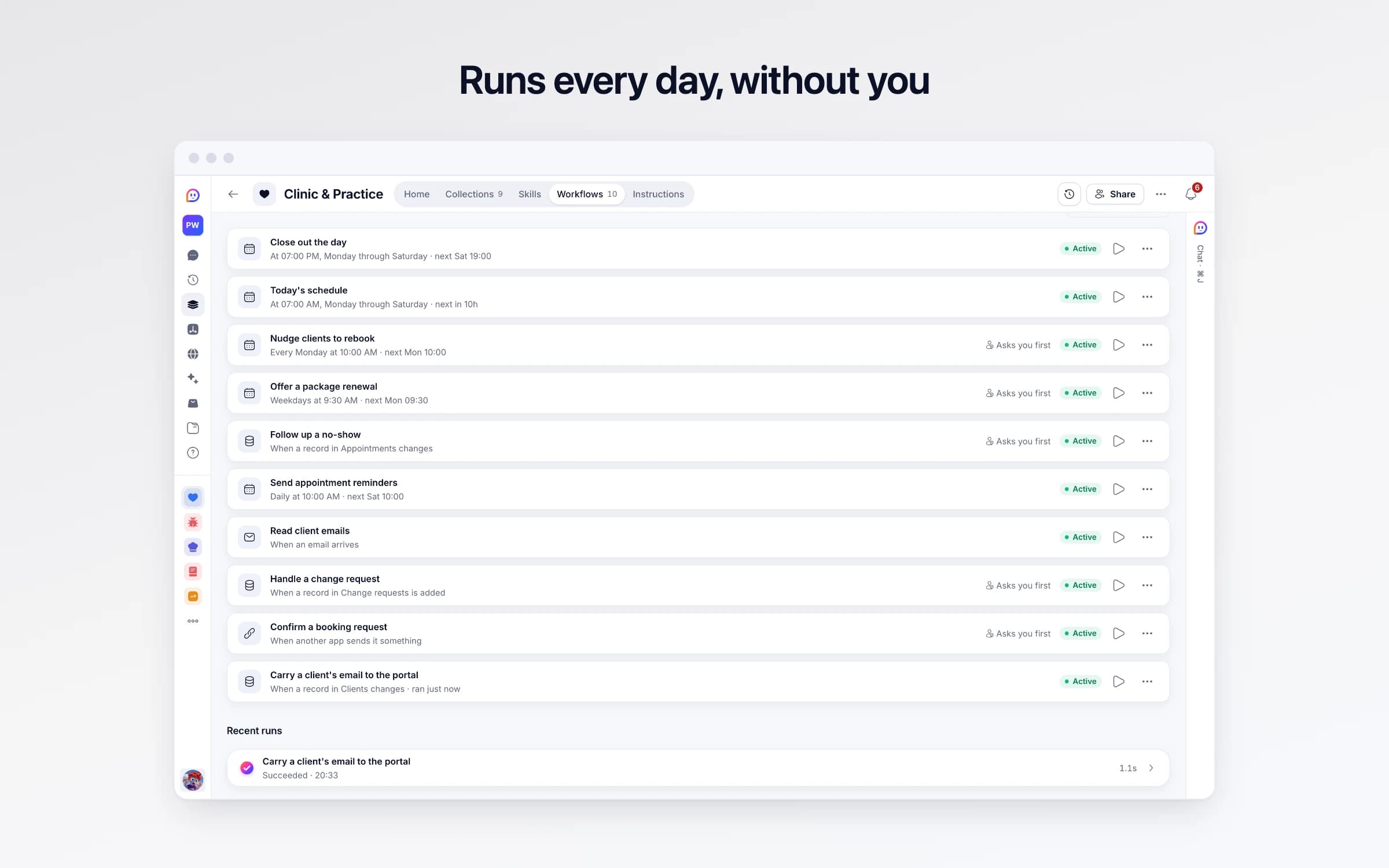
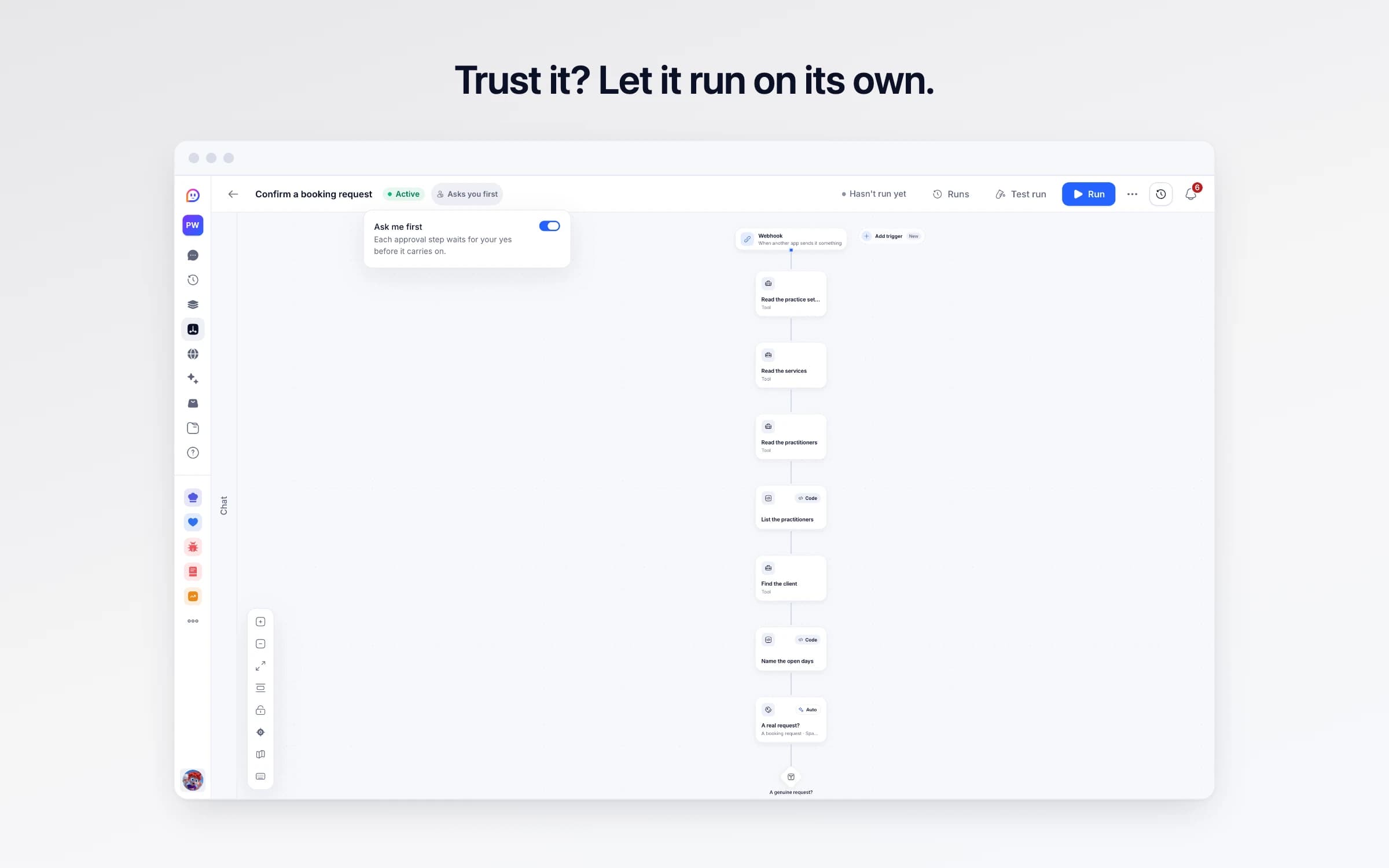
The routine part, done whether or not you're at your desk.
From Booking page
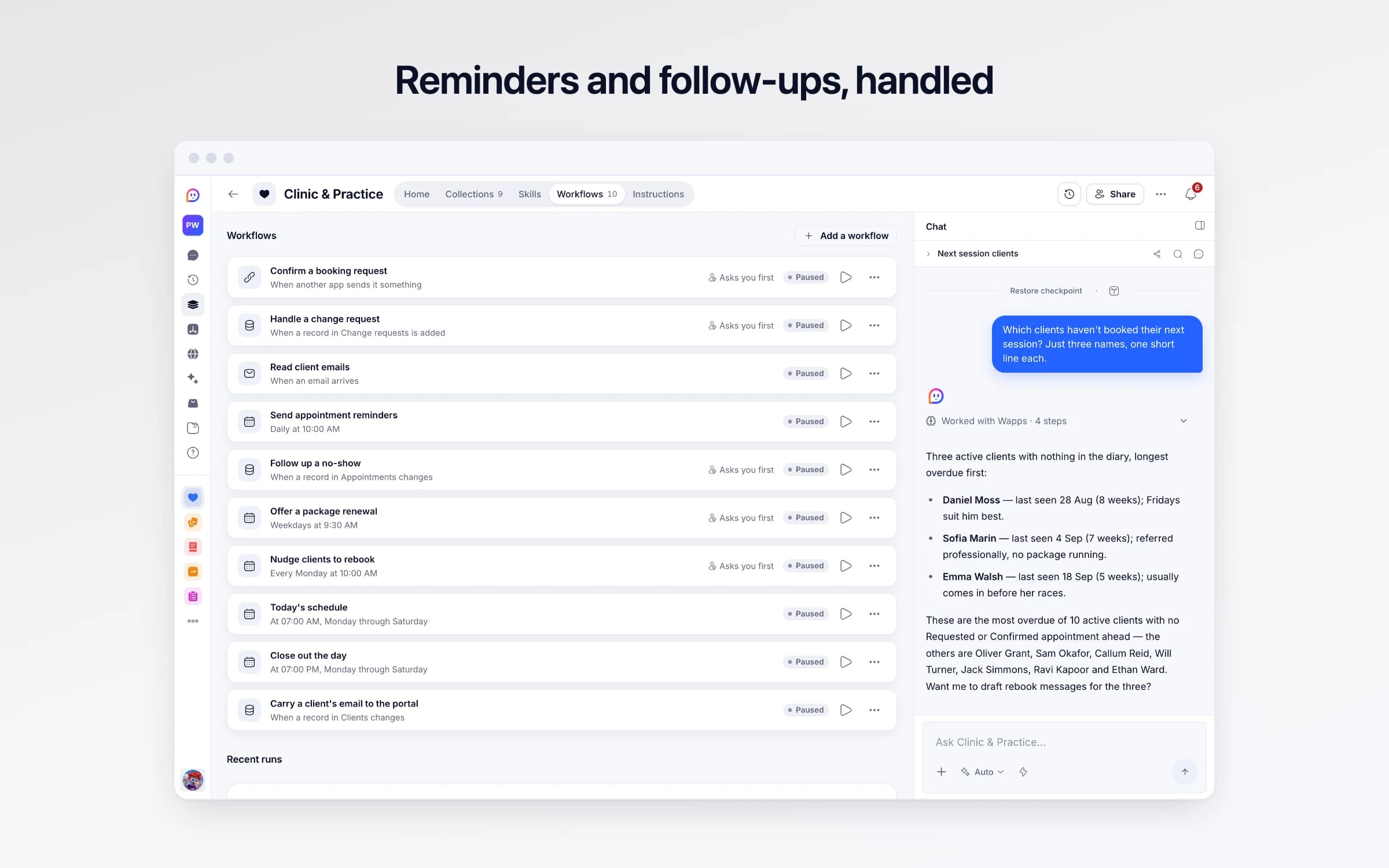
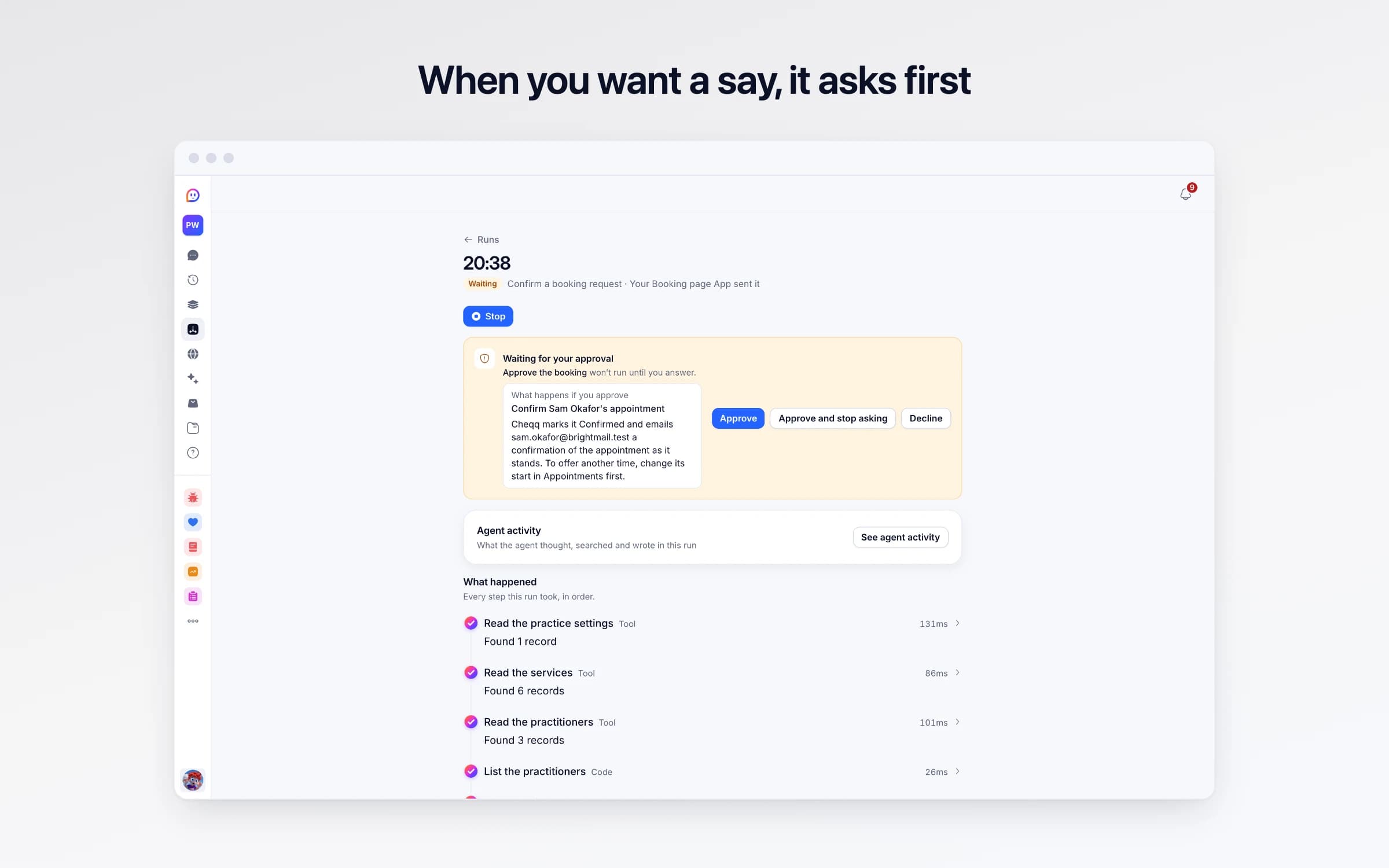
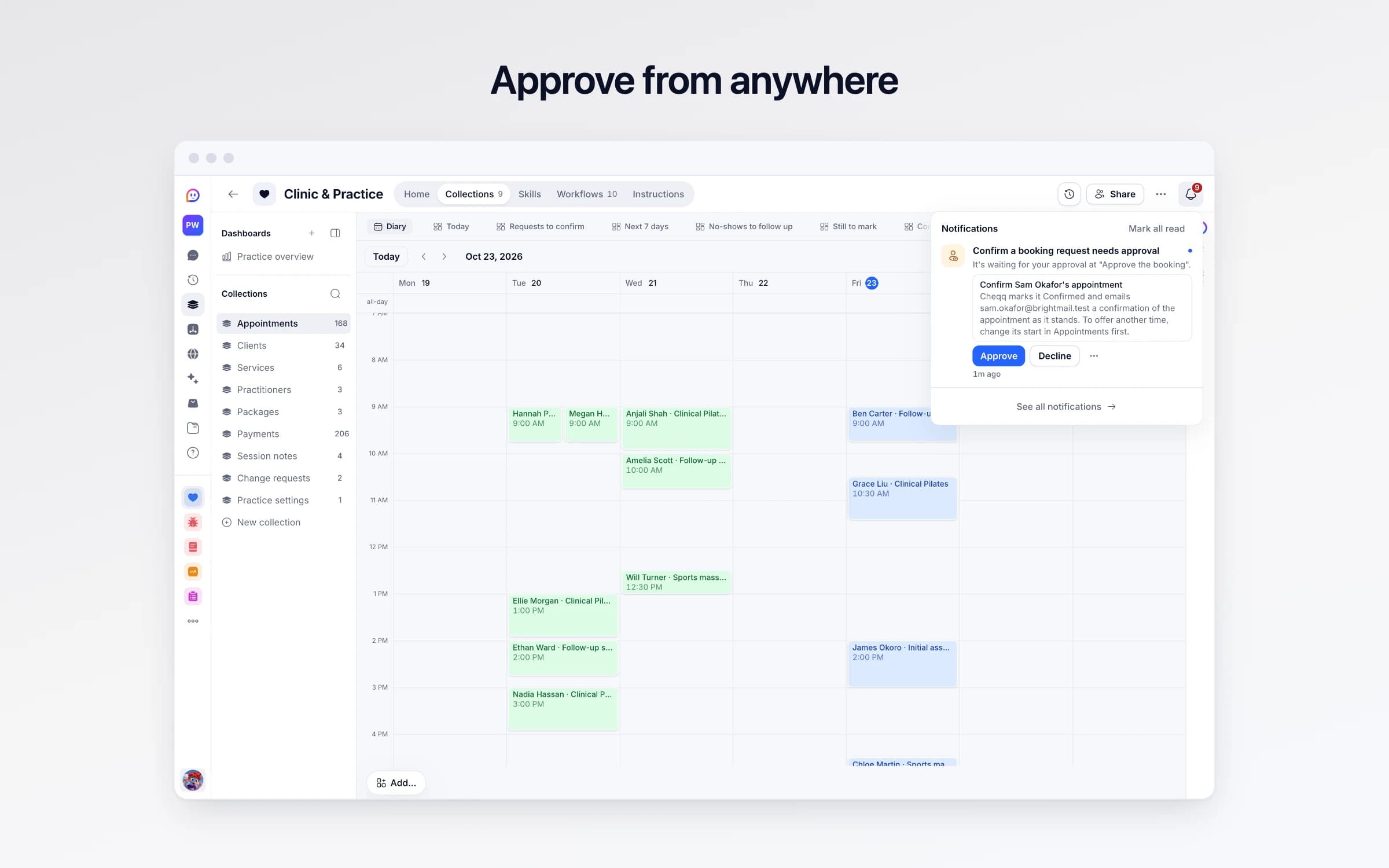
Confirm a booking request
Asks you firstWhen a client asks for an appointment on your booking page, Cheqq adds new clients, links the service, checks the diary and tells the team, noting when their email matches a client you already have. Once someone approves, it confirms the appointment and emails the client.
When a record in Change requests is added
Handle a change request
Asks you firstWhen a client asks to move or cancel an appointment, from the client portal or by email, Cheqq checks it's theirs and tells the team. Once someone approves, it makes the change and emails the client.
When an email arrives
Read client emails
Runs on its ownEvery email to your practice's Cheqq address, replies included. A request to move or cancel becomes a change request; anything that needs an answer is passed to the team.
Daily at 10:00 AM
Send appointment reminders
Runs on its ownEach morning at 10, every client with a confirmed appointment tomorrow gets a short reminder of it, sent at once. A day with nothing booked sends nothing.
When a record in Appointments changes
Follow up a no-show
Asks you firstWhen you mark an appointment No-show, Cheqq drafts a kind note inviting the client to book again, and sends it once you approve. Clients who have already rebooked aren't chased.
Weekdays at 9:30 AM
Offer a package renewal
Asks you firstEach weekday at 9:30, Cheqq drafts a note to each client with one session left on their package, asking if they'd like another. The notes go once you approve them.
Every Monday at 10:00 AM
Nudge clients to rebook
Asks you firstOn Monday mornings, Cheqq drafts a friendly note to clients not seen in six weeks who have nothing booked, inviting them back. The notes go once you approve them.
At 7:00 AM, Monday through Saturday
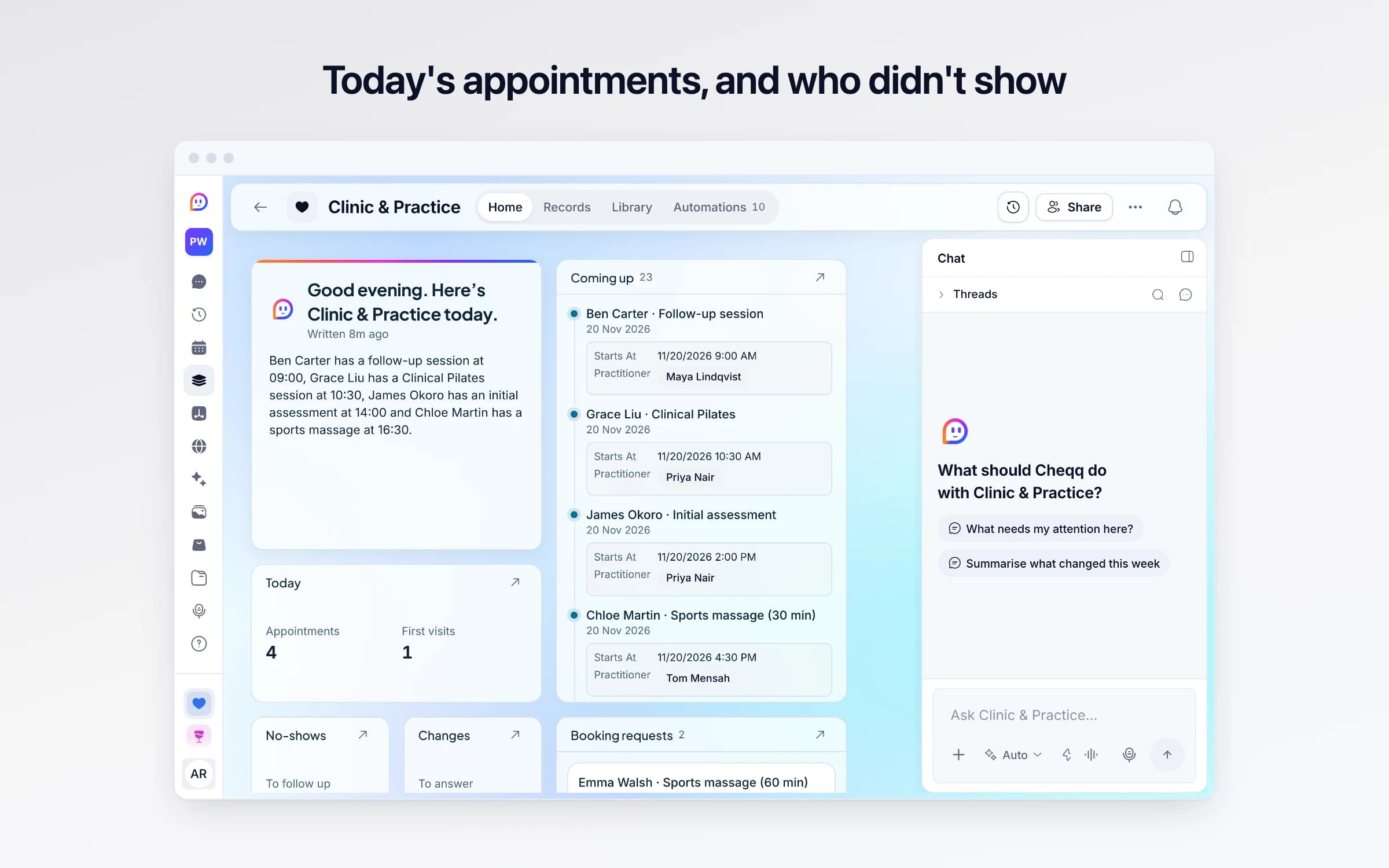
Today's schedule
Runs on its ownA morning digest, Monday to Saturday at 7: each practitioner's appointments today, then the booking requests, change requests and no-shows waiting for you.
At 7:00 PM, Monday through Saturday
Close out the day
Runs on its ownEach evening at 7, lists the appointments still marked Confirmed after their time, and the requests nobody answered, so the diary stays true. It also keeps each client's portal in step. A tidy day sends nothing.
When a record in Clients changes
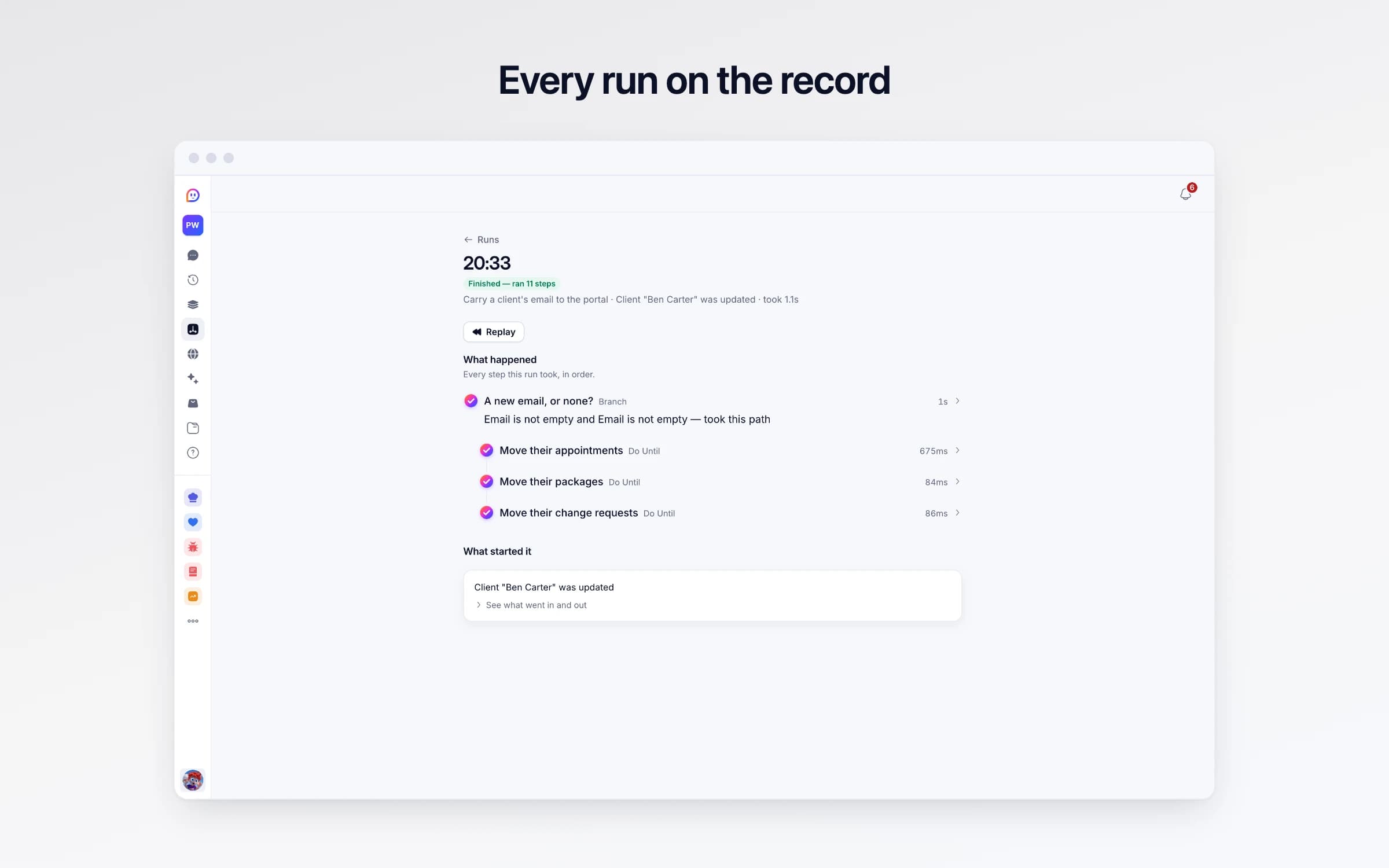
Carry a client's email to the portal
Runs on its ownWhen a client's email changes, moves their appointments, packages and change requests to the new one, so they keep seeing them in the client portal. When it's cleared, takes the old one off them and tells you, so that address sees nothing.
Talk to it the way you'd ask a colleague. It answers from what it has on record, and makes a change when you ask for one.
Clients ask for a time on your booking page, Cheqq checks the diary and asks your team, and a confirmation goes out once someone approves. Clients with a confirmed appointment tomorrow get an email reminder at 10, and no-show follow-ups, renewal offers and notes to clients not seen in six weeks wait for your yes. Each client signs in to a portal that shows only their own appointments and packages.
Booking requests arrive by phone between clients, by DM late in the evening and through the contact form on your website. Each one means checking the diary, messaging back with a time and waiting to hear whether it suits. The night before, someone texts tomorrow's clients one by one, and the changes they text back get fitted in by hand.
Someone still doesn't turn up, and the missed slot isn't written down anywhere. Packages live on punch cards, so nobody knows a client is on their last session until they ask. The client list in a spreadsheet says when people first came, not when they last did, and regulars drift away without anyone noticing.
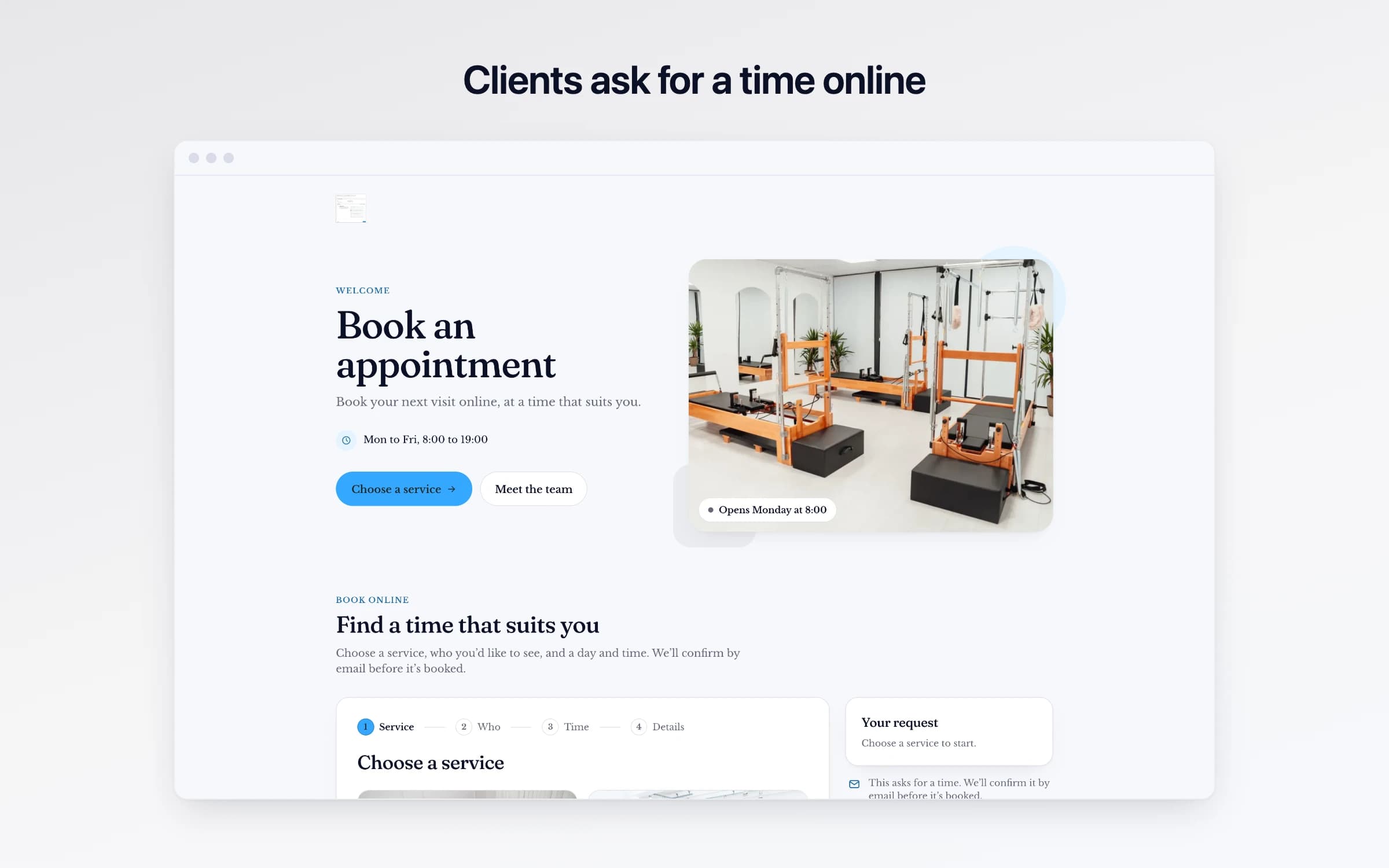
Your booking page goes on your website and your social profiles. Clients choose a service, pick who they'd like to see or say they don't mind, and ask for a day and time when you're open. First-timers can say how they found you and what they'd like help with, and everyone agrees to your cancellation policy. Each request lands in your diary as Requested: Cheqq adds the client if they're new, checks whether the practitioner is free and tells your team. Once someone approves, the client gets a confirmation by email with your address, your policy and, for a first visit, what new clients should know.
At 10 each morning, clients with a confirmed appointment tomorrow get a short email reminder, the one message that goes without asking you. When a client replies to move or cancel, or asks in their portal, it becomes a change request: Cheqq checks the appointment is theirs and tells you which of their suggested times the practitioner is free for. Put in the new time and approve, and Cheqq moves the appointment and emails them.
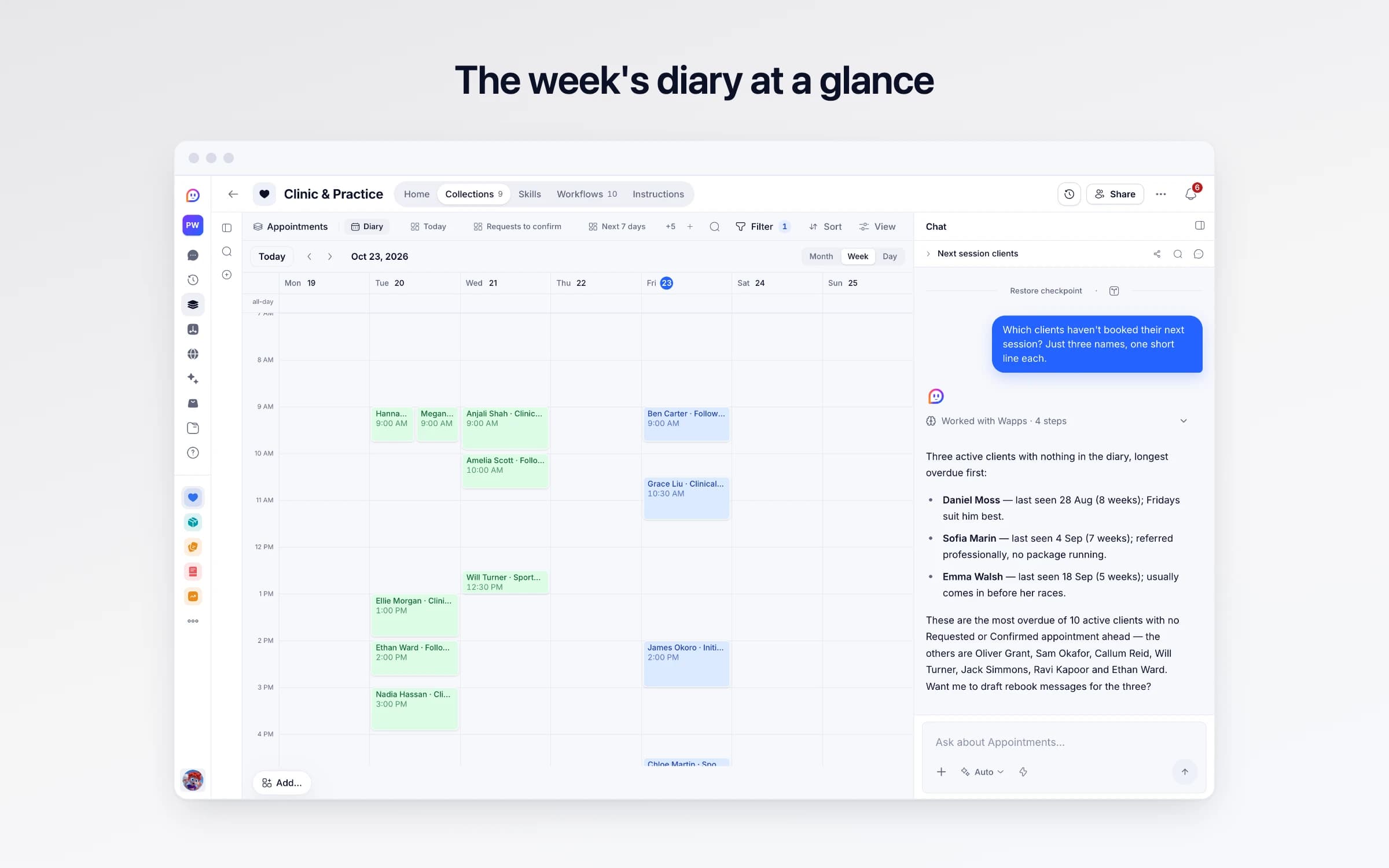
The diary shows your week on one calendar, and Monday to Saturday at 7, your team gets the day: each practitioner's appointments in time order, flagged where it's a first visit or the last session of a package, then the requests and no-shows waiting for you. At 7 that evening, anything still marked Confirmed after its time comes back to be marked Completed or No-show, and a tidy day sends nothing. Mark a No-show and a kind note inviting them to book again is drafted, unless they've already rebooked, and goes once you approve it.
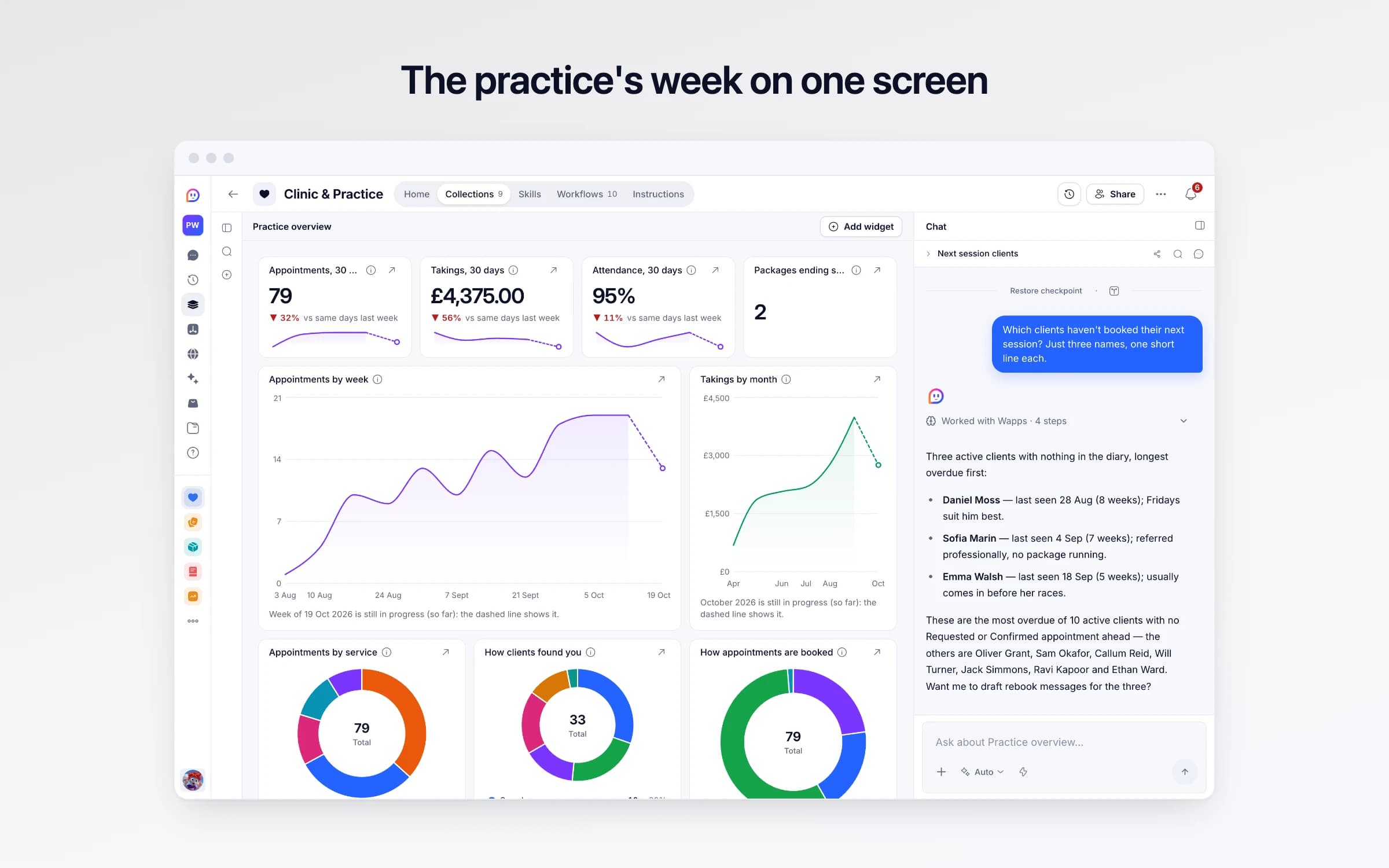
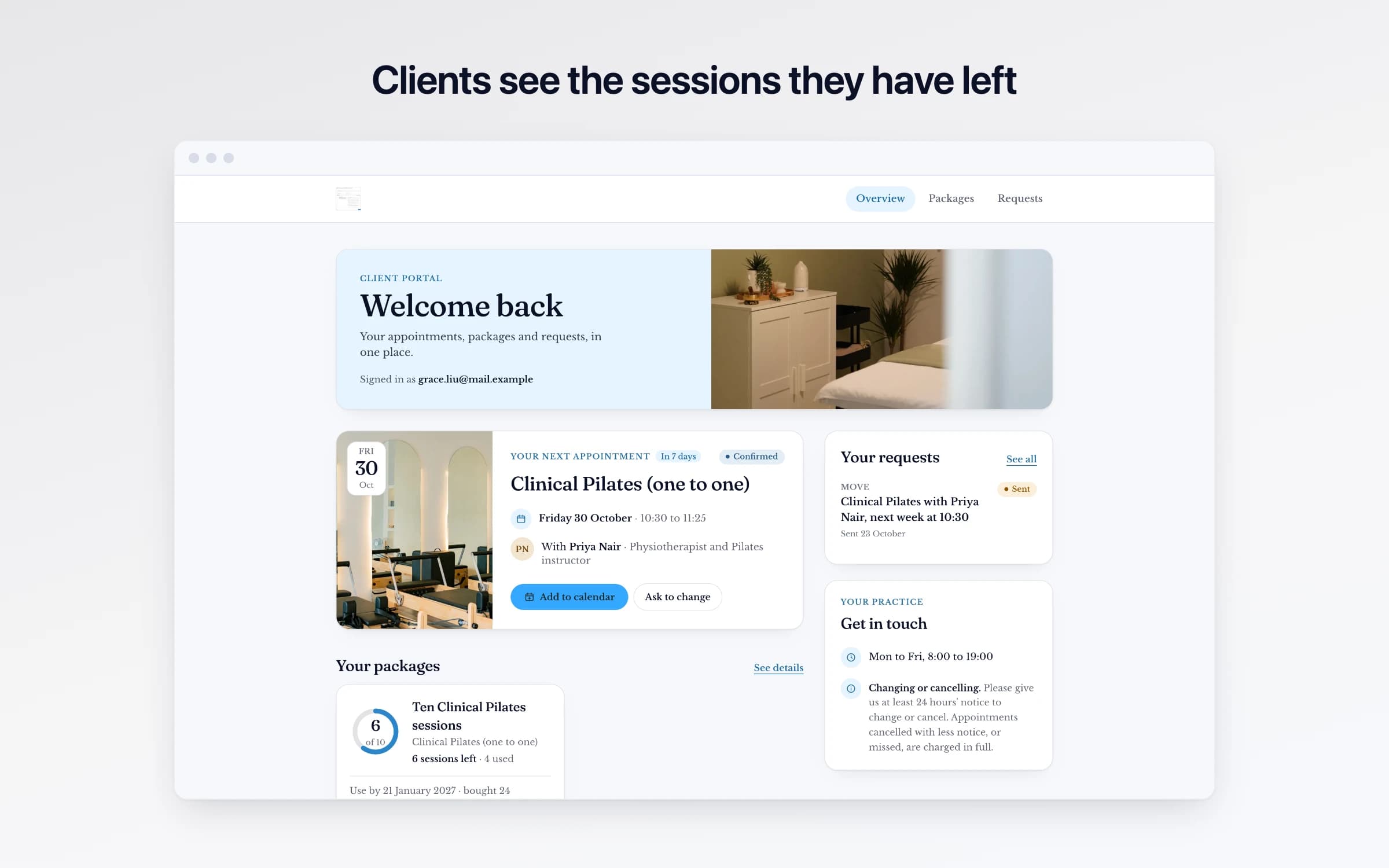
A package counts its own sessions from the appointments booked against it, attended or missed. Every weekday at 9:30, a client with one session left gets a note drafted asking if they'd like another, and on Monday mornings, clients not seen in six weeks with nothing booked get a friendly invitation back; both wait for your yes. Clients sign in to your client portal to see their appointments and the sessions left on their packages, and session notes never appear there. The Practice overview puts today's appointments and requests to confirm beside the last 30 days' takings and no-shows.
A client asks, your team confirms
A client picks a service, who they'd like to see and a time on your booking page. Cheqq checks the diary and asks your team, and once someone approves, the client gets a confirmation by email.
Reminders go out on their own
At 10 each morning, clients with a confirmed appointment tomorrow get a short email reminder. Monday to Saturday, your team gets each practitioner's day at 7, and in the evening anything still unmarked comes back to be marked Completed or No-show.
Each client has their own portal
Clients sign in to see their appointments and how many sessions their packages have left, and ask to move or cancel there. Renewal offers, no-show follow-ups and invitations to rebook are drafted, then sent once you say yes.
Online booking software
Your booking page takes requests for the services and hours you choose, each checked against the diary and confirmed by your team, instead of a booking tool billed every month.
Reminder texts
Clients with a confirmed appointment tomorrow get an email reminder at 10, and a reply asking to move it comes back as a change request, instead of an evening spent texting tomorrow's list.
The punch card
Each package counts its own sessions, the client sees what's left in their portal, and a renewal note is drafted when one session remains, instead of a card someone has to find and stamp.
The client list in a spreadsheet
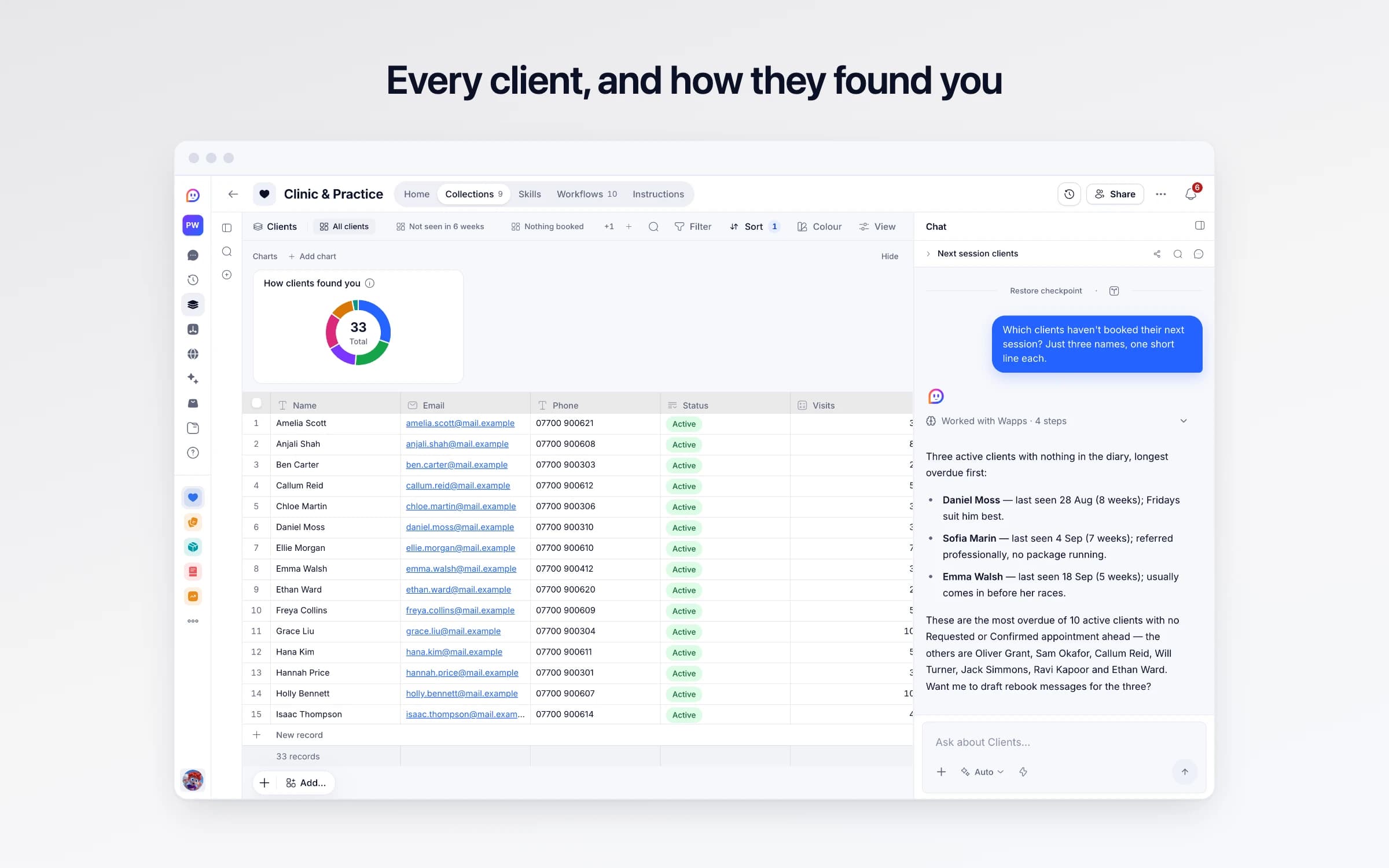
Visits, last visit and what's booked add themselves up on each client, and clients not seen in six weeks get a note drafted on Monday, instead of a list that only says when they first came.
A separate payments log
Payments are recorded against the client and the visit or package they paid for, and Completed, not paid lists the visits still owed. It doesn't take payments itself: you record what comes in.
10 automations, 2 apps, 9 lists of records and 3 documents. Your apps and automations all work from one set of records, so a change made once shows up everywhere.
Each one works from the same records as everything else here.
A booking page for your website and socials. Clients choose a service and ask for a time, and each request lands in Appointments for you to confirm.
Where your clients sign in to see their appointments and packages, with the sessions they have left, and ask to move or cancel an appointment.
Everything it reads and writes is yours to open: each list as your copy starts it, with sample records you can clear in one go.
| Title | Starts At | Practitioner | Service | Status |
|---|---|---|---|---|
Ben Carter · Follow-up session | Today, 9:00 AM | Maya Lindqvist | Follow-up session | Confirmed |
Grace Liu · Clinical Pilates | Today, 10:30 AM | Priya Nair | Clinical Pilates (one to one) | Confirmed |
James Okoro · Initial assessment | Today, 2:00 PM | Priya Nair | Initial assessment | Confirmed |
Chloe Martin · Sports massage (30 min) | Tomorrow, 4:30 PM | Tom Mensah | Sports massage (30 min) | Confirmed |
Hannah Price · Follow-up session | In 2 days, 8:30 AM | Maya Lindqvist | Follow-up session | Confirmed |
Emma Walsh · Sports massage (60 min) | Tomorrow, 6:00 PM | Empty | Empty | Requested |
| Name | Phone | Status | Found Us | |
|---|---|---|---|---|
Hannah Price | hannah.price@mail.example | 07700 900301 | Active | Professional referral |
Oliver Grant | oliver.grant@mail.example | 07700 900302 | Active | Search |
Ben Carter | ben.carter@mail.example | 07700 900303 | Active | Friend or family |
Grace Liu | grace.liu@mail.example | 07700 900304 | Active | Social media |
James Okoro | james.okoro@mail.example | 07700 900305 | Active | Social media |
Chloe Martin | chloe.martin@mail.example | 07700 900306 | Active | Friend or family |
| Name | Duration | Price | Bookable Online | Practitioners |
|---|---|---|---|---|
Initial assessment | 1:00 | £75.00 | Yes | Maya Lindqvist, Priya Nair |
Follow-up session | 0:45 | £60.00 | Yes | Maya Lindqvist, Priya Nair |
Sports massage (60 min) | 1:00 | £65.00 | Yes | Tom Mensah |
Sports massage (30 min) | 0:30 | £40.00 | Yes | Tom Mensah |
Clinical Pilates (one to one) | 0:55 | £55.00 | Yes | Priya Nair |
Running assessment | 1:15 | £95.00 | Empty | Maya Lindqvist |
| Name | Role | Working Days | Working Hours | Bookable Online |
|---|---|---|---|---|
Maya Lindqvist | Physiotherapist | MondayTuesdayThursdayFriday | 8:00 to 16:00 | Yes |
Tom Mensah | Sports massage therapist | MondayWednesdayThursdayFriday | 12:00 to 19:00 | Yes |
Priya Nair | Physiotherapist and Pilates instructor | MondayTuesdayWednesdayFriday | 9:00 to 17:00 | Yes |
| Name | Client | Service | Sessions Bought | Expires On |
|---|---|---|---|---|
Six follow-up sessions | Hannah Price | Follow-up session | 6 | In 4 weeks |
Ten Clinical Pilates sessions | Grace Liu | Clinical Pilates (one to one) | 10 | In 3 months |
Five 30-minute sports massages | Chloe Martin | Sports massage (30 min) | 5 | In 3 weeks |
| Description | Paid On | Client | Amount | Method |
|---|---|---|---|---|
Six follow-up sessions | 4 weeks ago | Hannah Price | £330.00 | Card |
Ten Clinical Pilates sessions | 4 weeks ago | Grace Liu | £495.00 | Bank transfer |
Five 30-minute sports massages | 6 weeks ago | Chloe Martin | £180.00 | Card |
Initial assessment | 2 weeks ago | Ben Carter | £75.00 | Card |
Sports massage (60 min) | 3 weeks ago | Oliver Grant | £65.00 | Card |
Sports massage (60 min) | 5 weeks ago | Leo Fischer | £65.00 | Cash |
| Title | Session Date | Client | Practitioner | Next Time |
|---|---|---|---|---|
Follow-up 5 | 4 days ago | Hannah Price | Maya Lindqvist | Last session of her package: review the programme and talk about what's next. |
Pilates session 4 | 7 days ago | Grace Liu | Priya Nair | Standing balance work. |
Initial assessment | 2 weeks ago | Ben Carter | Maya Lindqvist | Check how the routine is going. |
Pre-race massage | 3 weeks ago | Oliver Grant | Tom Mensah | Ask how the race went. |
| Appointment Label | Kind | Status | Requested By | Preferred Times |
|---|---|---|---|---|
Clinical Pilates with Priya Nair, next week at 10:30 | Reschedule | New | grace.liu@mail.example | Later the same week, any morning before 11 |
Sports massage with Tom Mensah, last week at 18:00 | Cancel | Done | leo.fischer@mail.example | Empty |
| Open Days | Opens At | Closes At | Currency | Cancellation Policy |
|---|---|---|---|---|
Monday, Tuesday, Wednesday, Thursday, Friday | 08:00 | 19:00 | GBP | Please give us at least 24 hours' notice to change or cancel. Appointments cancelled with less notice, or missed, are charged in full. |
How Clinic & Practice runs your practice
What is in Clinic & Practice, what runs for you and when, your booking page and client portal, and a routine for your first week.
Cancellation and no-show policy
A policy to start from: notice to change or cancel, late cancellations and missed appointments, running late, packages and payment.
New client intake form
A form for new clients to fill in before their first visit: their details, an emergency contact, what they'd like help with and their agreement.
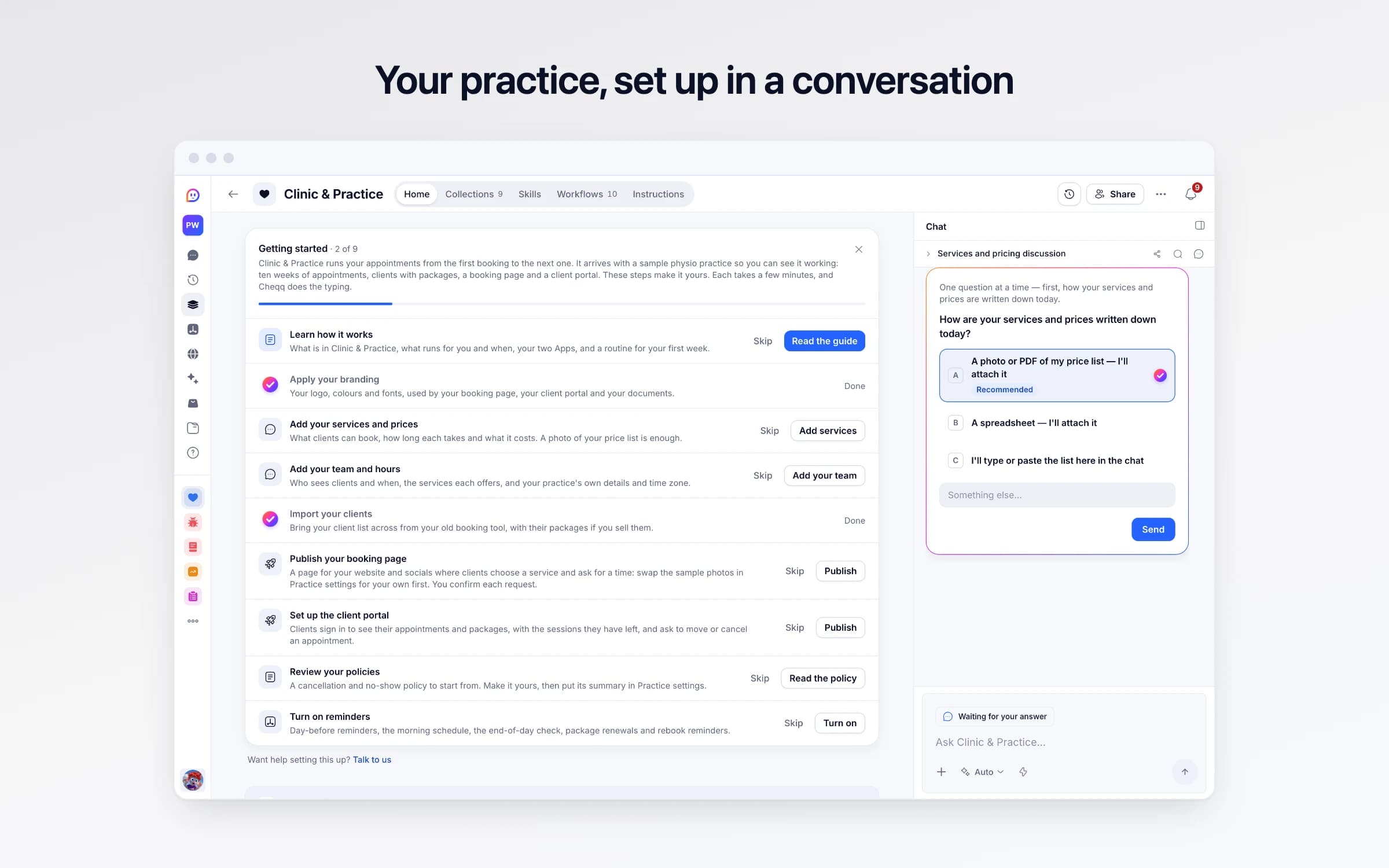
Clinic & Practice runs your appointments from the first booking to the next one. It arrives with a sample physio practice so you can see it working: ten weeks of appointments, clients with packages, a booking page and a client portal. These steps make it yours. Each takes a few minutes, and Cheqq does the typing.
Learn how it works
What is in Clinic & Practice, what runs for you and when, your two Apps, and a routine for your first week.
Apply your branding
Your logo, colours and fonts, used by your booking page, your client portal and your documents.
Add your services and prices
What clients can book, how long each takes and what it costs. A photo of your price list is enough.
Add your team and hours
Who sees clients and when, the services each offers, and your practice's own details and time zone.
Import your clients
Bring your client list across from your old booking tool, with their packages if you sell them.
Publish your booking page
A page for your website and socials where clients choose a service and ask for a time: swap the sample photos in Practice settings for your own first. You confirm each request.
Set up the client portal
Clients sign in to see their appointments and packages, with the sessions they have left, and ask to move or cancel an appointment.
Review your policies
A cancellation and no-show policy to start from. Make it yours, then put its summary in Practice settings.
Turn on reminders
Day-before reminders, the morning schedule, the end-of-day check, package renewals and rebook reminders.
One thing does: the day-before reminder, in fixed words with the day, time, service, practitioner and your address. Confirmations and changes go when someone on your team approves the booking or the change. No-show follow-ups, renewal offers and rebook reminders are drafted, then ask you first: approve and they're sent, or decline and write your own. Once you trust one, let it run on its own. It all starts switched off, so nothing runs on the sample practice until you turn it on.
They ask for one. Your booking page offers the days and hours you're open, from two hours ahead to eight weeks out, and never shows your diary, so nobody sees who else is booked. Each request waits until someone on your team approves it; to offer another time, move the appointment first. Services you only book by phone stay off the page.
Your practice gets its own Cheqq email address, with no mail account to connect. Once the automations are on, send one email to it and Cheqq records it as your sending address; from then on, confirmations, reminders and the notes you approve go from it, and clients' replies come back into Cheqq. Nothing goes by text message. Until then, each confirmation comes to you to send yourself.
You invite them, and each person signs in with their own email. They see the appointments and packages held under it: what's coming up, what's past and the sessions left on each package, and they can ask to move or cancel an appointment. Session notes, admin notes and payments never appear there, and no client ever sees another client's appointments.
Yes. Export your client list from the tool you use now and attach the spreadsheet or CSV in the chat: Cheqq brings every client in, matching your columns to the right fields, with their current packages and the sessions already used. For your services, a photo of your price list is enough.
No. It records the payments you take, by card, cash or bank transfer, and Completed, not paid lists the visits still owed. Your cancellation policy shows on the booking page, in confirmations and in the portal, and the note after a late cancellation or a no-show repeats it when it applies.
It's built for any practice that runs on appointments: physio and wellness clinics, therapists, salons, coaches and tutors. A solo practitioner uses all of it and skips inviting a team. A bigger practice invites its practitioners and front desk, and anyone who can edit can confirm a booking or a change.
11 of its 197 automation steps use AI, and draw AI credits each time they run: how many depends on the model you pick for the step. The other steps are fixed and draw none.
Every enquiry answered, every client updated, every invoice chased
Every booking confirmed, every guest reminded, the menu up to date
Rent chased, repairs filed, renewals flagged before they're late
You get your own copy: your own records, your own apps. Change any part of it. Or we'll set it up with you.
Free to start