Agency
Every enquiry answered, every client updated, every invoice chased
Free to start
The routine part, done whether or not you're at your desk.
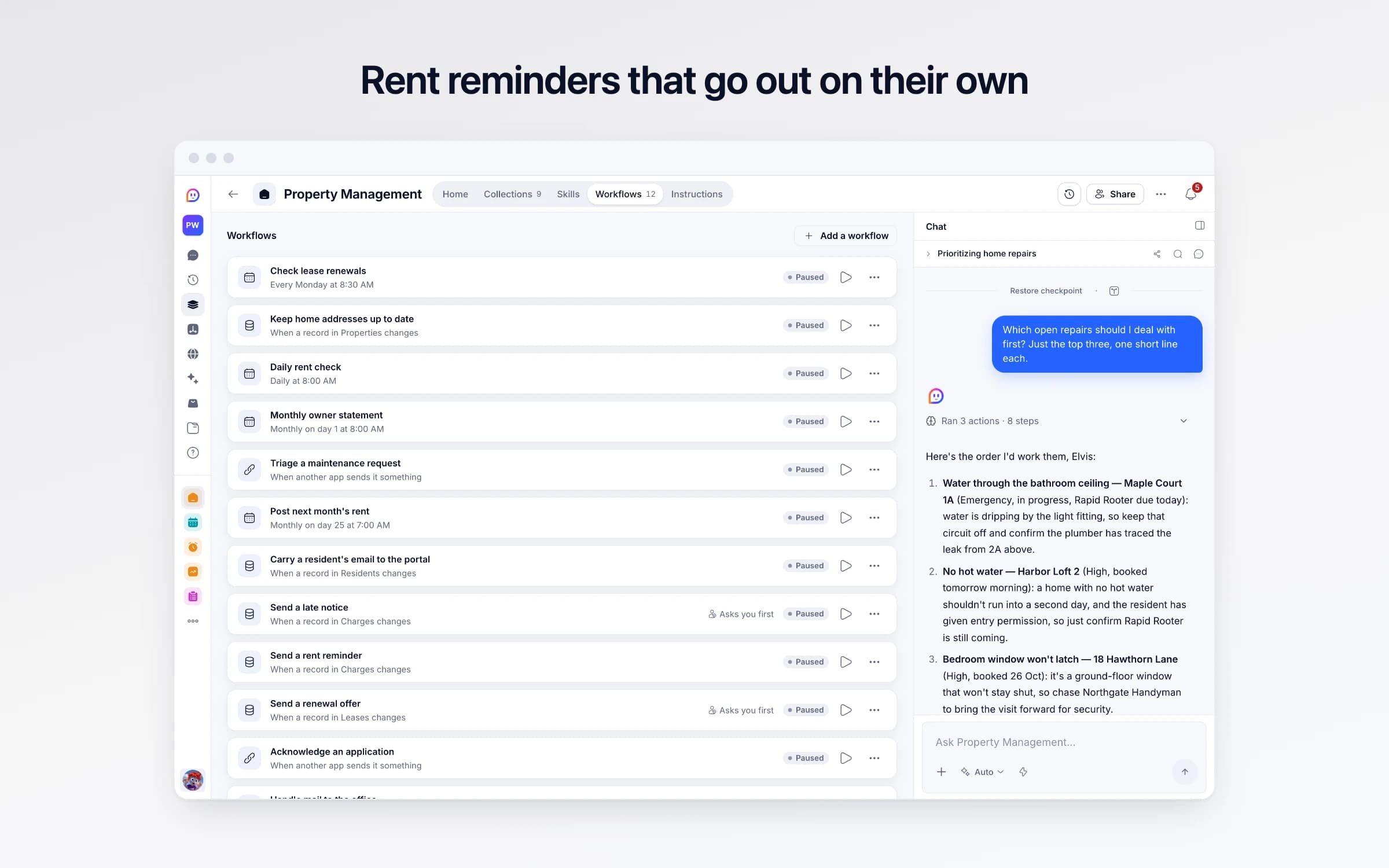
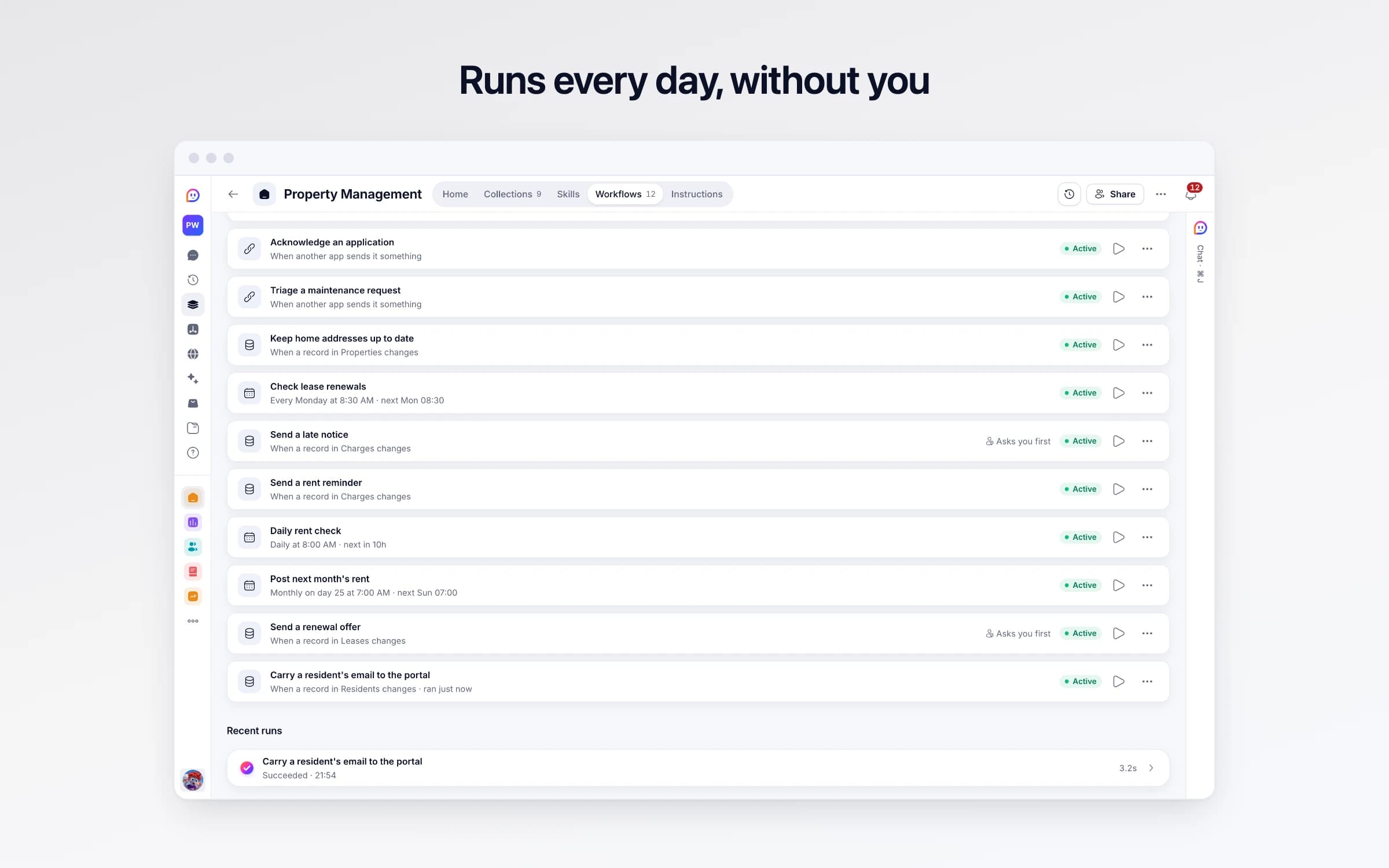
Monthly on day 25 at 7:00 AM
Post next month's rent
Runs on its ownOn the 25th, adds next month's rent to Charges for every lease that runs into it, due on each lease's rent day, and tells you what it posted and what needs you.
Daily at 8:00 AM
Daily rent check
Runs on its ownEach morning, queues a reminder for every resident whose rent is due in the next few days, tells you once about rent that has gone late, and has late notices drafted for your approval when your own late-rent policy allows.
When a record in Charges changes
Send a rent reminder
Runs on its ownWhen a charge's Send reminder box is ticked, by the daily rent check or by you, emails the resident a fixed reminder of what's due and how to pay. It goes at once: reminders are the one routine message that doesn't wait for approval.
When a record in Charges changes
Send a late notice
Asks you firstWhen a charge's Send late notice box is ticked, drafts a late notice by your own late-rent policy and waits for your approval before it goes to the resident. Without a policy, it drafts nothing and asks for one.
Every Monday at 8:30 AM
Check lease renewals
Runs on its ownEach Monday, raises every lease reaching 90, 60 or 30 days before it ends, once each, with what to decide. When a lease has ended and the resident has gone, it moves the unit to Make-ready and tells you what turnover needs.
When a record in Leases changes
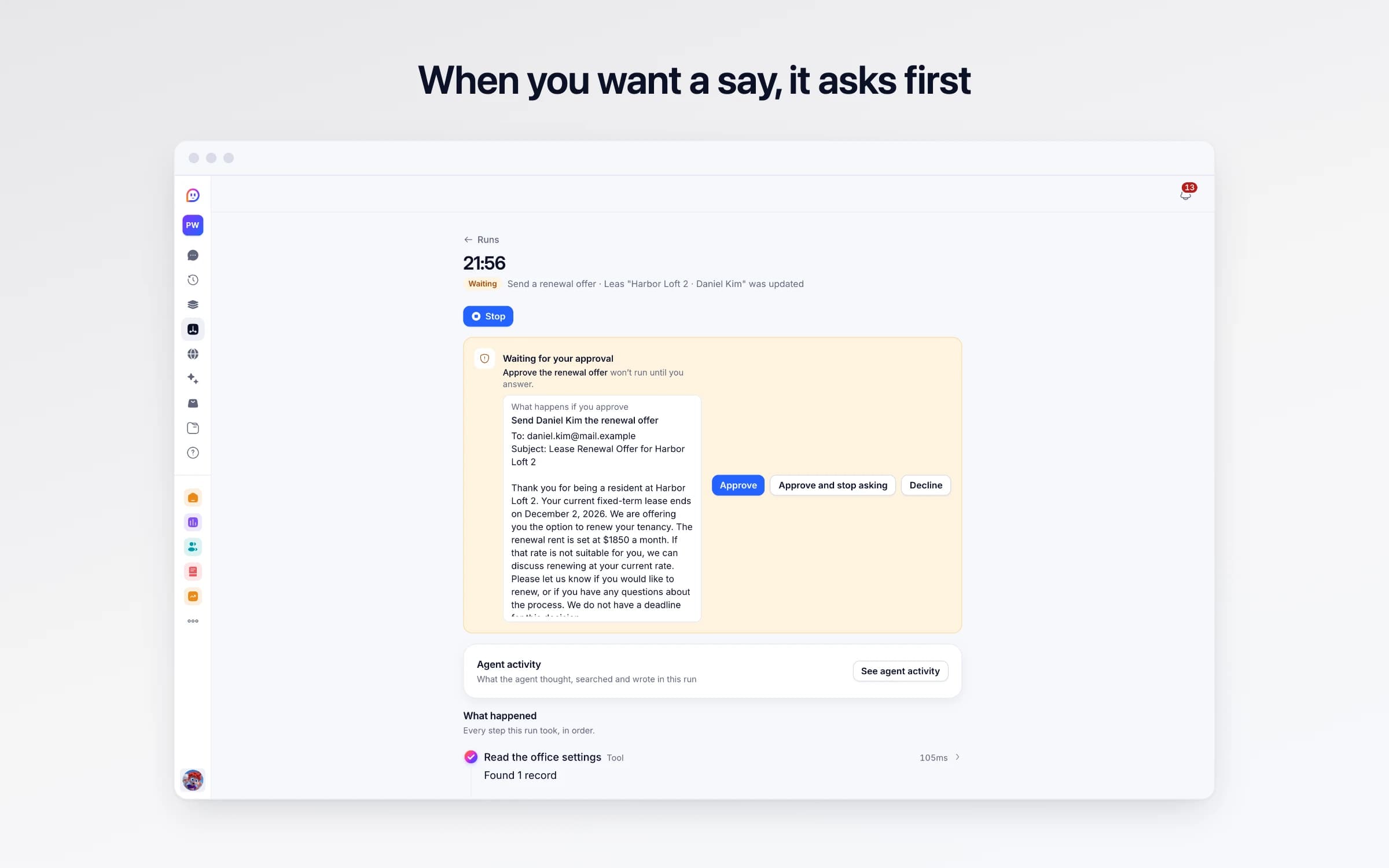
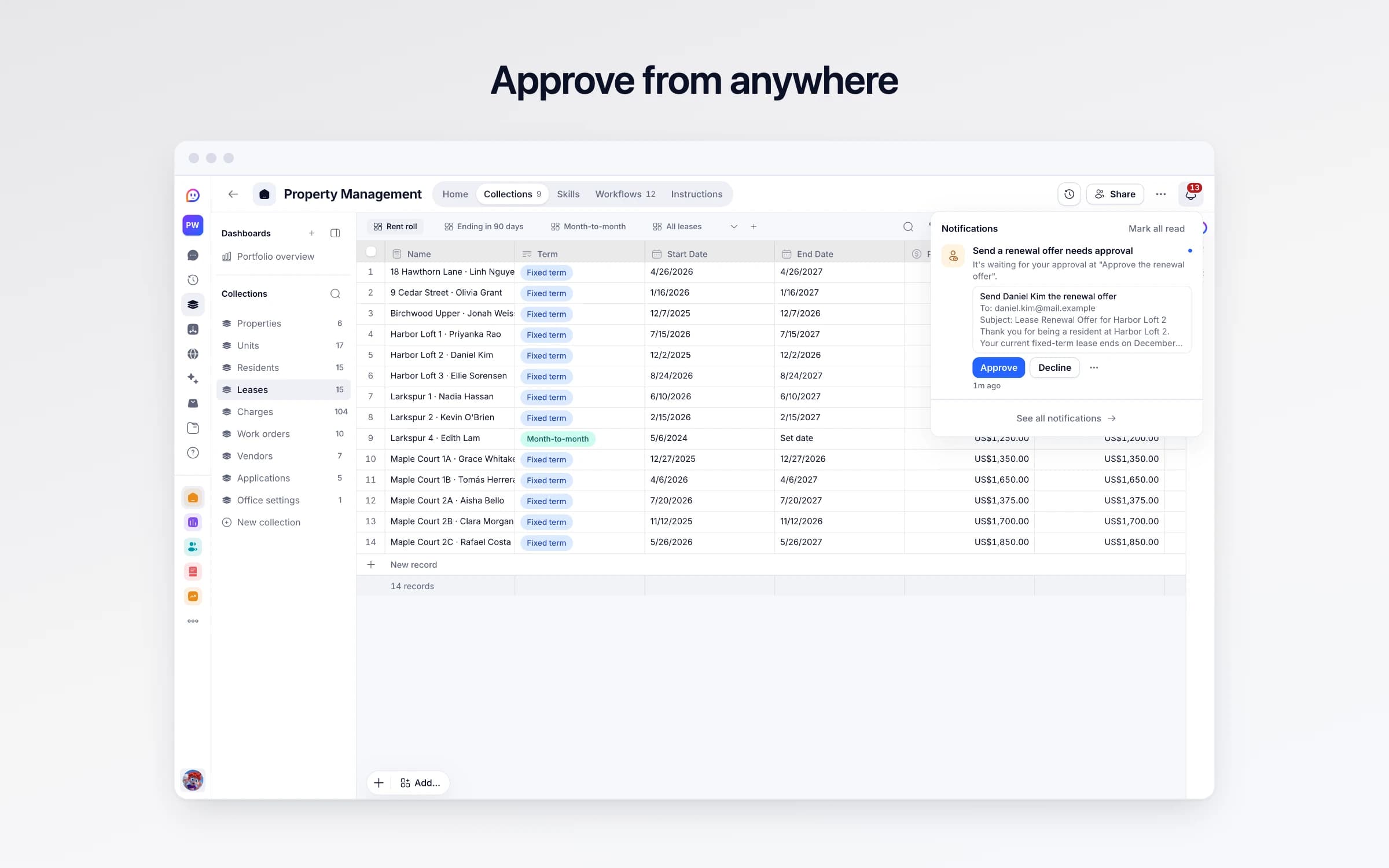
Send a renewal offer
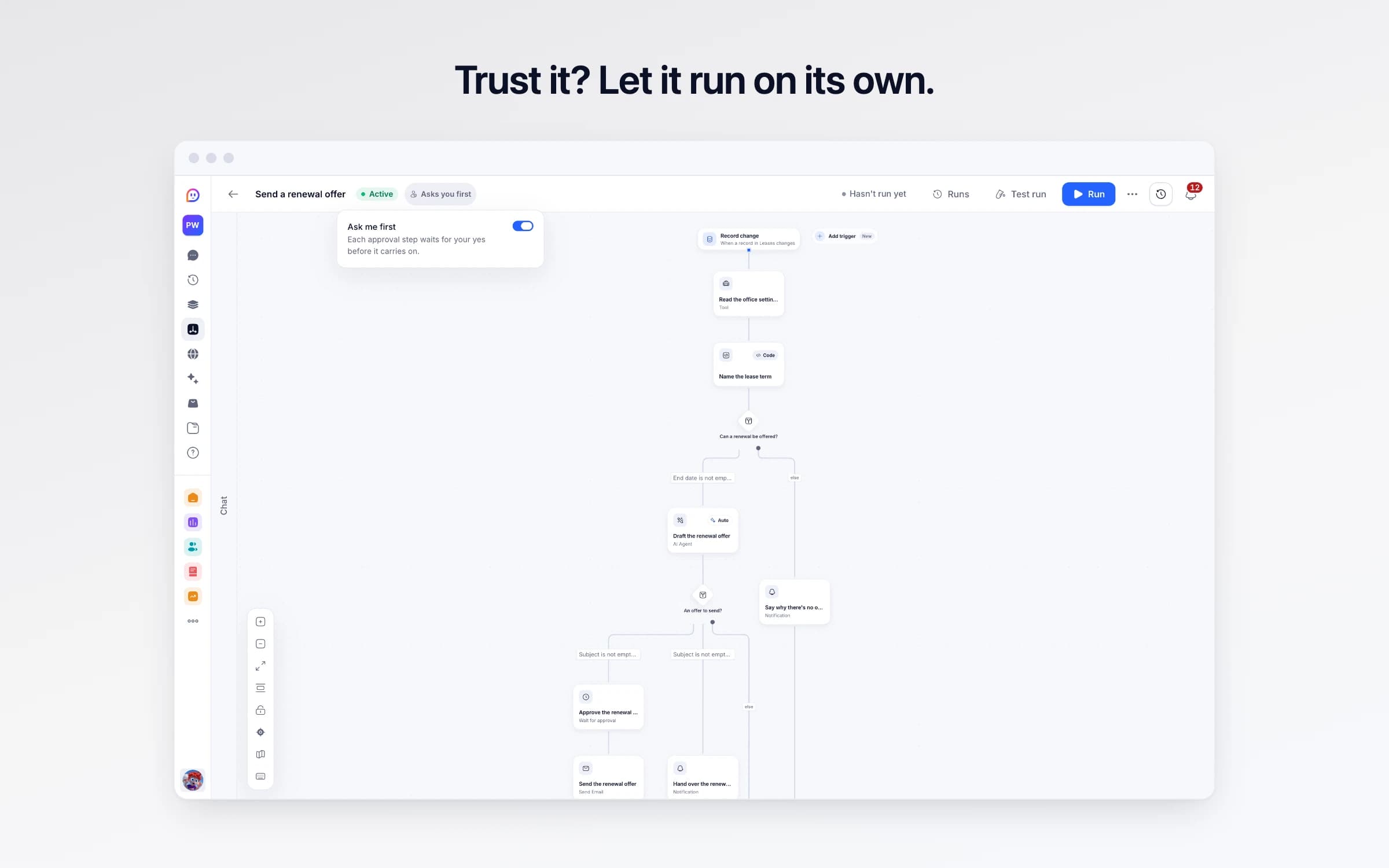
Asks you firstWhen you set a lease's renewal decision to Offer renewal, drafts the offer to the resident at the rent you chose and waits for your approval before it goes. Once it's sent, the lease says Offer sent.
When a record in Residents changes
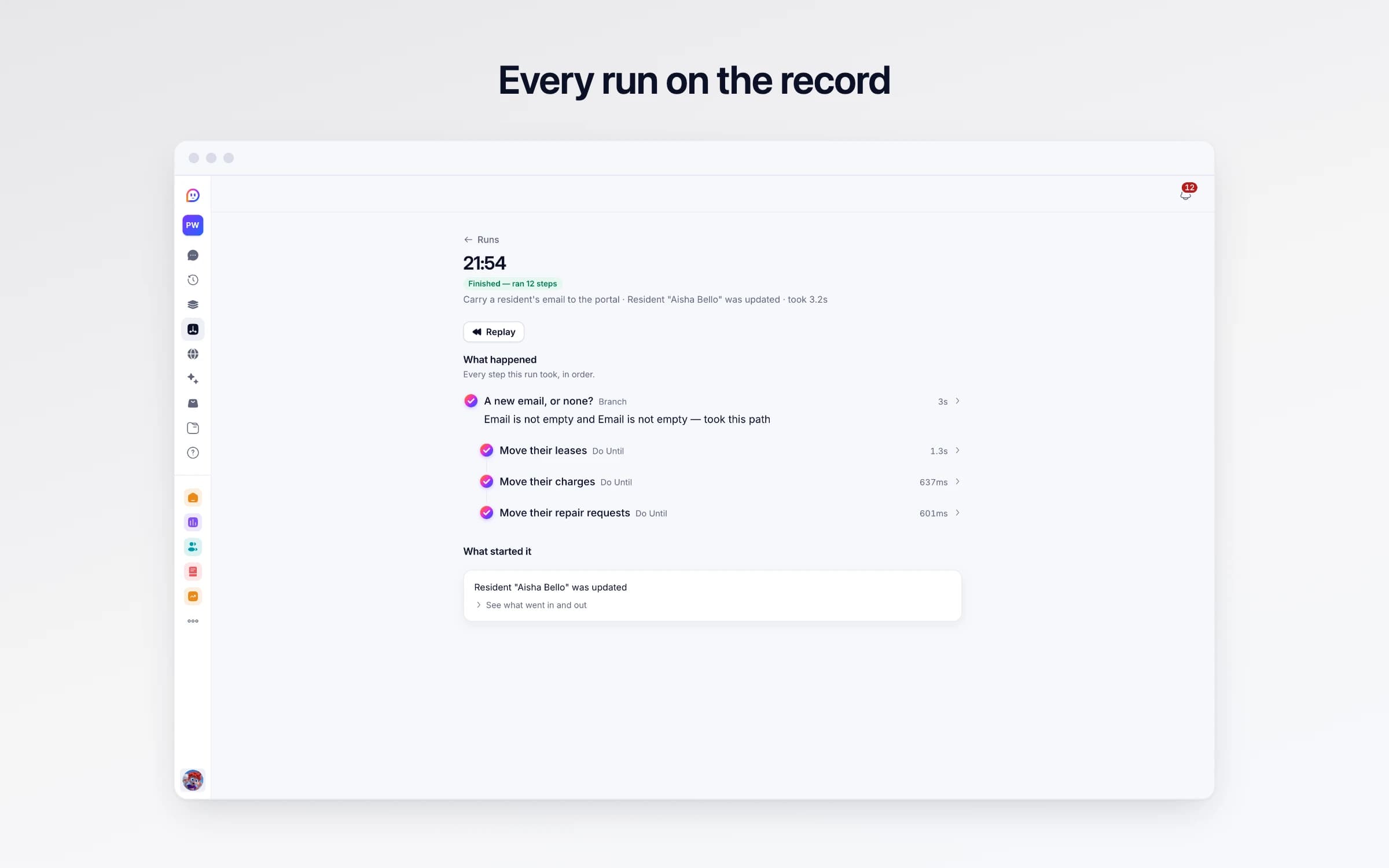
Carry a resident's email to the portal
Runs on its ownWhen a resident's email changes, moves their leases, charges and repair requests to the new one, so they keep seeing them in the resident portal. When it's cleared, takes the old one off them and tells you, so that address sees nothing.
When a record in Properties changes
Keep home addresses up to date
Runs on its ownWhen you change a property's details, refreshes its homes, so each resident's portal shows the building's address and neighbourhood as they are now.
From Resident portal
Triage a maintenance request
Runs on its ownWhen a resident reports a repair in the resident portal, Cheqq files it against their home, sets its priority and trade, suggests a vendor from your list, and tells the team. An emergency alerts the team at once.
From Listings site
Acknowledge an application
Runs on its ownWhen someone applies from your listings site, Cheqq links the application to the home, writes the team a summary, and emails the applicant a fixed receipt at once saying when they'll hear back. The receipt never answers the application.
When an email arrives
Handle mail to the office
Runs on its ownEmail your office's Cheqq address, or have residents write to it, and Cheqq files each message: a repair becomes a work order (an emergency alerts the team), a rental enquiry becomes an application, and the rest is noted on the right lease, application or job and passed to you.
Monthly on day 1 at 8:00 AM
Monthly owner statement
Runs on its ownOn the 1st, a digest of last month for each property, grouped by owner: rent charged and collected, what's still owed, repairs and their cost, occupancy, vacancies and leases ending soon. It arrives every month, quiet or not.
Talk to it the way you'd ask a colleague. It answers from what it has on record, and makes a change when you ask for one.
Next month's rent is posted on the 25th, each resident is reminded three days before it's due, and late rent comes to you once, with a late notice drafted by your own policy for your approval. Repairs reported in the portal or emailed to your office become work orders with a priority and a suggested vendor. Leases come to you 90, 60 and 30 days before they end, and vacant homes go on your listings site.
Rent day comes and you open the bank app to see who has paid. Two residents haven't, one has paid half, and the reminders you meant to send on the 28th never went out. The next few evenings go on texting, and on ticking names off a rent ledger that never quite matches the bank.
Repairs arrive by text at ten at night, the photo of the leak buried in your messages. A lease ending next month comes up only when the resident asks, the vacant apartment is listed by hand on three sites, and each owner's statement is pieced together from the bank, the ledger and a folder of receipts.
On the 25th, next month's rent is added for every lease that runs into it, due on each lease's own rent day, and you hear what was posted; a lease that starts or ends mid-month comes to you to decide. Each morning at 8, every resident with rent or a charge due in the next three days gets a short reminder of what's due and how to pay. It goes without waiting for you, because that's all it ever says.
Rent still unpaid after its due date comes to you once, with what's owed and how late it is. Late notices follow your own policy: write your grace period and what a notice should say in Office settings. Once the grace period has passed, a plain, polite notice is drafted by it, with no fee your policy doesn't name, and waits for your approval. Until you write one, you're only told what's overdue.
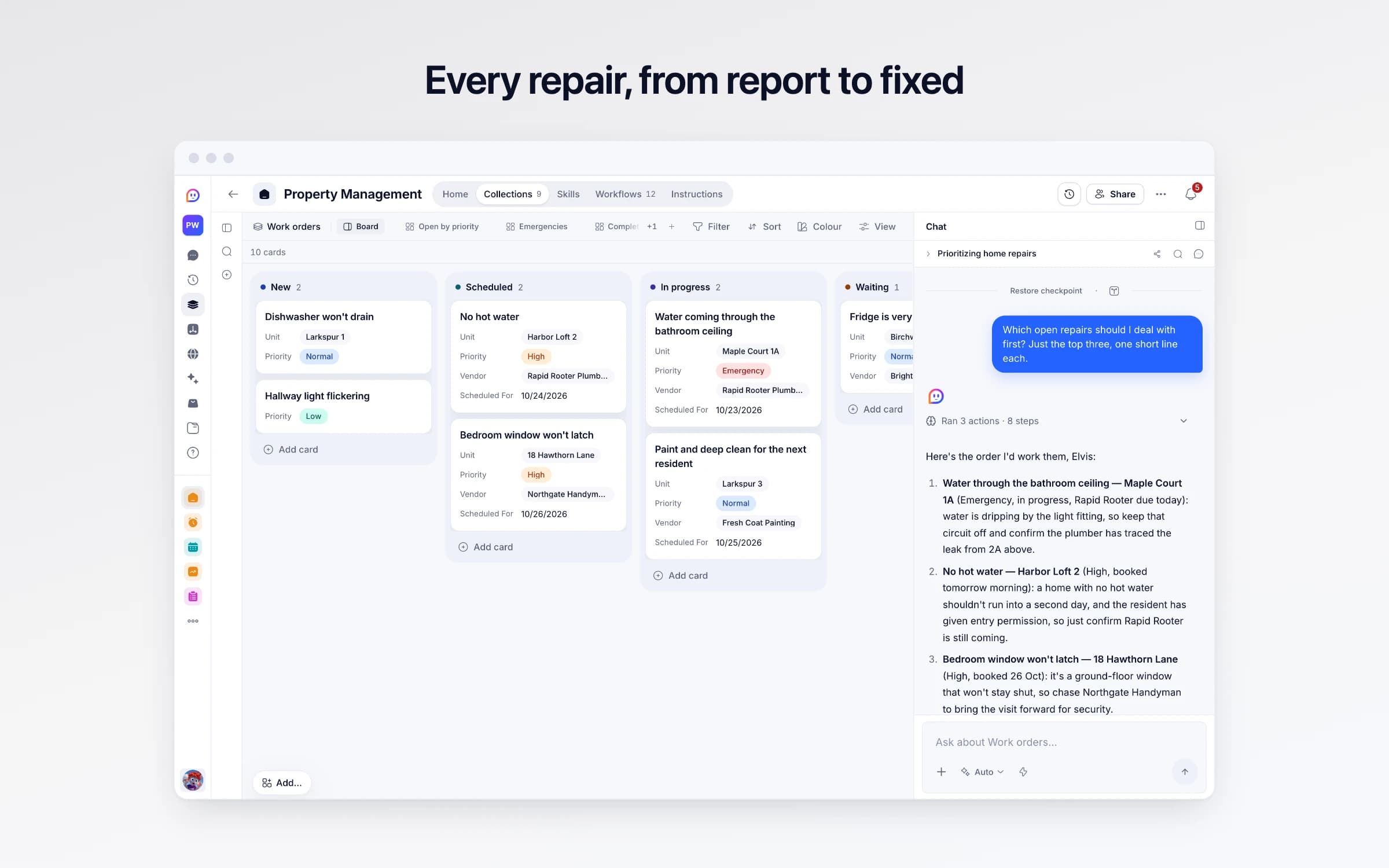
A resident reports a repair in their portal, saying where it is and whether it can't wait, or emails your office's Cheqq address. It becomes a work order on their home with a priority, the trade it needs and a vendor suggested from your own list, and your team hears about each one; an emergency, like water through a ceiling or a door that won't lock, alerts them at once. You assign the vendor, and the resident follows the request in their portal, with the visit date and your update.
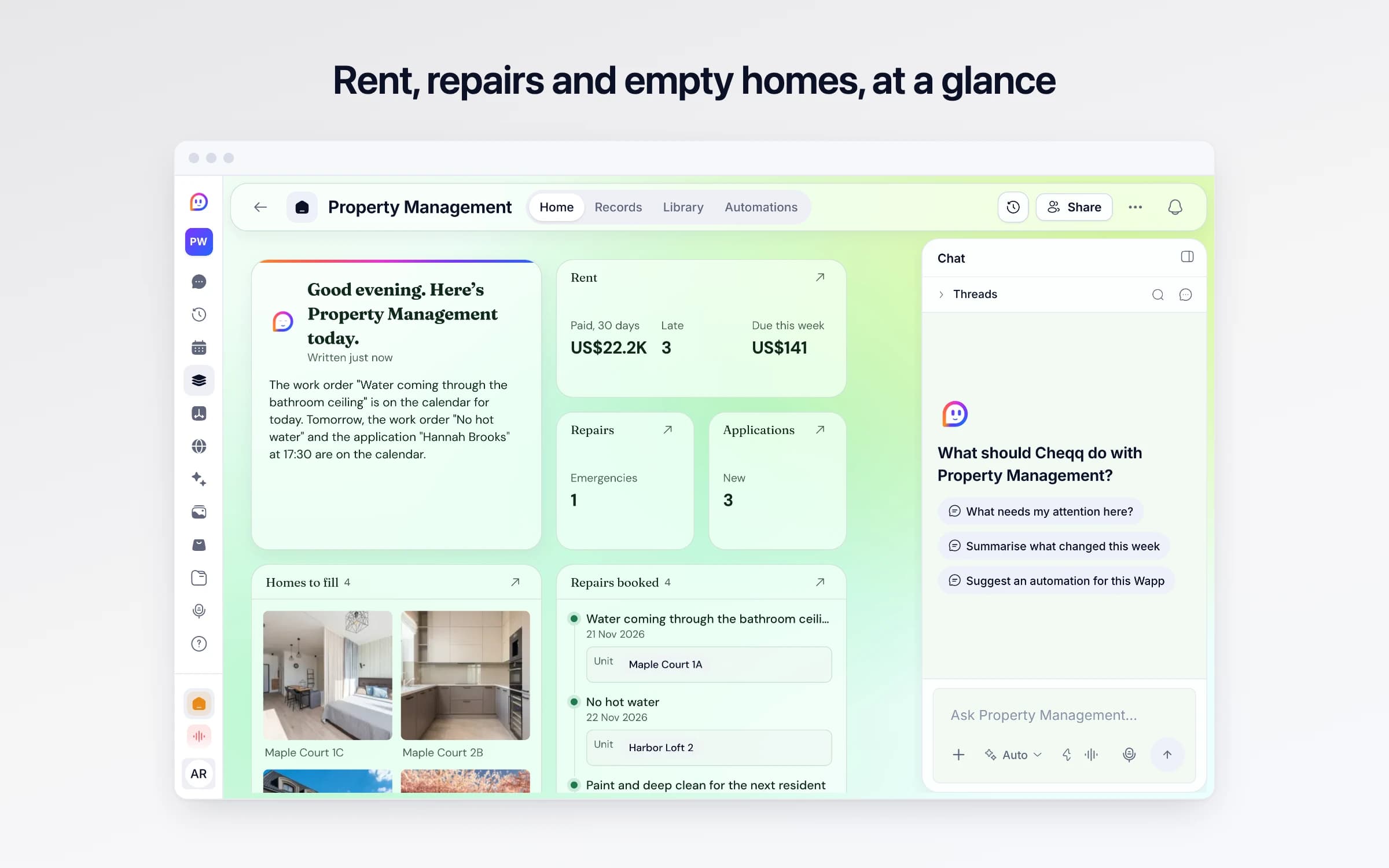
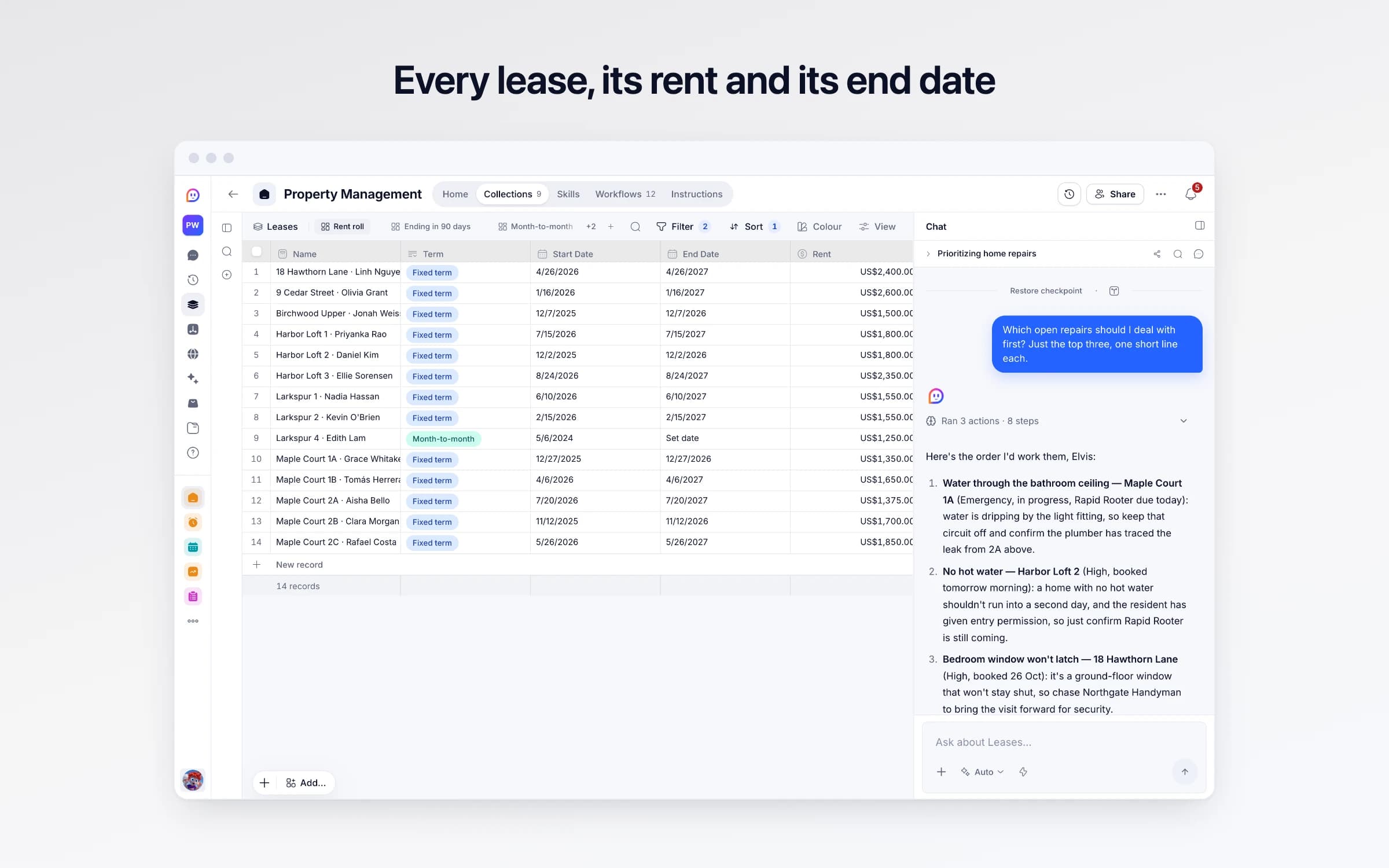
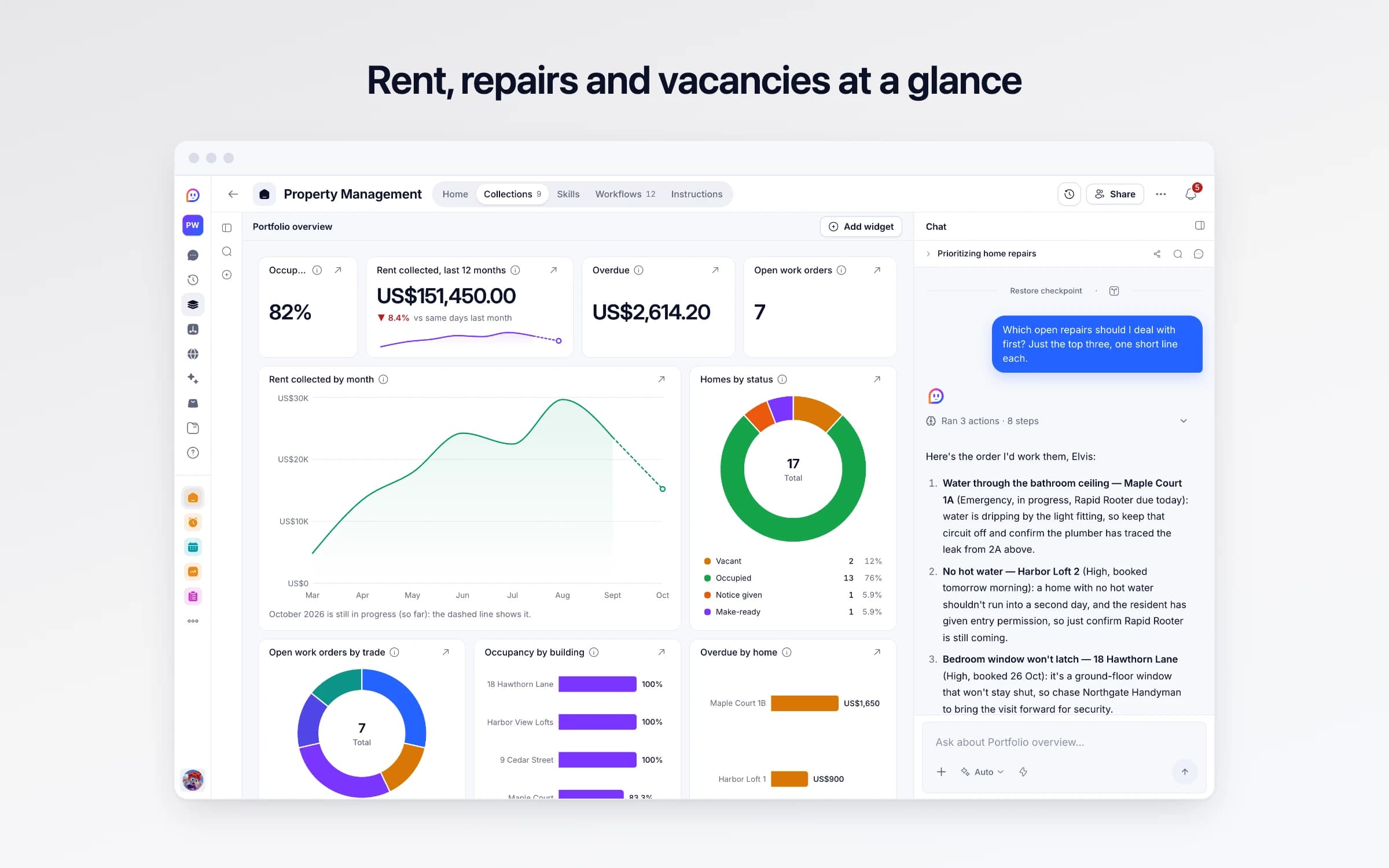
Each Monday at 8:30, a lease comes to you as it reaches 90, 60 and 30 days from its end, with what to decide; choose Offer renewal and the rent, and the offer is drafted for your approval. Once a resident has moved out, their home moves to Make-ready. Vacant homes show on your listings site with photos, rent and move-in date, and each applicant gets a receipt while you get a two-sentence summary, never a ranking. On the 1st, your team gets last month for each property, grouped by owner, and the Portfolio overview keeps occupancy, rent collected, what's overdue and open work orders side by side.
Rent comes due, residents are reminded
On the 25th, next month's rent is posted for your leases, each due on its own rent day. Three days before, each resident is reminded what's due and how to pay, and rent that goes late comes to you once.
A repair arrives, a vendor is suggested
A resident reports it in their portal or emails your office's Cheqq address. It becomes a work order on their home with a priority, a trade and a suggested vendor from your list, and an emergency alerts your team at once.
Renewals reach you 90 days early
Each Monday, leases 90, 60 or 30 days from ending come to you with what to decide, and the renewal offer you choose goes once you approve it. Vacant homes go on your listings site, and applicants get a receipt.
Property management software
Homes, residents, leases, rent, repairs and vendors sit in one place, and each owner's month is written up for you on the 1st, instead of being pieced together from exports.
The rent ledger
Every charge carries its resident, due date and status, part payments keep their own balance, and late rent comes to you the morning after, instead of a ledger checked against the bank.
Listing and application tools
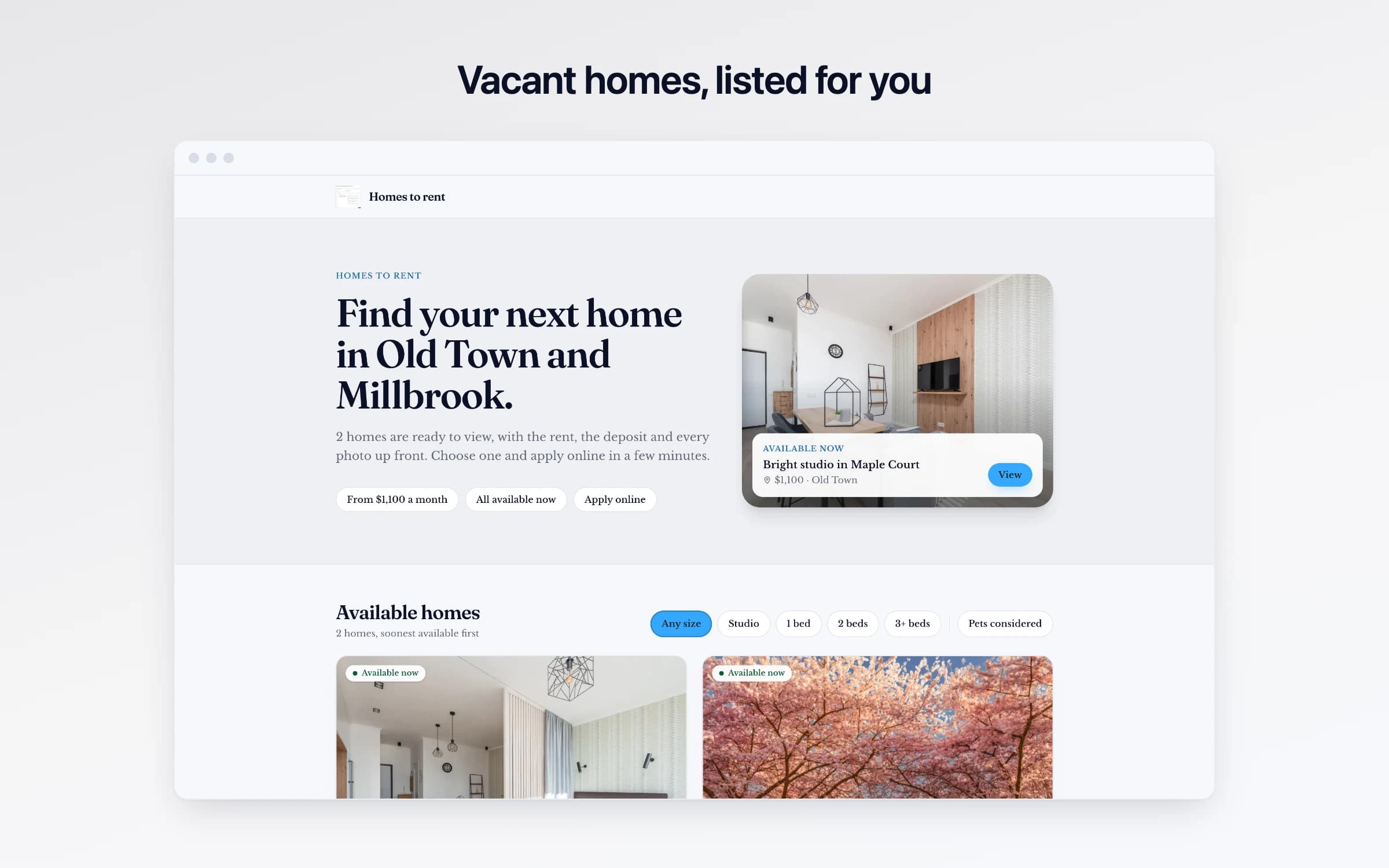
Each vacant home gets its own page on your listings site, with photos, rent and an application form, and comes off once it's let. Your adverts only need to link to it.
The maintenance request inbox
Repairs reported in the portal or emailed to your office arrive as work orders on the right home, with a priority and a suggested vendor, instead of texts and photos scattered across your phone.
The resident portal
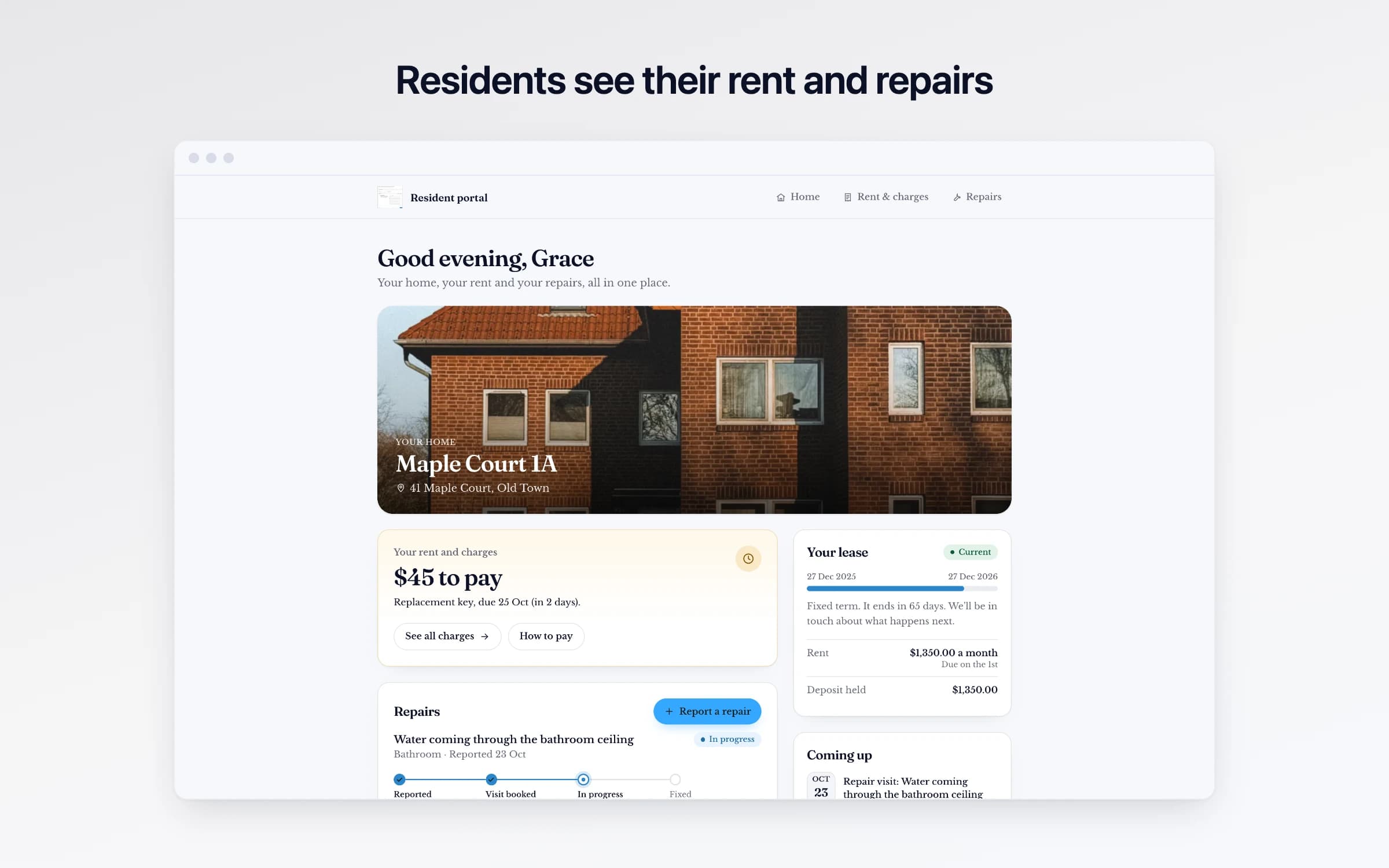
Residents sign in to see their lease, what they owe and how to pay, and to report a repair and follow it, instead of texting you to ask.
12 automations, 2 apps, 9 lists of records and 3 documents. Your apps and automations all work from one set of records, so a change made once shows up everywhere.
Each one works from the same records as everything else here.
Your vacant homes at their own address, with photos, rent and move-in dates, and an application form. Each application lands in Applications, and the applicant gets a receipt.
Where your residents sign in to see their home, lease and charges, report a repair and follow it, and read your notices.
Everything it reads and writes is yours to open: each list as your copy starts it, with sample records you can clear in one go.
| Name | Kind | Area | Owner | Manager |
|---|---|---|---|---|
Maple Court | Apartment building | Old Town | The Okafor family | You |
The Larkspur | Apartment building | Northgate | Empty | You |
18 Hawthorn Lane | House | Millbrook | Helen and Arjun Mehta | You |
Birchwood Duplex | Duplex | Millbrook | Empty | You |
Harbor View Lofts | Apartment building | Harborside | Tomasz Nowak | You |
9 Cedar Street | Townhouse | Old Town | Empty | You |
| Name | Property | Status | Rent | Bedrooms |
|---|---|---|---|---|
Maple Court 1A | Maple Court | Occupied | $1,350 | 1 |
Maple Court 1B | Maple Court | Occupied | $1,650 | 2 |
Maple Court 1C | Maple Court | Vacant | $1,100 | 0 |
Maple Court 2A | Maple Court | Occupied | $1,375 | 1 |
Maple Court 2B | Maple Court | Notice given | $1,700 | 2 |
Maple Court 2C | Maple Court | Occupied | $1,850 | 2 |
| Name | Status | Phone | Emergency Contact | |
|---|---|---|---|---|
Grace Whitaker | Current | grace.whitaker@mail.example | 555-0141 | Paul Whitaker (brother), 555-0188 |
Tomás Herrera | Current | tomas.herrera@mail.example | 555-0152 | Empty |
Aisha Bello | Current | aisha.bello@mail.example | 555-0163 | Empty |
Clara Morgan | Current | clara.morgan@mail.example | 555-0174 | Empty |
Rafael Costa | Current | rafael.costa@mail.example | 555-0185 | Empty |
Nadia Hassan | Current | nadia.hassan@mail.example | 555-0196 | Empty |
| Unit | Resident | Term | Start Date | End Date |
|---|---|---|---|---|
Maple Court 1A | Grace Whitaker | Fixed term | 10 months ago | In 2 months |
Maple Court 1B | Tomás Herrera | Fixed term | 7 months ago | In 6 months |
Maple Court 2A | Aisha Bello | Fixed term | 3 months ago | In 9 months |
Maple Court 2B | Clara Morgan | Fixed term | 11 months ago | In 3 weeks |
Maple Court 2C | Rafael Costa | Fixed term | 5 months ago | In 7 months |
Larkspur 1 | Nadia Hassan | Fixed term | 4 months ago | In 8 months |
| Description | Resident | Unit | Type | Amount |
|---|---|---|---|---|
Rent | Grace Whitaker | Maple Court 1A | Rent | $1,350.00 |
Rent | Grace Whitaker | Maple Court 1A | Rent | $1,350.00 |
Rent | Grace Whitaker | Maple Court 1A | Rent | $1,350.00 |
Rent | Grace Whitaker | Maple Court 1A | Rent | $1,350.00 |
Rent | Grace Whitaker | Maple Court 1A | Rent | $1,350.00 |
Rent | Grace Whitaker | Maple Court 1A | Rent | $1,350.00 |
| Title | Status | Unit | Priority | Vendor |
|---|---|---|---|---|
Water coming through the bathroom ceiling | In progress | Maple Court 1A | Emergency | Rapid Rooter Plumbing |
No hot water | Scheduled | Harbor Loft 2 | High | Rapid Rooter Plumbing |
Dishwasher won't drain | New | Larkspur 1 | Normal | Empty |
Bedroom window won't latch | Scheduled | 18 Hawthorn Lane | High | Northgate Handyman Co. |
Hallway light flickering | New | Empty | Low | Empty |
Paint and deep clean for the next resident | In progress | Larkspur 3 | Normal | Fresh Coat Painting |
| Name | Trades | Contact Name | Phone | Emergency Callouts |
|---|---|---|---|---|
Rapid Rooter Plumbing | Plumbing | Dee Alvarez | 555-0101 | Yes |
Volt & Wire Electric | Electrical | Sam Patel | 555-0102 | Yes |
Comfort Air Heating & Cooling | Heating & cooling | Rita Okoye | 555-0103 | Yes |
Brightside Appliance Repair | Appliances | Marco Bianchi | 555-0104 | Empty |
Northgate Handyman Co. | Doors, locks & windowsGeneralPainting & cleaning | Lou Fontaine | 555-0105 | Empty |
Fresh Coat Painting | Painting & cleaning | Ana Ruiz | 555-0106 | Empty |
| Name | Status | Unit Name | Move In | Occupants |
|---|---|---|---|---|
Dev Patel | New | Maple Court 1C | In 2 weeks | 1 |
Hannah Brooks | Viewing booked | Birchwood Lower | In 4 weeks | 2 |
Marcus Bell | New | Birchwood Lower | In 7 days | 3 |
James O'Neill | New | Larkspur 3 | In 3 weeks | 4 |
TenantBlast | Spam | Maple Court 1C | Empty | Empty |
| Send From | Reply Within | Rent Reminder Days |
|---|---|---|
Your Cheqq address | one working day | 3 |
How Property Management runs your rentals
What's in Property Management, what runs for you and when, your listings site and resident portal, and a routine for your first week.
Residential lease template
A lease to fill in for each new resident: the home, term, rent, deposit, repairs and ending it. A starting point to check against your local law.
Move-in and move-out checklist
The same walk through the home at both ends of a lease: keys, meters, condition room by room, and the steps to a deposit return.
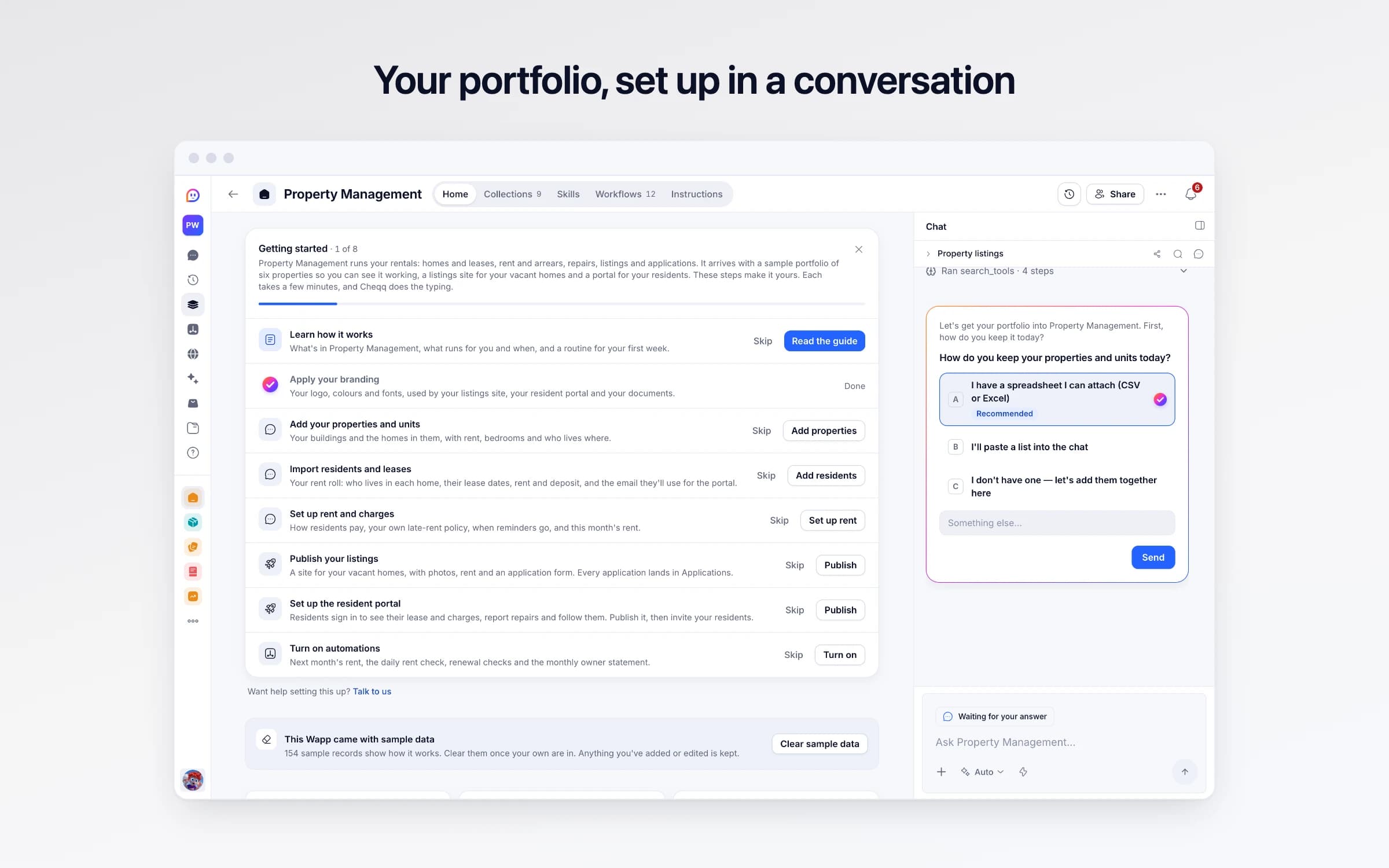
Property Management runs your rentals: homes and leases, rent and arrears, repairs, listings and applications. It arrives with a sample portfolio of six properties so you can see it working, a listings site for your vacant homes and a portal for your residents. These steps make it yours. Each takes a few minutes, and Cheqq does the typing.
Learn how it works
What's in Property Management, what runs for you and when, and a routine for your first week.
Apply your branding
Your logo, colours and fonts, used by your listings site, your resident portal and your documents.
Add your properties and units
Your buildings and the homes in them, with rent, bedrooms and who lives where.
Import residents and leases
Your rent roll: who lives in each home, their lease dates, rent and deposit, and the email they'll use for the portal.
Set up rent and charges
How residents pay, your own late-rent policy, when reminders go, and this month's rent.
Publish your listings
A site for your vacant homes, with photos, rent and an application form. Every application lands in Applications.
Set up the resident portal
Residents sign in to see their lease and charges, report repairs and follow them. Publish it, then invite your residents.
Turn on automations
Next month's rent, the daily rent check, renewal checks and the monthly owner statement.
Two things do, both fixed: the rent reminder, which says only what's due and how to pay, and the application receipt, which says only that it arrived and when you'll hear back. Late notices and renewal offers ask you first: approve one and it's sent, or decline it and write your own. Once you trust one, let it run on its own. It all starts switched off, so nothing runs on the sample portfolio until you turn it on.
Your office gets its own Cheqq email address, with no mail account to connect. Once the automations are on and the first email has reached it, reminders, receipts and the messages you approve go from it, and replies come back to it and are filed on the right lease, application or job. Until then, reminders, notices and offers come to you to send yourself.
You invite them, and each resident signs in with their own email. The portal matches it to the email on their lease and charges, so they see their own home, rent and deposit, what they owe and how to pay, and every repair they've reported with your latest update. Notes, costs, vendors, renewal decisions and other residents never reach them.
Yes. Attach your rent roll or property list as a spreadsheet or CSV in the chat, and Cheqq brings your properties, units and residents in, then sets up each lease from the same file. You can also paste a list, or add the first few together. It tells you what it added, and which residents still have no email.
No. It keeps track of what each resident owes, from Due to Paid, part payments included. Put how residents pay you, your bank details or a payment link you already use, in Office settings, and every reminder and the portal show it. Mark a charge Paid when the money arrives, or tell Cheqq.
Yes: a residential lease template and a move-in and move-out checklist. The lease covers the home, term, rent and deposit, utilities, pets, repairs, entry and ending it. It's a starting point: adapt it to your homes, and check it with your own adviser if you want to. Ask Cheqq to fill it in from a lease.
Yes. Give each property its owner, or leave it empty for your own. On the 1st your team gets last month for each property, grouped by owner: rent charged and collected, what's still owed, repairs and their cost, and occupancy, for you to pass on to each owner. Late rent, new repairs, emergencies and leases coming up reach everyone on your team who can edit.
15 of its 162 automation steps use AI, and draw AI credits each time they run: how many depends on the model you pick for the step. The other steps are fixed and draw none.
Every enquiry answered, every client updated, every invoice chased
Every booking confirmed, every guest reminded, the menu up to date
Bookings confirmed, clients reminded and invited back after six weeks
You get your own copy: your own records, your own apps. Change any part of it. Or we'll set it up with you.
Free to start