Newsletter Digest
Every newsletter's key points on one list
Free to start
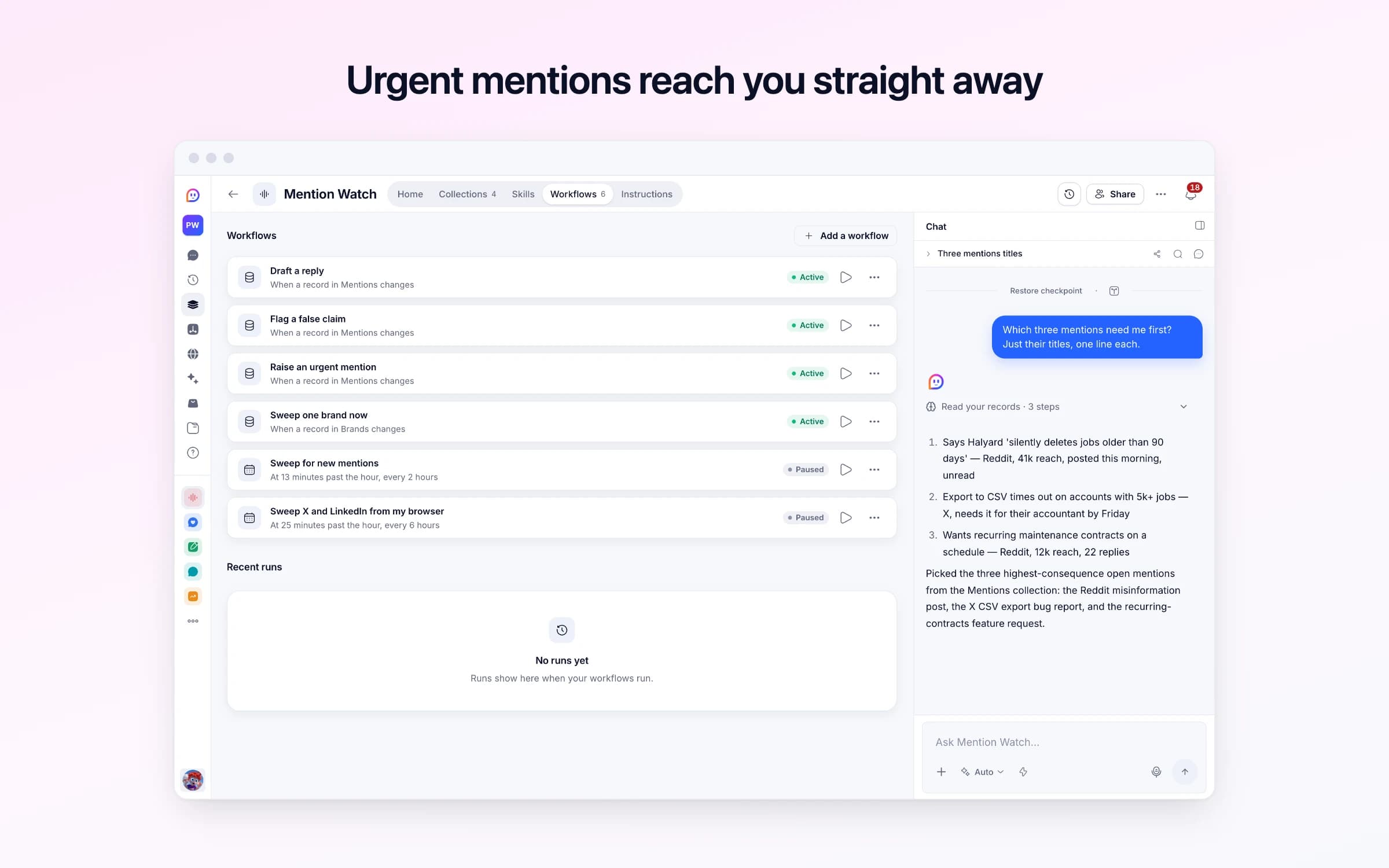
The routine part, done whether or not you're at your desk.
At 13 minutes past the hour, every 2 hours
Sweep for new mentions
Runs on its ownEvery two hours, searches each enabled keyword across its platforms and files what is genuinely about you. After quiet sweeps it waits longer, up to eight hours.
At 25 minutes past the hour, every 6 hours
Sweep X and LinkedIn from my browser
Runs on its ownThe platforms ordinary search can't see, read from your own logged-in session through the Cheqq Companion. Reads only; it never posts.
When a record in Brands changes
Sweep one brand now
Runs on its ownTick Run requested on a Brand to search its keywords now, over the last week, instead of waiting for the schedule.
When a record in Mentions changes
Raise an urgent mention
Runs on its ownWhen a mention scores above 80 it tells you straight away, rather than waiting for the next digest.
When a record in Mentions changes
Flag a false claim
Runs on its ownSomething factually wrong about your product, said in public, told to you while it can still be corrected.
When a record in Mentions changes
Draft a reply
Runs on its ownTick Draft requested on a mention and a reply is written for you to send. Nothing is ever posted for you.
Talk to it the way you'd ask a colleague. It answers from what it has on record, and makes a change when you ask for one.
Describe your product, list what shares its name and add the words to listen for, and Reddit, YouTube, Hacker News, blogs and forums are searched every two hours, less often when it's quiet. Real mentions are filed in the author's own words and sorted by kind, feeling and urgency, and anything urgent or false reaches you on its own.
You hear about the Reddit thread calling your product broken when a customer forwards it a week later, with sixty replies under it and a wrong answer upvoted to the top.
Keyword alerts don't fix it. Your name is also a surname, a town or a piece of sailing kit, so the alerts fill with posts that aren't about you and the one that mattered is lost among them. The kind words a customer wrote on LinkedIn are never saved, and the landing page still has no quotes on it.
Each brand you watch has a plain description of what it is, a list of the things that share its name, and your own accounts, which never count as mentions. Once you switch it on, every two hours each term is searched on the platforms you chose, coincidences are dropped, and each real mention is filed with the author, the link and their own words, quoted rather than paraphrased.
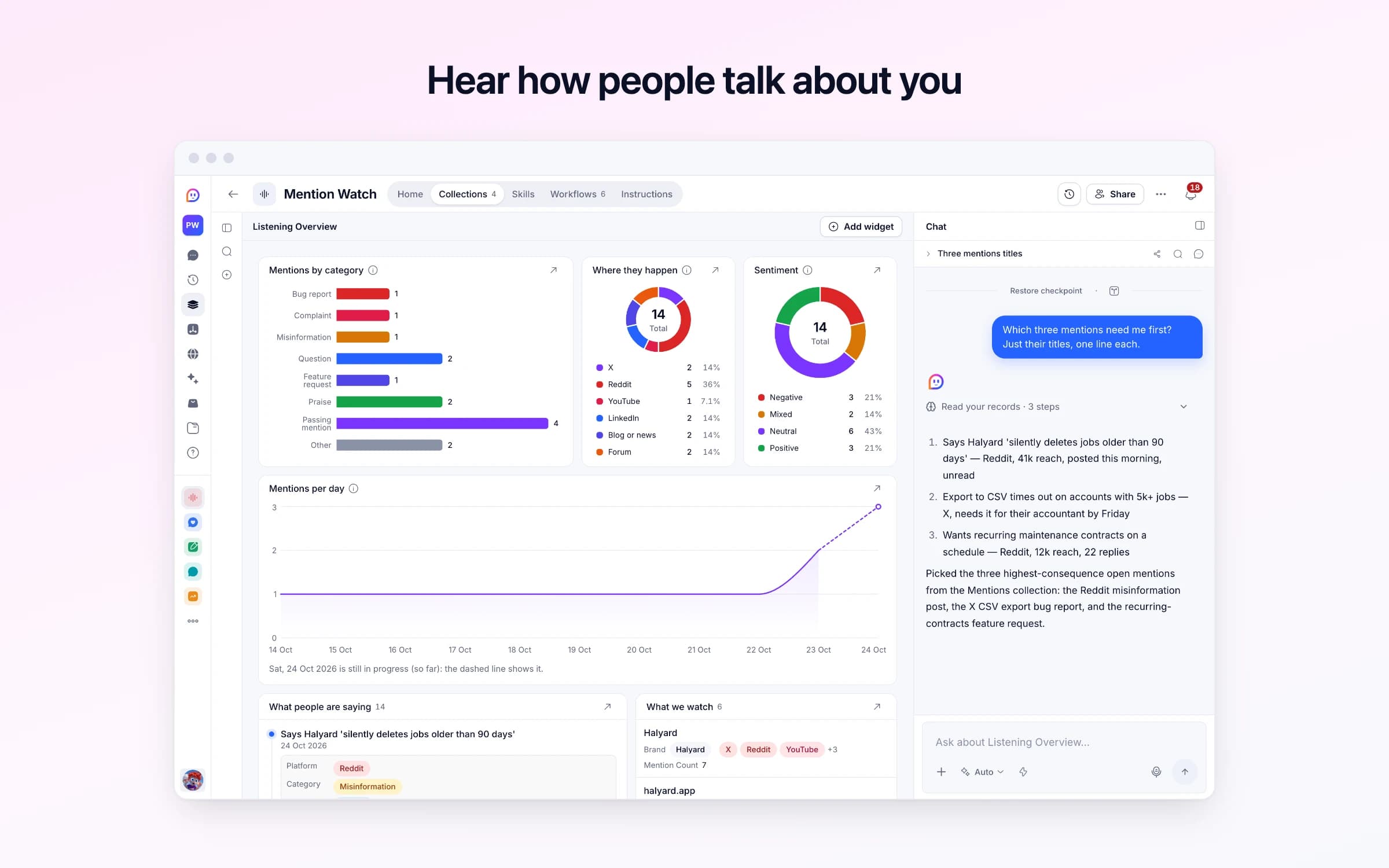
Each mention is sorted into what it is, from bug report and false claim to testimonial or passing mention, given a feeling from negative to positive, and scored 0 to 100 for how soon it needs you, on consequence rather than tone. Anything above 80, and any false claim about you, sends an alert of its own. The rest wait for the short note after a search that filed something; a search that finds nothing says nothing.
When searches keep coming back empty, it waits longer between them: two hours, then four, then up to eight, and it's back to every two hours as soon as something turns up.
X and LinkedIn block ordinary search, so a second search, switched on separately, reads them from your own logged-in browser through the Companion extension, on a computer that's awake with Chrome or Edge open. Tick a box on any mention and a reply is drafted in your voice for you to post yourself. Nothing is ever posted for you.
Say what to listen for
Describe your product, list what shares its name, like a band or a town, and add the words to search for: your name, your domain, your handle, a competitor.
It searches and sorts
Once switched on, every two hours each term is searched on the platforms you chose, less often when nothing turns up. Coincidences and your own posts are dropped, and each real mention is sorted by kind, feeling and urgency.
What matters reaches you
Anything scored above 80, or stating something false about you, sends an alert of its own. Tick a box on a mention and a reply is drafted for you to post yourself.
Google Alerts
Alerts send every match. Here posts about other things with your name are dropped before they're filed, and what's left is sorted and scored.
Listening tools like Brand24 or Awario
If you need your name watched where people talk about products, not press coverage reports for a comms team, this does it without another subscription.
The screenshot folder of kind words
Move a testimonial to Saved and it's kept in the author's own words with the link, ready for a landing page.
6 automations, 4 lists of records and 1 document. Every automation works from the records you keep here, so a change made once is the one they all see.
Everything it reads and writes is yours to open: each list as your copy starts it, with sample records you can clear in one go.
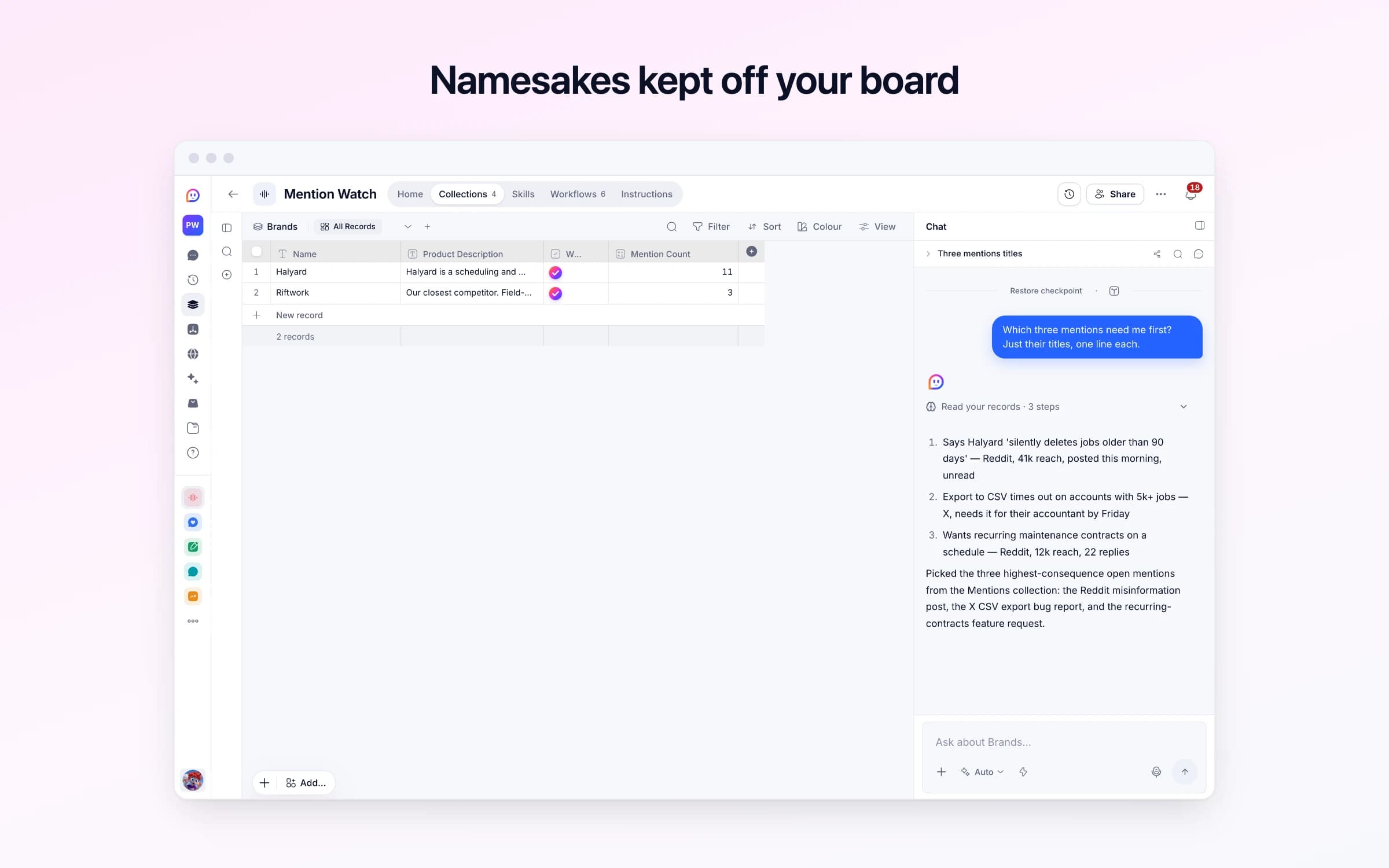
| Name | Product Description | Watch Enabled | Known Confusions | Own Handles |
|---|---|---|---|---|
Halyard | Halyard is a scheduling and dispatch tool for small field-service teams — plumbers, electricians, installers. Sold to owner-operators with 3-20 technicians. Competes with pen-and-paper and with heavier field-service suites. | Yes | A halyard is the rope that raises a sail, so sailing and boating posts use the word constantly and are never about us. There is also a medical supplies manufacturer with a similar name, and a street in Boston. Ignore all three. | @halyardhq, u/halyard_team, linkedin.com/company/halyard |
Riftwork | Our closest competitor. Field-service software aimed at larger crews, sold top-down, priced per technician. Watched so we hear what their customers complain about and where we come up in comparisons. | Yes | Riftwork is also the name of a game modding community. Posts about mods, servers or patches are not about the company. | Empty |
| Term | Brand | Match | Platforms | Enabled |
|---|---|---|---|---|
Halyard | Halyard | Exact phrase | XRedditYouTubeLinkedInHacker NewsBlog or news | Yes |
halyard.app | Halyard | Exact phrase | XRedditHacker NewsBlog or newsForum | Yes |
@halyardhq | Halyard | Handle | XLinkedIn | Yes |
field service scheduling alternative | Halyard | Broad | RedditForumHacker News | Yes |
Riftwork | Riftwork | Exact phrase | RedditXLinkedInBlog or news | Yes |
Riftwork vs | Riftwork | Broad | RedditYouTubeBlog or news | Yes |
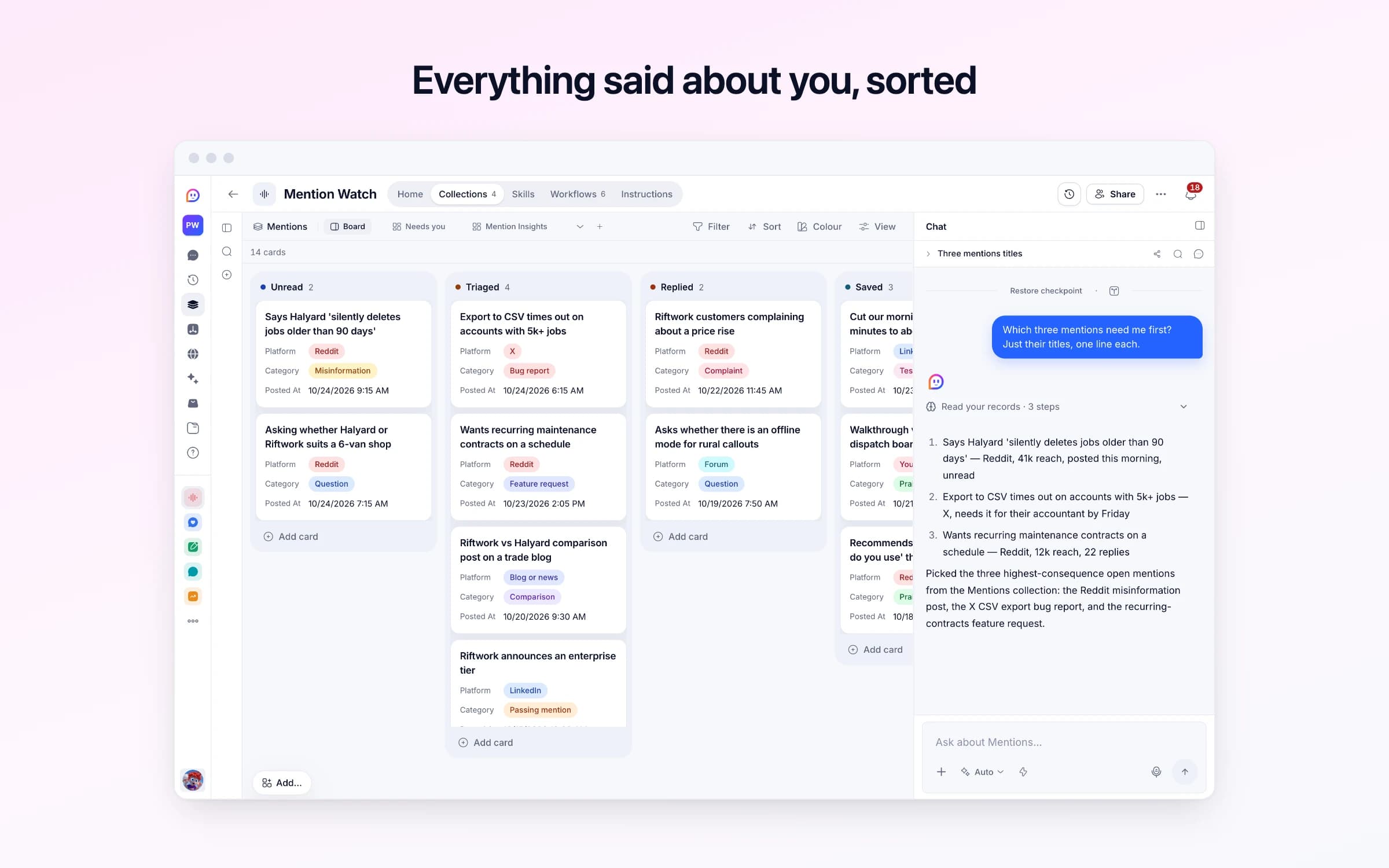
| Title | Status | Platform | Category | Posted At |
|---|---|---|---|---|
Says Halyard 'silently deletes jobs older than 90 days' | Unread | Reddit | Misinformation | 2 hours ago |
Export to CSV times out on accounts with 5k+ jobs | Triaged | X | Bug report | 5 hours ago |
Asking whether Halyard or Riftwork suits a 6-van shop | Unread | Reddit | Question | 4 hours ago |
Cut our morning dispatch from 90 minutes to about 15 | Saved | LinkedIn | Testimonial | Yesterday, 8:20 AM |
Wants recurring maintenance contracts on a schedule | Triaged | Reddit | Feature request | Yesterday, 2:05 PM |
Riftwork customers complaining about a price rise | Replied | Reddit | Complaint | 2 days ago, 11:45 AM |
| Note | Ran At | Items Seen | Items Kept |
|---|---|---|---|
Scheduled sweep: 6 keywords, 1 new. | 1 hour ago | 214 | 1 |
Scheduled sweep: 6 keywords, 2 new. | 3 hours ago | 198 | 2 |
On-demand sweep: Halyard: 4 keywords, 2 new. | Yesterday, 9:05 AM | 96 | 2 |
Scheduled sweep: 6 keywords, 1 new. | 2 days ago, 12:13 PM | 231 | 1 |
Scheduled sweep: 6 keywords, 1 new. Over 40 sailing posts left out. | 4 days ago, 10:13 AM | 187 | 1 |
On-demand sweep: Halyard: 4 keywords, 6 new. | 10 days ago, 11:00 AM | 410 | 6 |
How Mention Watch works
Where it listens, how it sorts and scores mentions, what it never does, and your first week.
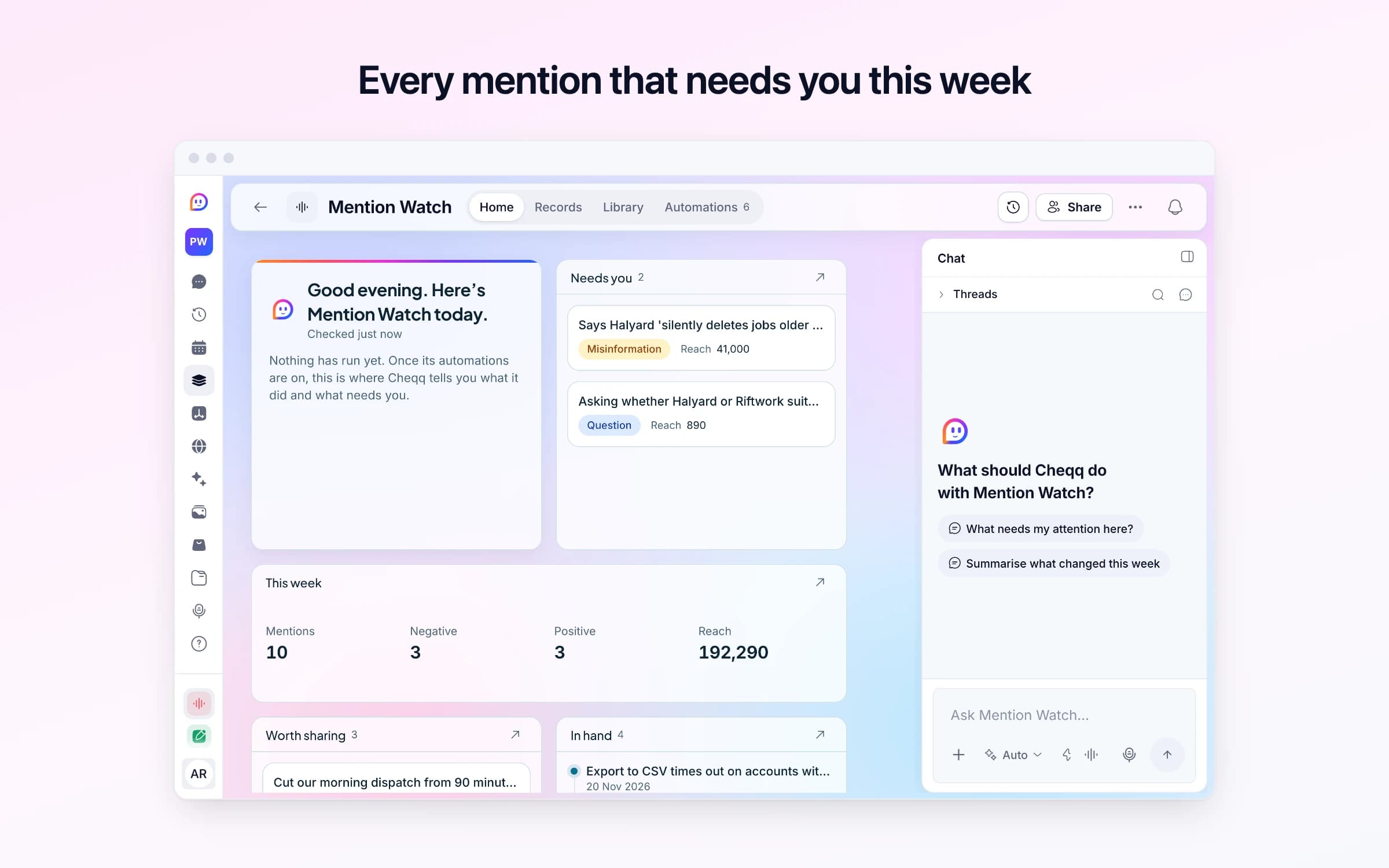
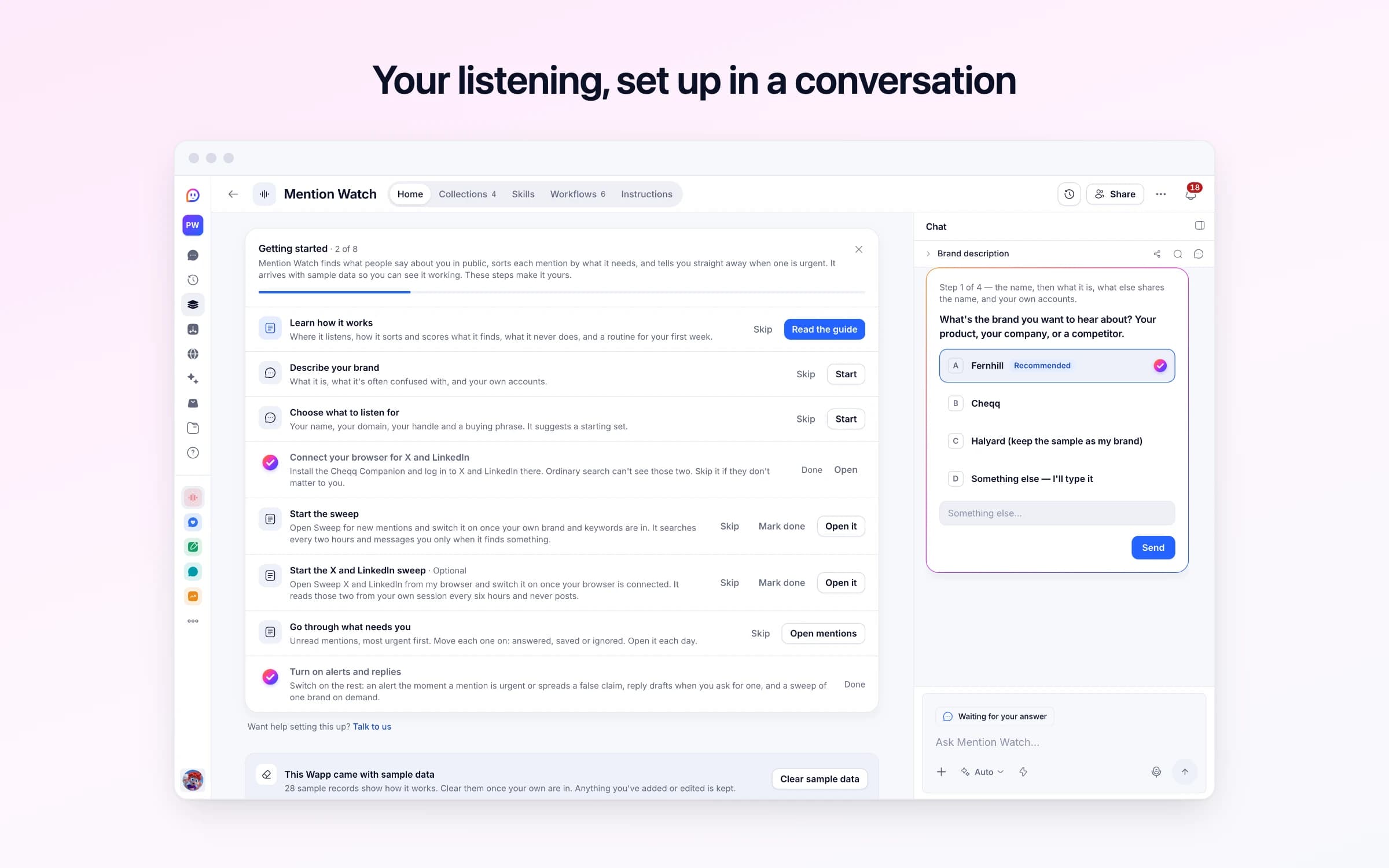
Mention Watch finds what people say about you in public, sorts each mention by what it needs, and tells you straight away when one is urgent. It arrives with sample data so you can see it working. These steps make it yours.
Learn how it works
Where it listens, how it sorts and scores what it finds, what it never does, and a routine for your first week.
Describe your brand
What it is, what it's often confused with, and your own accounts.
Choose what to listen for
Your name, your domain, your handle and a buying phrase. It suggests a starting set.
Connect your browser for X and LinkedIn
Install the Cheqq Companion and log in to X and LinkedIn there. Ordinary search can't see those two. Skip it if they don't matter to you.
Start the sweep
Open Sweep for new mentions and switch it on once your own brand and keywords are in. It searches every two hours and messages you only when it finds something.
Start the X and LinkedIn sweep
Open Sweep X and LinkedIn from my browser and switch it on once your browser is connected. It reads those two from your own session every six hours and never posts.
Go through what needs you
Unread mentions, most urgent first. Move each one on: answered, saved or ignored. Open it each day.
Turn on alerts and replies
Switch on the rest: an alert the moment a mention is urgent or spreads a false claim, reply drafts when you ask for one, and a sweep of one brand on demand.
On Reddit, YouTube, Hacker News, blogs, news sites and forums, through ordinary web search, on the platforms you tick for each term. X and LinkedIn are only partly visible that way, so a second search reads them from your own logged-in browser through the Companion extension, on a computer that's awake with the browser open.
Your product's name, your domain, your handle and a competitor's name make a good start. Each term is matched as an exact phrase, a broad topic or a handle, and searched only on the platforms you tick for it, so a term that only matters on Reddit stays there.
With your description. Each brand has a plain account of what it is and a list of the things that share its name, and every result is checked against both before it's filed. When it isn't sure, it leaves the post out, and posts from your own accounts never count.
No. Tick a box and a reply is drafted for you to post yourself. It never posts, likes, follows or messages anyone, on any platform.
No. The sample brands are made up, so its searches arrive switched off. Getting started on its Home walks you through describing your brand, choosing what to listen for and starting the sweep, plus the X and LinkedIn sweep if you want it, and it searches every two hours from then, waiting longer when nothing turns up. Tick a box on a brand to search it straight away.
Yes. Add them as a brand without your own accounts, and their customers' complaints and comparison threads land on the same board, kept apart by brand.
Yes. Download them as CSV or JSON, filtered to what you need, or ask Cheqq for every testimonial from a quarter with its link.
4 of its 58 automation steps use AI, and draw AI credits each time they run: how many depends on the model you pick for the step. The other steps are fixed and draw none.
Every newsletter's key points on one list
Ideas drafted for each channel and scheduled
From brief to published post, on one board
You get your own copy: your own records and automations. Change any part of it. Or we'll set it up with you.
Free to start