Applicant Tracker
Every application filed, and every applicant answered
Free to start
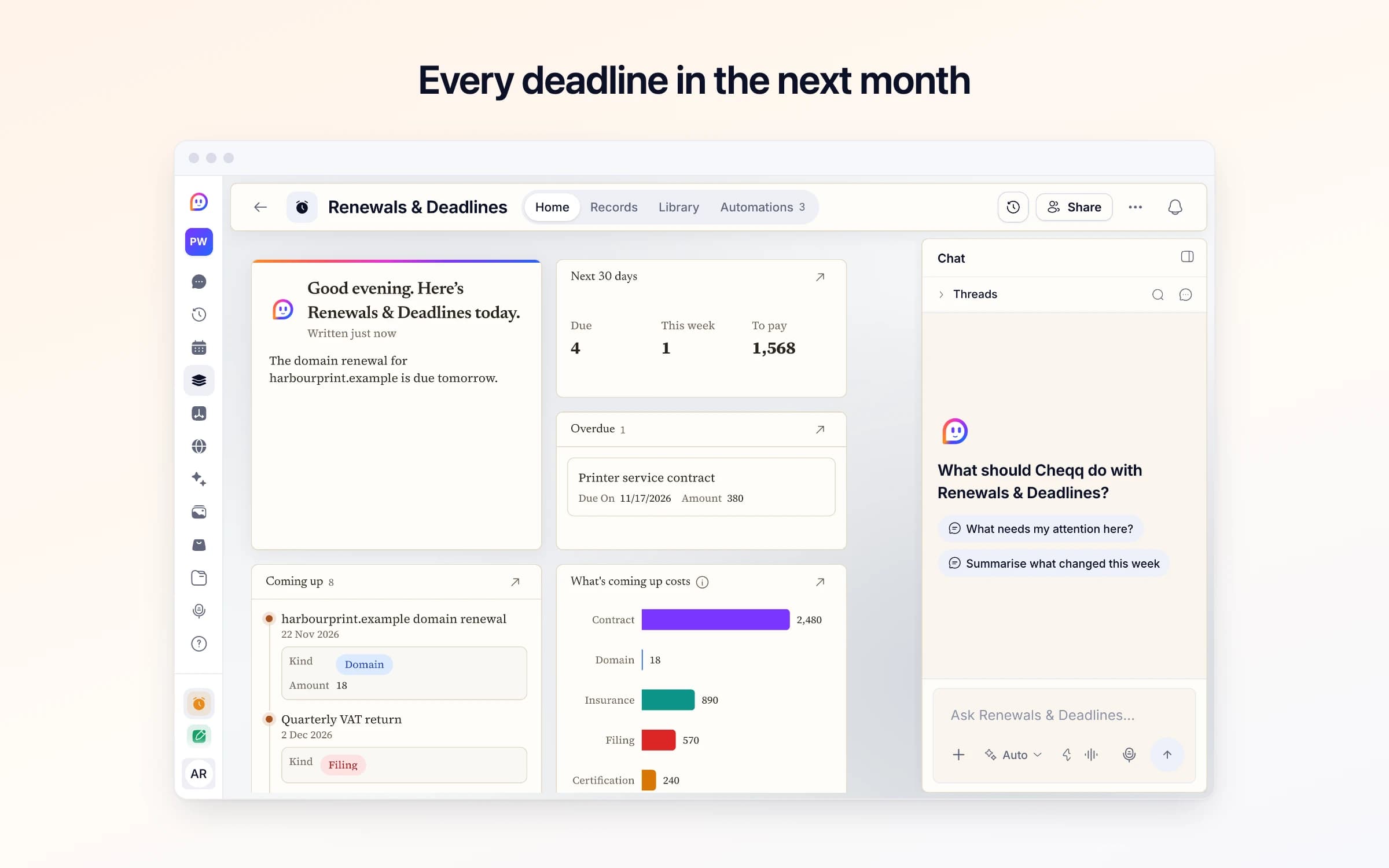
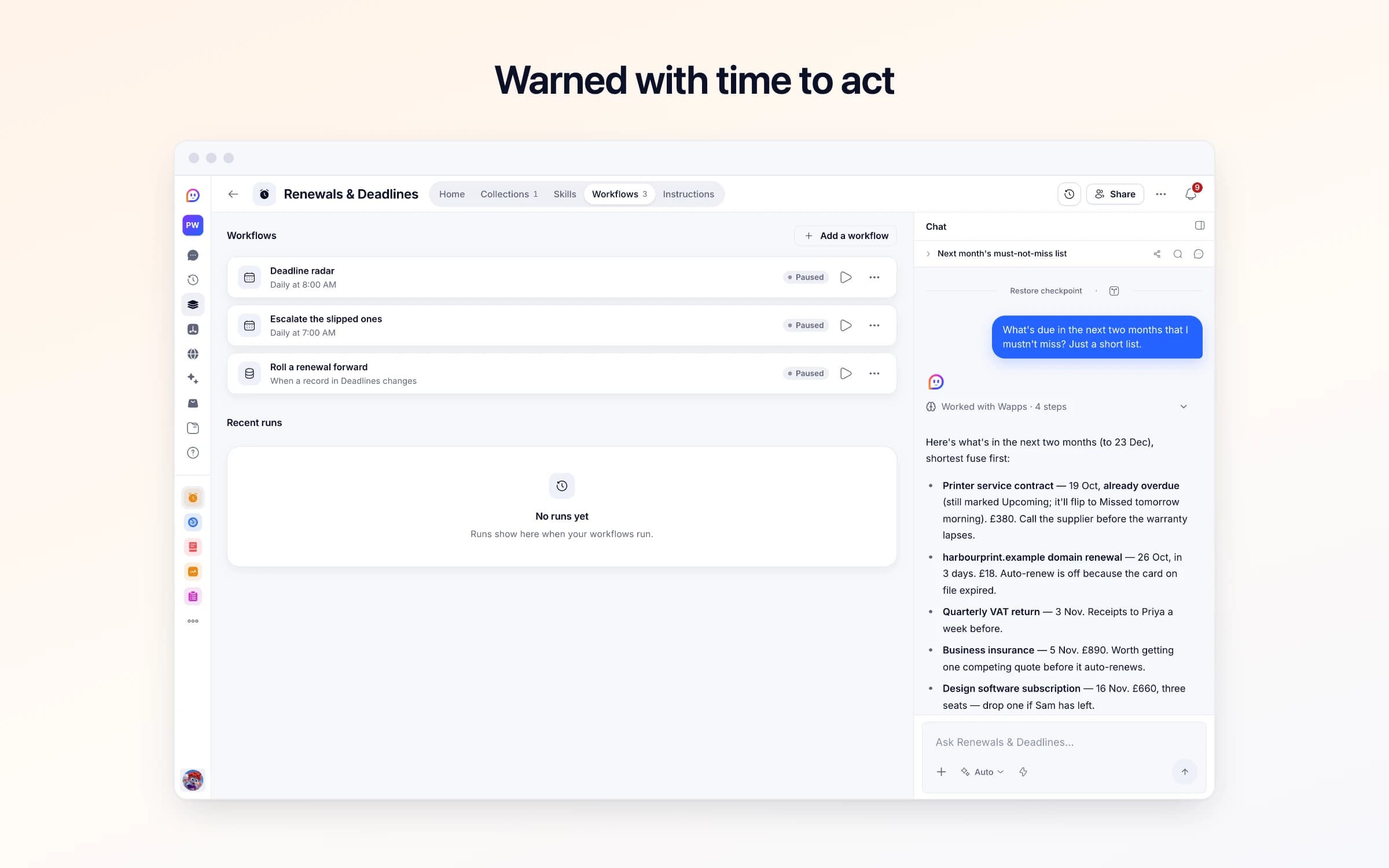
The routine part, done whether or not you're at your desk.
Daily at 8:00 AM
Deadline radar
Runs on its ownEach morning, reminds you of what's coming up inside its notice window: weekly at first, every few days in the last week, and daily at the end, until you mark it Handled. Quiet when nothing is close.
Daily at 7:00 AM
Escalate the slipped ones
Runs on its ownEach morning, marks anything whose date has passed and is still Upcoming as Missed, and tells you, most overdue first. Quiet when nothing slipped.
When a record in Deadlines changes
Roll a renewal forward
Runs on its ownWhen you mark a repeating deadline Handled, adds the next one: a month, a quarter or a year on, with the same notice, cost and link.
Talk to it the way you'd ask a colleague. It answers from what it has on record, and makes a change when you ask for one.
Every contract end, domain, subscription, policy and filing date goes on one calendar with its cost and the link to act on it. Each one reminds you from its own notice window, more often as it gets close, and the morning after a date slips, it's marked Missed at 7 and flagged to you.
The domain renewal is a reminder in someone's calendar, the insurance date is in last year's email, the lease notice window is in a PDF nobody has opened since signing, and the filing deadline is in the accountant's head.
Most of them are fine until one isn't. The lease rolls over for another year because the notice window closed during launch week, a policy renews itself without a competing quote, and a missed filing brings a penalty larger than the fee.
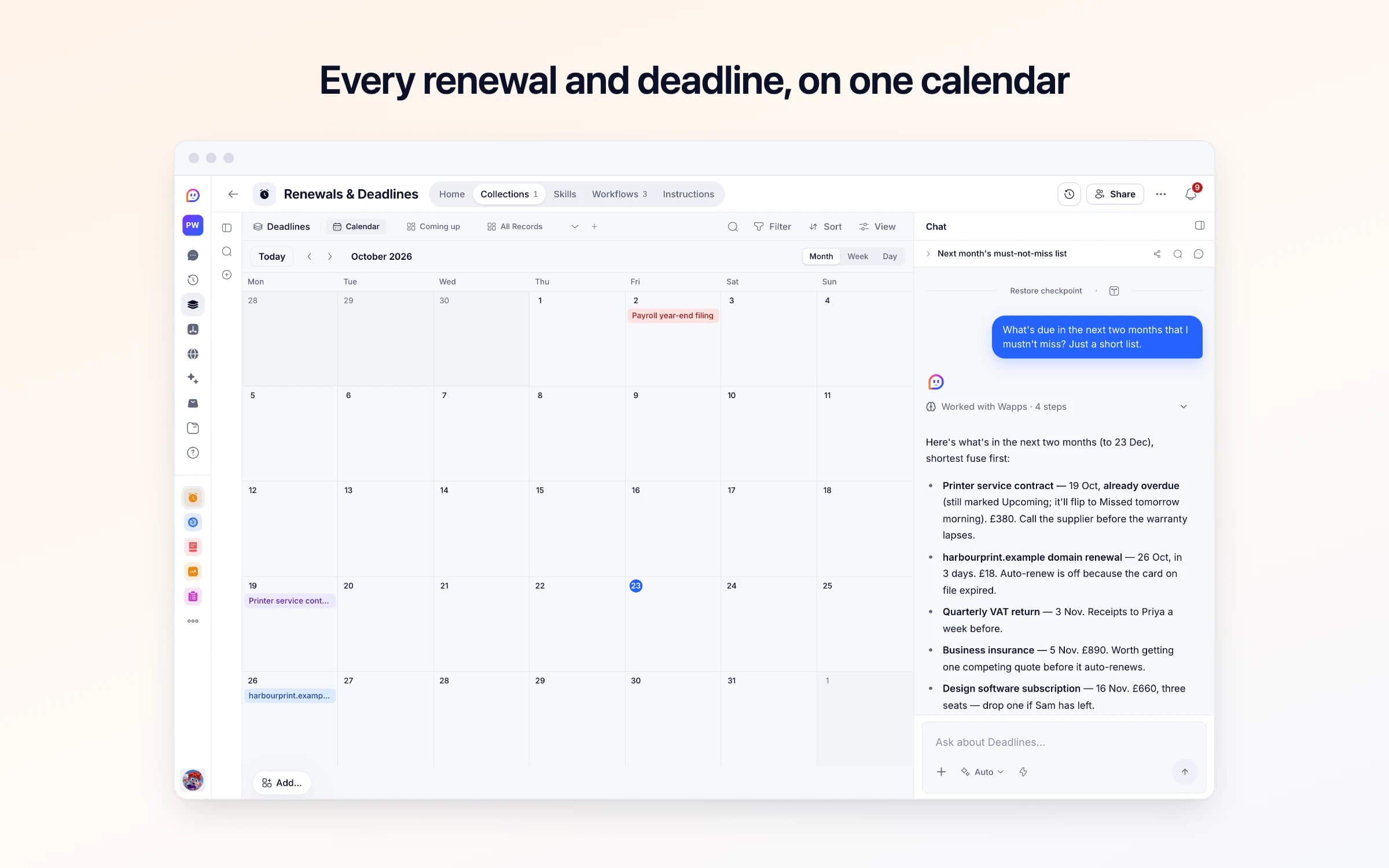
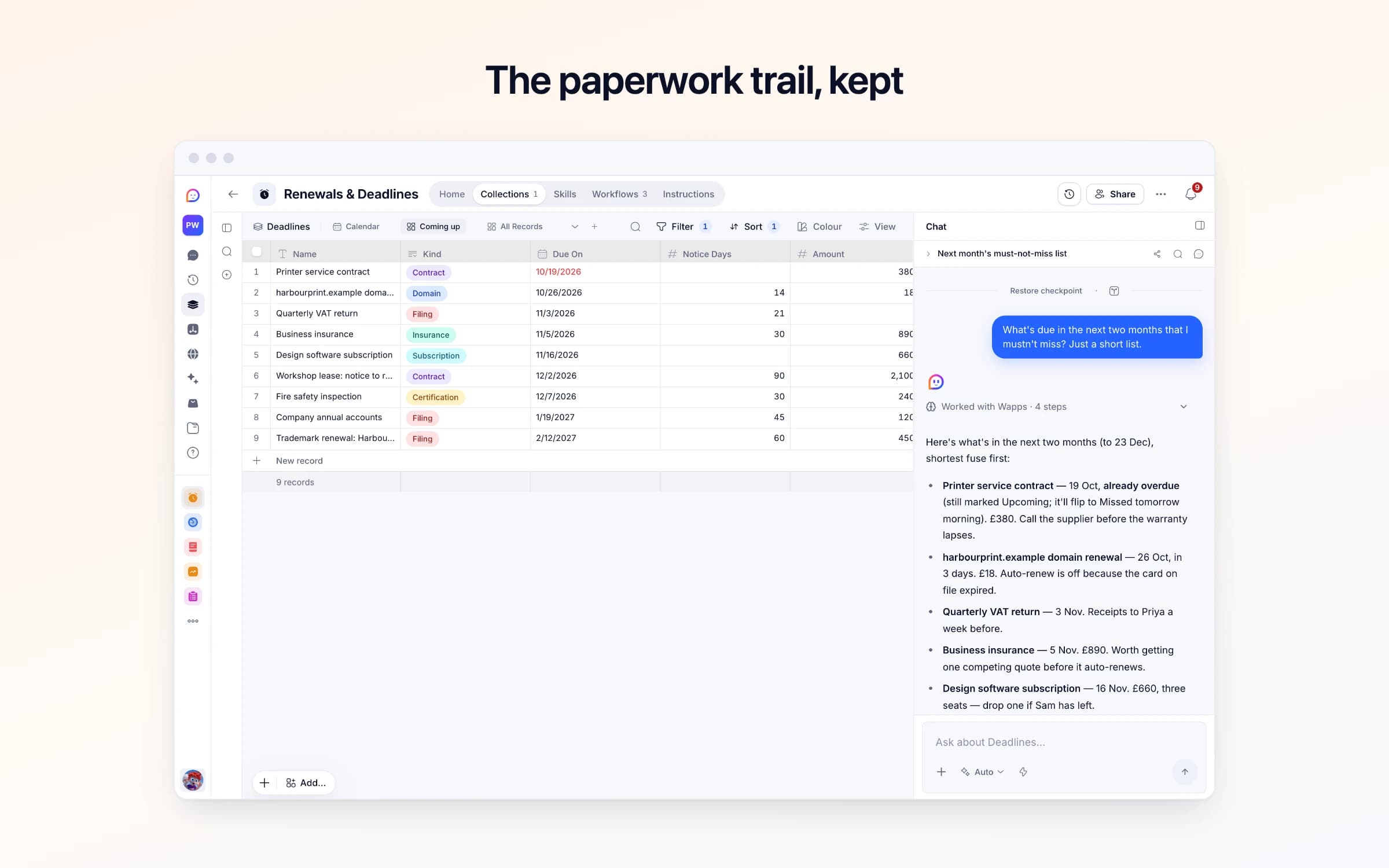
Each obligation is one record with one due date, on a month calendar coloured by kind: Contract, Domain, Subscription, Insurance, Filing, Certification or Other. Each carries what it costs, how many days' notice you want, a link to where you act on it, like the registrar or the tax portal, and notes on what handling it involves.
Each morning at 8, anything inside its notice window comes to you with the days remaining, what it costs and the link: once a week at first, every three days in the last week, and every day in the last two. A lease can warn you 90 days out while a domain waits for 14. At 7 each morning, anything whose date passed and is still Upcoming is marked Missed and listed with how many days late it is, most overdue first, so a deadline is marked Missed the morning after its due date. Missed deadlines stay on the calendar, never deleted.
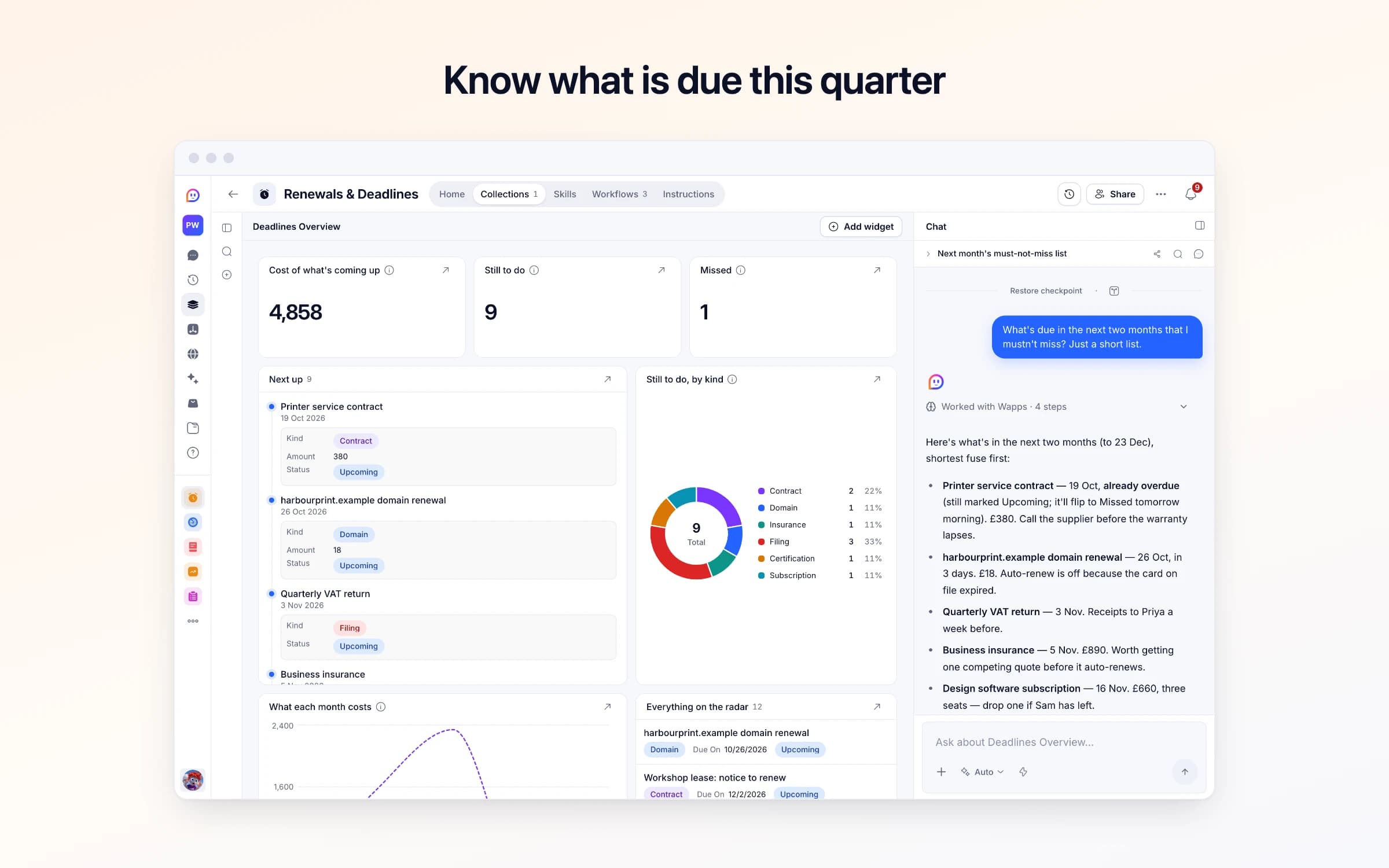
Mark a repeating deadline Handled and the next one is added for you, a month, a quarter or a year on, with the same notice, cost, link and notes. The Deadlines Overview dashboard shows what each month costs, deadlines by kind, and everything on the radar with its status.
Every hard date, one calendar
Each obligation is one record with one due date, colour-coded by what it is — contract, domain, subscription, insurance, filing — on a month view you can read at a glance.
Reminders that get closer together
Each date warns you from its own notice window, with what it costs and the link to act on it: weekly at first, every three days in the last week, daily in the last two. Mark a repeating one Handled and the next is added.
Slips escalate, not vanish
The morning after a date passes with the deadline still open, the 7am check marks it Missed and tells you, so it stays on the record instead of vanishing.
Reminders scattered across calendars
Every date sits in one list with its cost and where to act, instead of a reminder that just says “domain”.
The renewals spreadsheet
Each date reminds you on its own schedule, so nobody has to open a spreadsheet to find out what's coming.
Contract management software
If you need dates, costs and warnings, not document storage or e-signatures, this covers it without another subscription.
3 automations, 1 list of records and 1 document. Every automation works from the records you keep here, so a change made once is the one they all see.
Everything it reads and writes is yours to open: each list as your copy starts it, with sample records you can clear in one go.
| Name | Kind | Due On | Notice Days | Amount |
|---|---|---|---|---|
harbourprint.example domain renewal | Domain | Tomorrow | 14 | 18 |
Workshop lease: notice to renew | Contract | In 6 weeks | 90 | 2,100 |
Quarterly VAT return | Filing | In 11 days | 21 | Empty |
Business insurance | Insurance | In 13 days | 30 | 890 |
Design software subscription | Subscription | In 3 weeks | Empty | 660 |
Fire safety inspection | Certification | In 6 weeks | 30 | 240 |
How Renewals & Deadlines works
What it tracks, when reminders come, what it never does, and your first week.
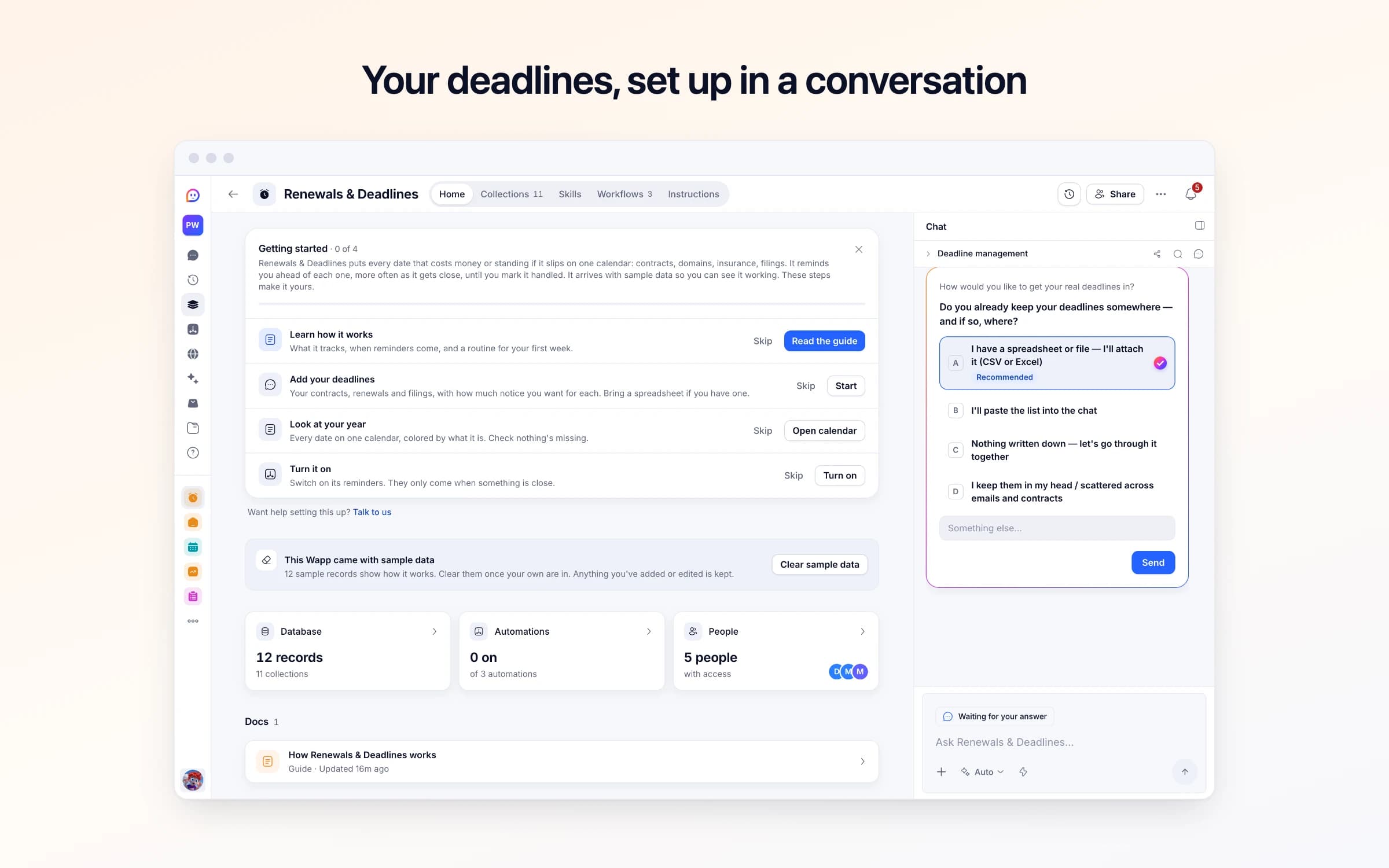
Renewals & Deadlines puts every date that costs money or standing if it slips on one calendar: contracts, domains, insurance, filings. It reminds you ahead of each one, more often as it gets close, until you mark it handled. It arrives with sample data so you can see it working. These steps make it yours.
Learn how it works
What it tracks, when reminders come, and a routine for your first week.
Add your deadlines
Your contracts, renewals and filings, with how much notice you want for each. Bring a spreadsheet if you have one.
Look at your year
Every date on one calendar, colored by what it is. Check nothing's missing.
Turn it on
Switch on its reminders. They only come when something is close.
Anything with a hard date and a cost of missing it: contract ends and notice windows, domain and software renewals, insurance policies, tax and company filings, certifications and trademarks. It installs with an example of each so the calendar isn't empty, and you can clear them in one go from its Home.
You add them, or tell Cheqq. Add a deadline on the calendar with its date, kind and cost, import a list from a CSV, or type “our insurance renews on 3 March for £890”. Getting started walks you through adding them one kind at a time. It doesn't read contracts, emails or your calendar to find dates.
From the start of its notice window, 14 days unless you set another: once a week at first, every three days in the last week, and every day in the last two, at 8 in the morning. Nothing comes on a day when nothing is close. The morning after the date passes with the deadline still Upcoming, the 7am check marks it Missed and tells you.
No. A slipped date is flagged once, marked Missed, and stays on the calendar and in the dashboard's list so it can't quietly vanish. Mark it Handled once it's dealt with.
Set how often it repeats. When you mark it Handled, the next one is added a month, a quarter or a year on, so the history of what was paid and when builds up as you go.
Yes. Invite them and they see the same calendar and costs. The reminders and the evening check come to you, in Cheqq and by email unless you turn that off; ask Cheqq to send them to others too.
Yes. Download the deadlines as CSV or JSON, filtered by kind, status or date.
None of its 23 automation steps calls a model, so running it draws no AI credits. Asking Cheqq to do something does, like any chat.
Every application filed, and every applicant answered
First-round interviews recorded in each candidate's own time
Every customer email triaged, answered and timed
You get your own copy: your own records and automations. Change any part of it. Or we'll set it up with you.
Free to start