Applicant Tracker
Every application filed, and every applicant answered
Free to start
Candidate interview
Where a candidate you invited signs in, watches each question and records their answer.
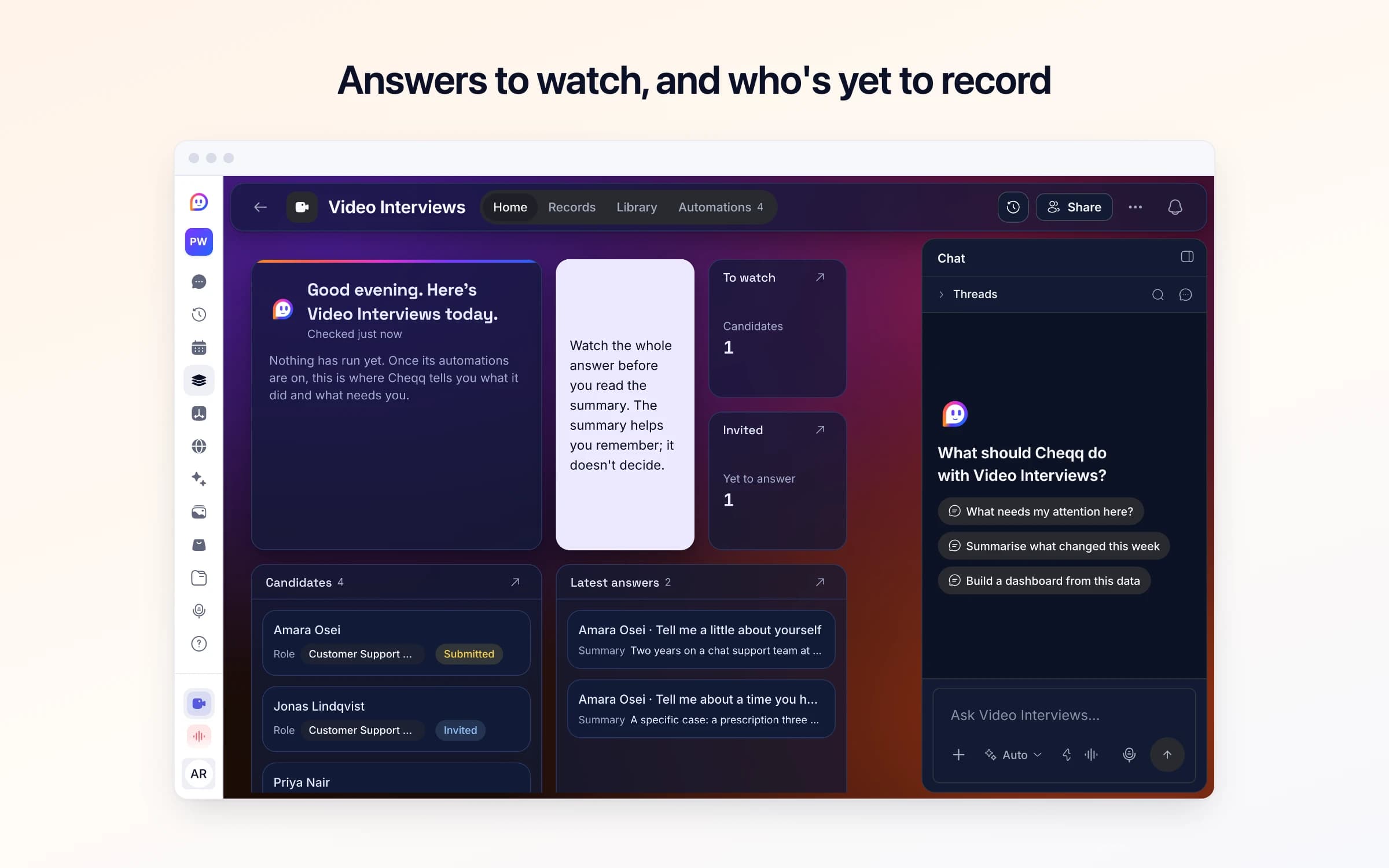
Review desk
Where your team sees every candidate, watches their answers and decides who goes forward.
The routine part, done whether or not you're at your desk.
When a record in Questions is added or changed
Make a question's clip
Runs on its ownWhen you add a question or change its wording, your interviewer records it: a short video candidates watch before they answer. One clip per question, shown to every candidate.
When a record in Interviews is added or changed
Invite a candidate
Asks you firstWhen you move an interview to Invited, the candidate is emailed a link to their interview, once you approve it, unless you turned checking off.
When a record in Answers changes
Read an answer
Runs on its ownWhen a candidate's recording arrives, Cheqq writes down what they said and sums it up against the role's must-haves. Once every question is answered, it sums up the interview and tells you.
When an email arrives
Pass on a candidate's reply
Runs on its ownWhen someone writes to your interviews address, such as a candidate with a question about their invitation, you're told. Nothing is changed.
Talk to it the way you'd ask a colleague. It answers from what it has on record, and makes a change when you ask for one.
Add a role and its questions, and your interviewer asks each one in a short video clip. Candidates you invite sign in and record their answers when it suits them, and you get each recording with what was heard and a summary against the role's must-haves. Nothing is scored: you watch, and you decide.
Every first-round interview is a half-hour call to fit into two calendars, and most of it is the same five questions you asked the candidate before. By the tenth call of the week you're asking them a little differently each time, and writing fewer notes.
The notes that do get written live in a notebook or a doc. When the team talks it over a week later, the candidate everyone remembers best is the one interviewed most recently, not the one who answered best.
Each role has its must-haves, what someone in it genuinely needs to do, and a welcome candidates read before they start. Its questions are set in order, each with time to think and time to answer. When you add a question or change its wording, your interviewer, one of the avatars you saved in Image & Video, records it as a short clip, and every candidate for the role watches the same one.
Add a candidate and move their interview to Invited. The invitation is written from the role's own questions, saying how many there are and about how long it takes, and goes from your interviews address once you approve it. If something's missing, such as their email or the page's address, you're told what instead.
The candidate signs in with the email you invited, so nobody else can open their interview. They check their camera and microphone and try a practice question nobody sees. Then your interviewer asks each question, a countdown gives them time to think, and recording starts by itself against a timer. They can record an answer again, up to the number of tries you set.
Each answer is transcribed and summed up in a few sentences against the role's must-haves, with the examples they gave. When every question is answered, the interview gets a summary of its own, moves to Submitted and you're told. You watch in the Review desk, write your notes and make the call yourself: Move forward, Keep in mind or Not moving forward.
Your interviewer asks each question
Write a role's questions and what the role genuinely needs. Your interviewer, an avatar you pick, records each question once as a short clip, and every candidate for the role watches the same one.
Candidates record when it suits them
Move an interview to Invited and the candidate is emailed a link once you approve it. They sign in with that email, try a practice question, then hear each question, get time to think and record an answer against a timer.
You watch, and you decide
Each answer is transcribed and summed up against the role's must-haves, in words, never scored. When every question is answered, the interview is summed up, moved to Submitted, and you're told.
Scheduling first-round calls
Candidates answer in their own time, so there's no hour to find for each one, and everyone for a role hears the same questions.
One-way interview tools like HireVue or Spark Hire
If you want recorded answers with transcripts and summaries to watch, not scores, rankings or a hiring platform, this covers it without another subscription.
Interview notes in a notebook
Every answer keeps its recording, what was heard and a short summary, next to your own notes and decision.
4 automations, 2 apps, 5 lists of records and 2 documents. Your apps and automations all work from one set of records, so a change made once shows up everywhere.
Each one works from the same records as everything else here.
Where a candidate you invited signs in, watches each question and records their answer.
Where your team sees every candidate, watches their answers and decides who goes forward.
Everything it reads and writes is yours to open: each list as your copy starts it, with sample records you can clear in one go.
| Title | Status | Must Haves | Welcome |
|---|---|---|---|
Customer Support Specialist | Open | Explains things clearly and calmly to someone who is frustrated. Has handled customers by phone, chat or email. Comfortable learning a new product quickly. | Thanks for applying to Brightline. This is a short recorded interview: four questions, about ten minutes in all. Our team lead Maya asks each one, you get a moment to think, and then you record your answer. Find somewhere quiet, and answer as you would in a conversation. There are no trick questions. If recording a video isn't possible for you, reply to your invitation and we'll arrange another way. |
Support Team Lead | Open | Has led a support team of five or more. Coaches people with specific feedback. Uses numbers to spot what's going wrong before customers do. | Thanks for your interest in leading a team at Brightline. Three questions, about ten minutes. You get a moment to think before each answer, and a second try if the first goes wrong. |
| Wording | Role | Position | Answer Seconds |
|---|---|---|---|
Tell me a little about yourself, and what brings you to customer support. | Customer Support Specialist | 1 | 90 |
Tell me about a time you helped someone who was upset. What did you say, and how did it end? | Customer Support Specialist | 2 | 120 |
A customer asks about something you don't know the answer to. Walk me through what you do. | Customer Support Specialist | 3 | 120 |
What would you want from us in your first month to do this job well? | Customer Support Specialist | 4 | 90 |
Tell me about the team you lead now, or the last one you led. What was working, and what wasn't? | Support Team Lead | 1 | 150 |
Describe a time you gave someone difficult feedback. What happened next? | Support Team Lead | 2 | 150 |
| Candidate Name | Stage | Role | Invited At | Submitted At |
|---|---|---|---|---|
Amara Osei | Submitted | Customer Support Specialist | 4 days ago | Yesterday, 7:10 PM |
Jonas Lindqvist | Invited | Customer Support Specialist | 2 days ago | Empty |
Priya Nair | Reviewed | Support Team Lead | 9 days ago | 6 days ago, 12:40 PM |
Tomás Herrera | To invite | Customer Support Specialist | Empty | Empty |
| Answer To | Interview | Summary | Transcript | Status |
|---|---|---|---|---|
Amara Osei · Tell me a little about yourself | Amara Osei | Two years on a chat support team at an online pharmacy, retail before that. She says she wants to add phone support, which she hasn't done. | Hi, I'm Amara. For the last two years I've been on the chat team at an online pharmacy, so mostly people asking where their order is or whether something is in stock. I like it because you can usually fix someone's day in five minutes. Before that I worked in a shop. I'm looking for somewhere I can do phone as well, because I think I'd be good at it. | Ready |
Amara Osei · Tell me about a time you helped someone | Amara Osei | A specific case: a prescription three days late. She apologised once, said exactly what she could do (a same-day courier), and followed up the next morning as promised. This speaks directly to staying clear and calm with a frustrated customer. | There was a man whose prescription was late, and he was really angry, he'd been waiting three days. I said I'm sorry, once, because saying it five times doesn't help. Then I told him exactly what I could do, which was get it sent again that day by courier, and I said I'd message him in the morning to check it came. And I did, and it had. He actually wrote back to say thanks. | Ready |
| Interviews Address | Tries Per Question | Check Invitations |
|---|---|---|
Your Cheqq address | 2 | Yes |
How Video Interviews works
What candidates see, what runs for you, what it costs, the attention measure, and your first week.
Fair interviewing checklist
Before you invite, what to tell candidates, reviewing, measuring attention, and keeping recordings.
Video Interviews lets candidates answer your questions on video, in their own time. Your interviewer asks each question in a short clip, the candidate records an answer, and you get the recording, what was said and a summary to review. It arrives with a sample company's interviews so you can see it working. These steps make it yours.
Learn how it works
What candidates see, what Cheqq does with each answer, what it costs, and what it never does.
Apply your branding
Your logo, colours and fonts, on the page candidates record on.
Add a role and its questions
What you're hiring for, what it needs, and the questions your interviewer asks.
Publish the candidate's page
The page candidates sign in to. Only someone you've added an interview for can open it.
Publish your Review desk
Where your team sees every candidate, watches their answers and decides. Only people in your workspace can open it.
Connect your invitations
Your company's name, how long candidates have, and the page's address, so invitations link to it.
Pick your interviewer and turn it on
Choose the avatar who asks your questions in the Make a question's clip automation, then switch the automations on.
No, on purpose. Each answer is summed up in words against what the role needs, with no score, grade, ranking or recommendation, and candidates are never compared. It never notes or guesses anyone's age, gender, nationality, accent, appearance, health or family, and only a person sets an interview's decision. It comes with a Fair interviewing checklist for writing questions, reviewing answers and looking after recordings.
An avatar you choose: one of the people saved in Image & Video, under Avatars. You pick it in the Make a question's clip automation before you switch it on, and it says each question word for word. Changing a question's wording makes a new clip, and every candidate sees the newest one.
A camera, a microphone, somewhere quiet and the email address you invited. Their link opens a page only they can get into, showing only their own interview, and they can do it whenever it suits them, or within the time you set, such as within five days.
Making each question's clip uses AI credits, once per question until you change its wording, and so do each answer's transcript and summary. Recordings count toward your workspace's storage. The Free plan includes AI credits, with no card needed.
Yes. Each invitation waits for your approval, unless you untick Check invitations in Interview settings. Invitations go from your interviews address, and when a candidate writes back to it, you're told.
An option that's off until you tick it. When it's on, each candidate is asked first and can say no and carry on just the same. It notes how much of each answer their face was in view and turned to the screen, and whether they left the page, for you to read beside the recording, and it never feeds a summary. Measuring attention in hiring is regulated in some places, so check where you hire first.
Yes. It arrives with a sample company's roles, questions and interviews, and the automations that make clips, send invitations and read answers start switched off, so nothing runs on the sample candidates. Add an interview with your own email, invite yourself and do the interview, to see what arrives.
Every application filed, and every applicant answered
Every customer email triaged, answered and timed
Client work in one place, with the Friday update drafted
You get your own copy: your own records, your own apps. Change any part of it. Or we'll set it up with you.
Free to start